

An application that allows an admin to create or update tickets from a spreadsheet in CSV, XLSX, JSON, or Numbers formats. It matches fields and creates users if the user isn't matched.
Problem Statement
If a user has a list of issues from one or more end users and needs to create tickets for them, it can be a time-consuming process to enter the data. Zendesk has bulk importers for Custom Objects, Organizations, and Users, but not Tickets.
This application provides an easy way to import data from file sources and create or update the tickets.
Potential Enhancements
There are a number of possible enhancements, depending on the individual case needs. The app could allow data to be edited, it could search for similar tickets, it could queue and handle multiple files, it could retrieve the data from an on-line source, or other features that fit different requirements.
Screenshots
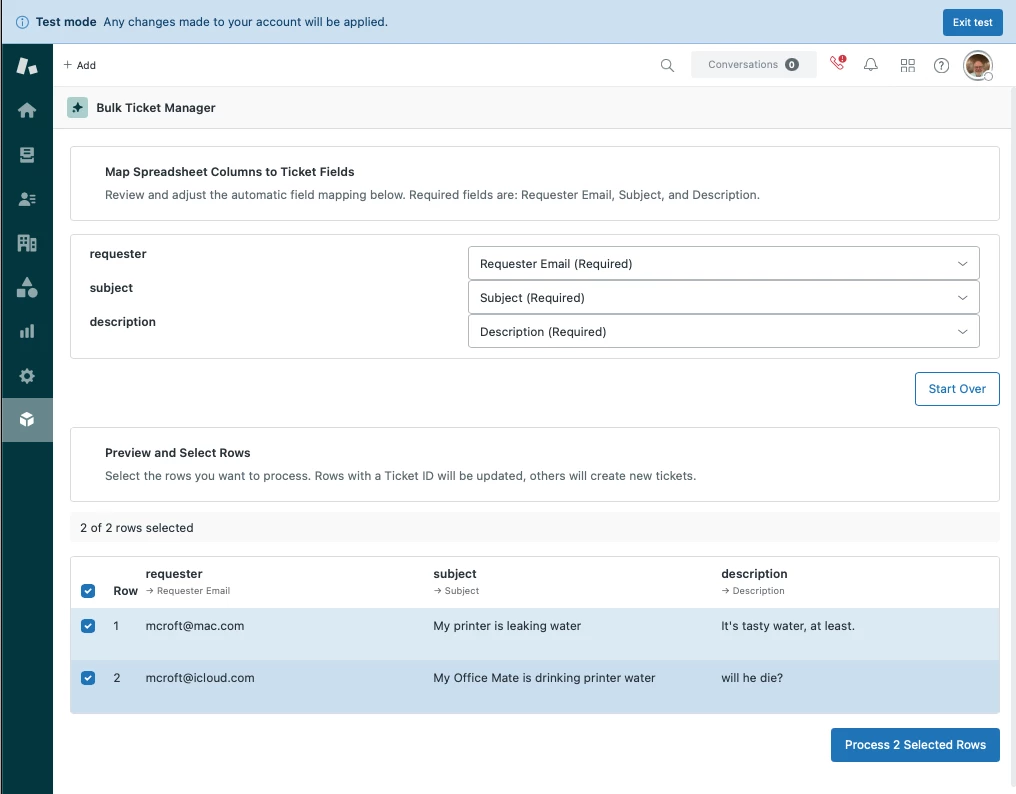
Prompt
Create an app that reads in a spreadsheet in XLSX, CSV, JSON or Apple Numbers format and displays the results in a grid. Remember that Garden FileUpload component needs to render an actual input element, so please include that.
Where possible, avoid multi-step processes. There's no need to manually process the file when the user selects a file to upload.
Provide a button to create a ticket for each selected row. The row must have an email for the requester, a subject, and a description or else it should not be selectable
All other columns should be matched by name but if they're blank, don't send them. You'll need to load all ticket fields.
If there Is a ticket ID, update the ticket instead of creating a new one. The update only needs a sender and a comment (which could be the description).
Allow the user to match columns in the spreadsheet to ticket fields, but use the best guess as a default. Match loosely where possible. Similar words and case and whitespace, dashes, underscores, etc. should not preclude a match Display the current mapping in the UI
It there is no selected field for a column (and it should be possible to set a column to no field), then that column will be skipped.
For updates, you'll need to get the user's ID. If the user isn't found, please create the user.
Designer's Notes
The first prompt I wrote was simpler, but this seems to be the most resilient version. It's possible to get good results with a shorter prompt. Pay attention to the suggestions offered, they're often really helpful.