Managing Projects with Zendesk | Community
Skip to main content

Managing Projects with Zendesk

  • January 8, 2014
  • 73 replies
  • 0 views

Show first post

73 replies

  • December 4, 2017

Hi Guys, 


still wondering if someone could answer my question above? 


Additional question is on a bit more guidance on how to add the specific JSON code (what code exactly) to auto-select the appropriate group when creating a child ticket. 

Thanks!


  • December 5, 2017

Hey Niek,

Regarding the Parent/Child Tickets, the best way to exclude Child Tickets is to make sure each of them gets a Tag.  You could create a Custom Field to note it being a Child Ticket and then Filter by that Tag that gets attached to those Tickets.  Filtering Tags can get a bit complex and would require you to create this metric here:

https://support.zendesk.com/hc/en-us/articles/203664306-Insights-tag-reporting-Reporting-on-tickets-with-one-or-more-tags-Professional-and-Enterprise-#Filtering

Regarding your JSON coding question, I'd recommend placing that question over here and seeing what answer you get:

https://developer.zendesk.com/rest_api/docs/core/groups

Thanks!


Steven45
  • February 14, 2018

We've been using this app for awhile with almost no problems. It seems that there was an update recently and ever since then it has been very buggy. A lot of times after creating a child ticket it will not actually create the project and link the tickets. Any insight?


  • February 14, 2018

Steven Loeb, This is the 1st time I have heard of not creating the project links. Could you post here https://github.com/zendesklabs/project_app/issues anything you have on replications steps 


  • May 2, 2018

Hello Zendesk Team,

we recently started to use the app to escalate tickets between teams.
Is there a possibility, that the parent ticket gets reopened as soon as the child ticket gets updated with a comment?

Thank you


  • May 8, 2018

Hi Gernot!

The app wasn't built with that functionality; it would be necessary for you to build a custom version of the app that linked the parent and child tickets in that way.


  • August 8, 2018

Hello,


I have two questions regarding functionality, before we go ahead and instal it:

- Can we email all child tickets from the parent ticket?

- Can we solve all child tickets in bulk from the parent (maybe solving the parent, for example?).


I don´t mind if any of these two needs to be set up outside of the app, whatever works.


  • August 13, 2018

Hi Jorge!

The Linked Ticket app doesn't link tickets in that way. Have you checked out our Problem/Incident Ticket functionality? It does exactly what you're describing. So you could create Child Tickets from a Parent Ticket, set the Parent as the Problem Ticket, and all the Child Tickets as the Incidents.


  • October 4, 2018

When using Project Management app, should I be able to Solve a parent ticket that has an open child ticket?   My system allowed me to do this.


  • October 15, 2018

Hi David!

To the best of my knowledge this is expected behavior. I'm not sure whether it's possible to code that kind of dependency into an app, but I do know that the Project App is not built that way.


  • January 11, 2019

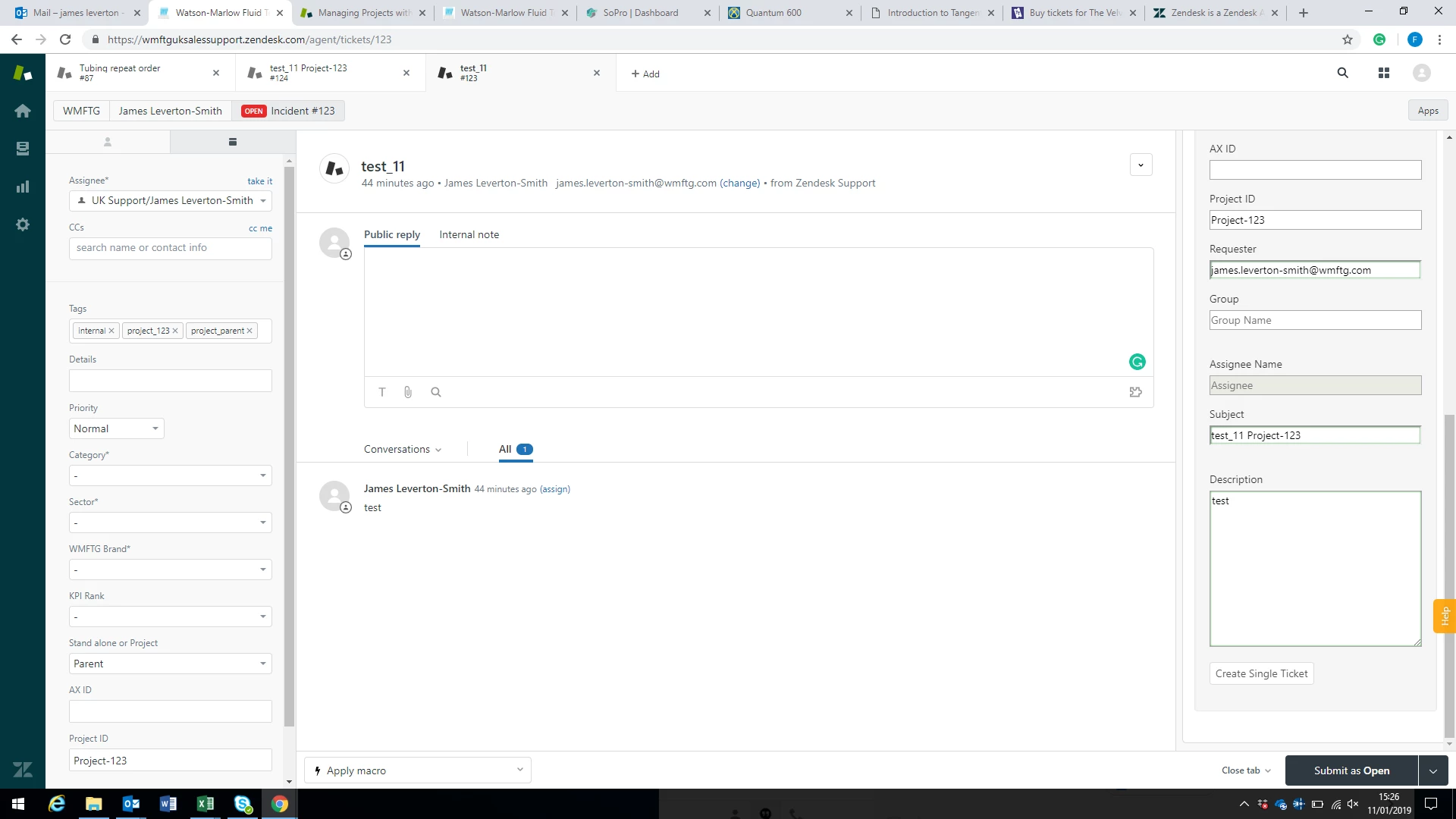
When I create a child ticket, the Assignee is blank and the box to set the Assignee when creating the ticket is grayed out (sown below) so I can't manually set it.  

Is they a way of making the child ticket take the Assignee from the parent ticket? 


  • January 11, 2019

I also find that for the first child ticket I have to manually input the Project ID, when the ticket is created the parent ticket has the Project ID auto-populated and so do the subsequent tickets (I assume they are picking the data up from the Parent which isn't there on the first ticket) is they a way of having the Project ID added to both the parent and first child tickets? 


  • January 11, 2019

Hi James!

The Project Management app is a Zendesk Labs app, which means it's unsupported so I'm afraid I won't be much help to you. But hopefully there are some other members of the community who will be able to help you out!


  • April 26, 2019

Hi Team,

How to make this app to pick the form(Ticket Form) which I have created instead of the default form. Its as of now taking default form. I want to make this happen to show the Problem(newly created) form instead question(Defaulted) form.

And also the order of the feilds are scattered, Its not in in the order which form is created. Do i need to change anything so that the form feilds will be in order.


Thanks in advance.


Brett13
  • Community Manager
  • April 26, 2019

Hey Adarsh,

The Project App is not a supported app by Zendesk so we won't be able to troubleshoot or offer up any advice on our end unfortunately :-/ That being said, I was able to track down the GitHub page for this integration so it may be worth reaching out there to see if you can get some assistance: Project App GitHub

I'll also leave this open in case any other community members want to jump in and offer up some advice.

Cheers!


  • June 11, 2019

Hi Team,

When I create a ticket using this app, the child ticket will not have pictures copied from comments instead it copies the HTML link of the picture. Does any setting need to change to copy pictures from parent ticket instead HTML link page of the picture?

Thanks

Adarsh 


Brett13
  • Community Manager
  • June 11, 2019

Hey Adarsh,

I did some testing on my end with the app and it doesn't look like this is possible in its current state. It doesn't look like there's a setting to change how the image is transferred from the parent ticket to the child ticket.

If you have developer resources available, you could download and configure the app directly from the GitHub page: Project App GitHub

Hope this helps!


  • August 19, 2021

We're currently searching for a tool to replace basecamp that can be managed completely inside of ZenDesk. I'd love to use something built by Zen but it doesn't appear this tool has been upgrade since it was launched. Any plans?


  • August 30, 2021

@Andrew Yeager-Buckley depending on your PM requirements, you might find the add-ons from Sweethawk to be worth looking at. 

https://sweethawk.com/zendesk-project-management

In particular the calendar and tasks apps.

https://sweethawk.com/zendesk-calendar-app
https://sweethawk.com/zendesk-tasks-app


  • October 5, 2023

Hello @brett13,

I tried to access the Project App Github link without link, getting Page not found. Would you be able to help downloading the app so we can configure it for our instance?


Brett13
  • Community Manager
  • October 6, 2023

Hey Tatiana,

I think there's now an app in the marketplace you can now use instead: https://www.zendesk.com/marketplace/apps/support/39234/project-management/

If you're experiencing issues with downloading the app, I would recommend reaching out to our Customer Support team using these instructions: Contacting Zendesk Customer Support

I hope this helps!


  • October 6, 2023

Hi Brett,

Yes, it's there. No issues with installing the app, we have in in our sandbox now, thanks anyway.

I was hoping we could configure the apps appearance and functionality, which I thought would be possible by editing it via GitHub.


Brett13
  • Community Manager
  • October 9, 2023
Hey Tatiana, 

I'm not aware of a way to customize the look and functionality unfortunately. If you're looking to have someone set this up for you in a different way, we do have a professional services team available that can potentially help. 
 
I'm happy to get a ticket created for you and assigned over to your Account Manager so they can discuss with you further.

Let me know!