List all articles for each section(s) on the same category page | Community
Skip to main content

List all articles for each section(s) on the same category page

  • February 16, 2016
  • 49 replies
  • 0 views

Hi there,

Zendesk Component Reference: Category with section and article list.

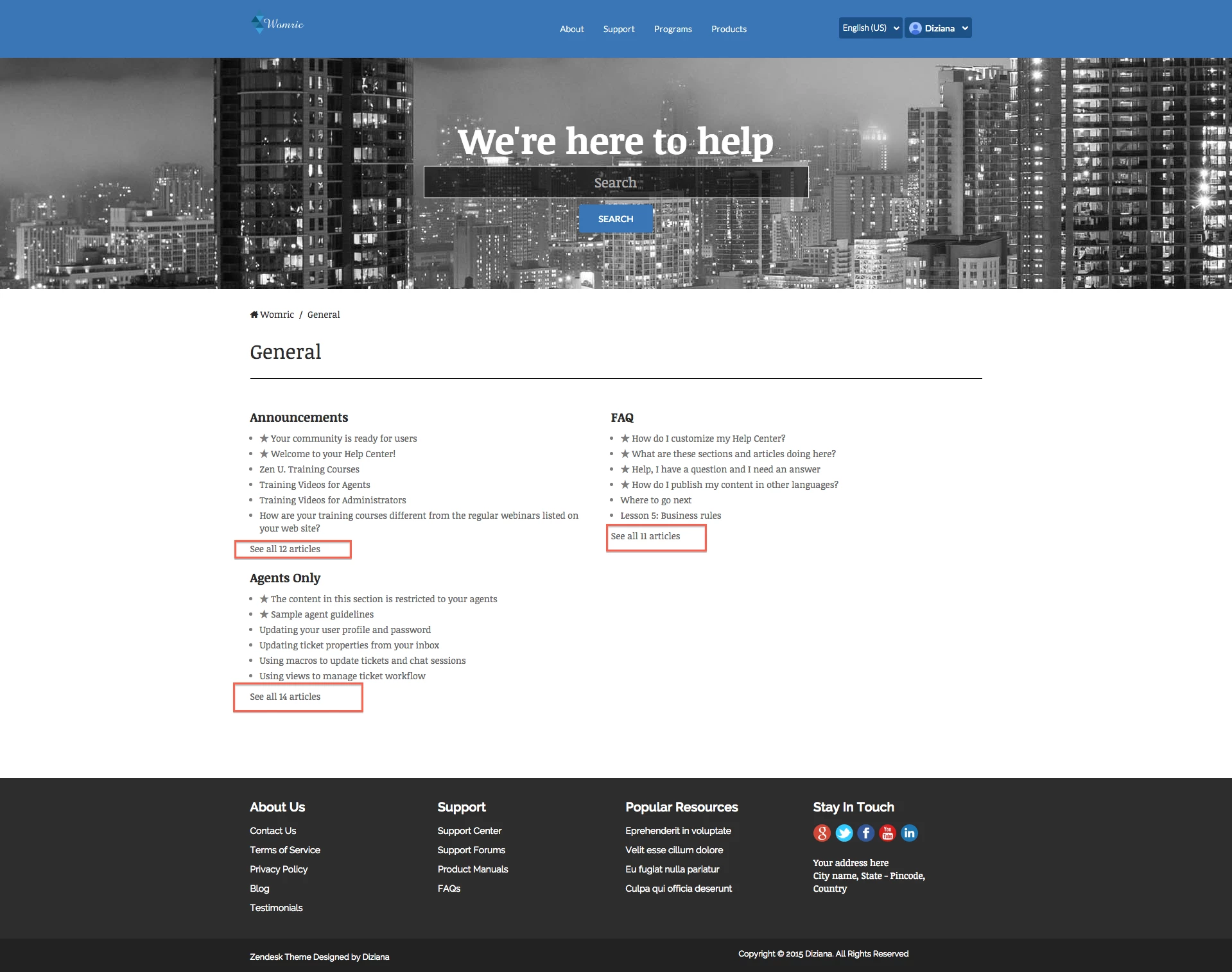
Background: On category page when we have more articles (more than 6) for each section/sections, then there exist a "See all link" that would take you to the main section page in order to list/show all its articles.

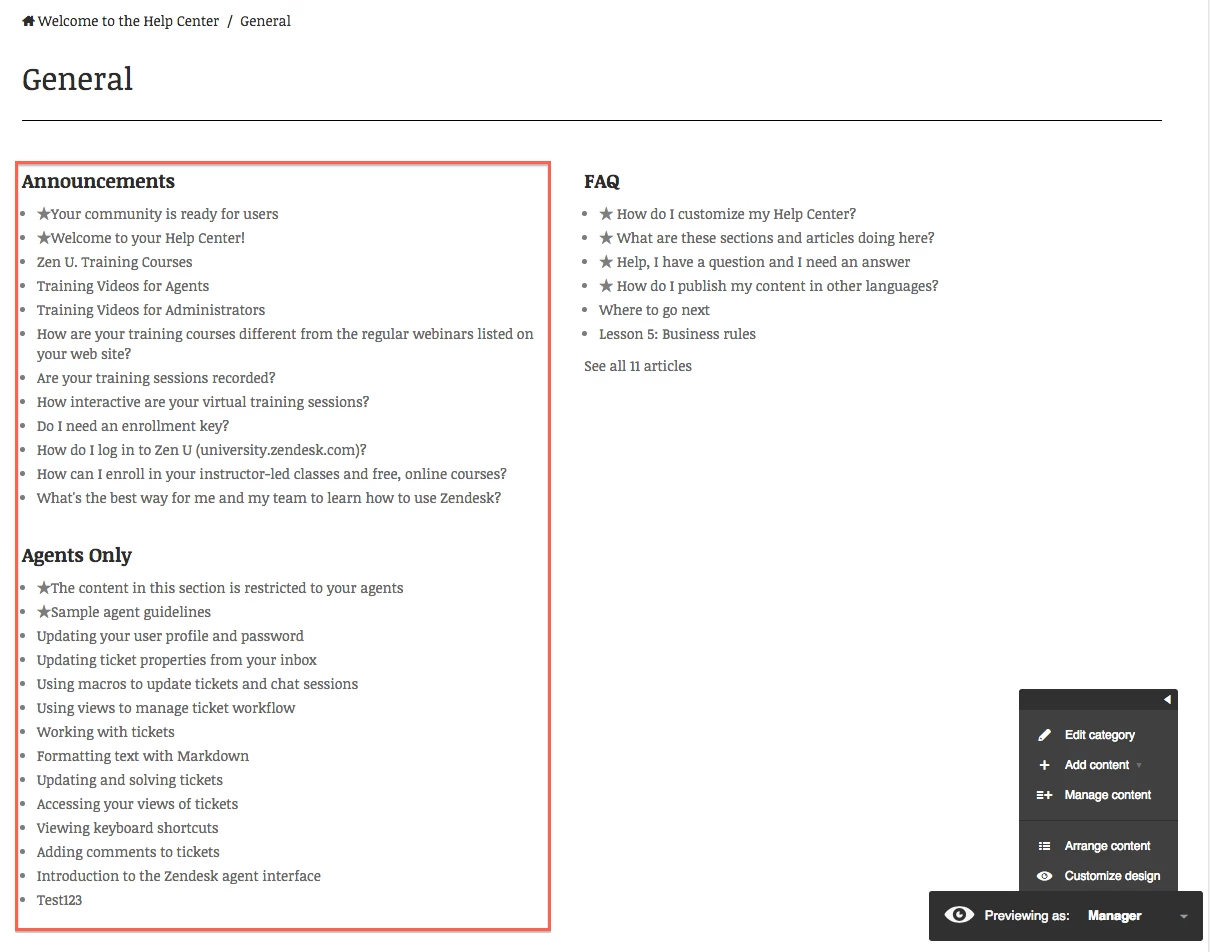
We have used existing Zendesk component and add a capability (JS) through which we can pull/list all the article for the section on the same category page. (without redirecting users to the main section page). Whenever user click "See all link", the next set of the articles would appear.

How to do it:

  • Add below JS to the JS section of HC:
$(document).ready(function(){

/**
@add your hc domain here
@for eg: var hc_url = 'https://testcompany.com'
*/
var hc_url = 'Your_HC_URL'

var _allarticles = [],
_sorted = [],
_artHtml = '',
_id,
_url;

var _articles = function(article){
$.ajax({
url: _url,
type: 'GET',
dataType: 'json',
success: article
});
};

// function for see all articles button in category
$('.see-all-articles').click(function(e){
e.preventDefault();
_id = $(e.target).attr('href').split('/sections/')[1].split('-')[0];

if(typeof HelpCenter.user.locale == 'undefined') {
HelpCenter.user.locale = window.location.pathname.replace('/', '').replace('?', '/').split('/')[1];
}

_url = hc_url+'/api/v2/help_center/'+HelpCenter.user.locale+'/sections/'+_id+'/articles.json';
_articles(function(data){
_allarticles = data.articles;

if(data.count>30){
for(var i = 1; i<data.page_count; i++){
_url = data.next_page;
_articles(function(data){
_allarticles = _allarticles.concat(data.articles);
_arthtml = '';
$(_allarticles).each(function(idx, itm){
if(itm.draft==true){
} else {
_arthtml = _arthtml + '<li class="'+(itm.promoted==true?'article-promoted':'')+'"><span data-title="Promoted article" style="'+(itm.promoted==false?'display:none':'')+'">★</span><a href="'+itm.html_url+'">'+itm.title+'</a></li>';
}
});
$(e.target).parent().find('ul.article-list').html(_arthtml);
$(e.target).hide();
})
}
} else {
_arthtml = '';
$(data.articles).each(function(idx, itm){
if(itm.draft==true){
} else {
_arthtml = _arthtml + '<li class="'+(itm.promoted==true?'article-promoted':'')+'"><span data-title="Promoted article" style="'+(itm.promoted==false?'display:none':'')+'">★</span><a href="'+itm.html_url+'">'+itm.title+'</a></li>';
}
});
$(e.target).parent().find('ul.article-list').html(_arthtml);
$(e.target).hide();
}

});
});
// function for see all articles button in category ends here

});
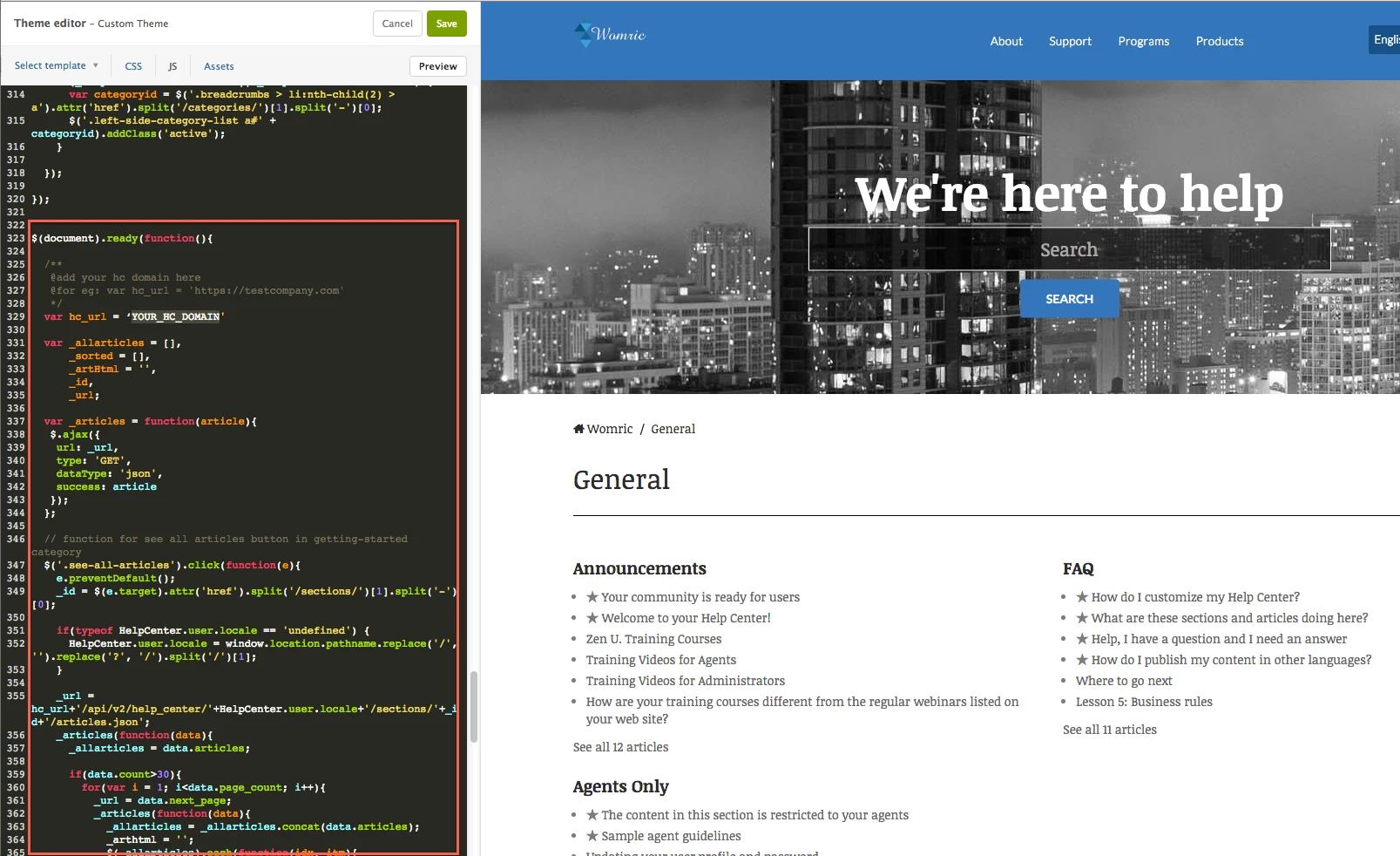


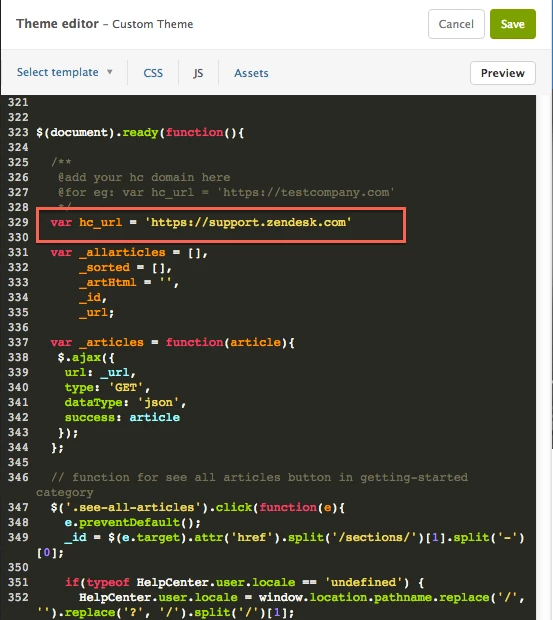
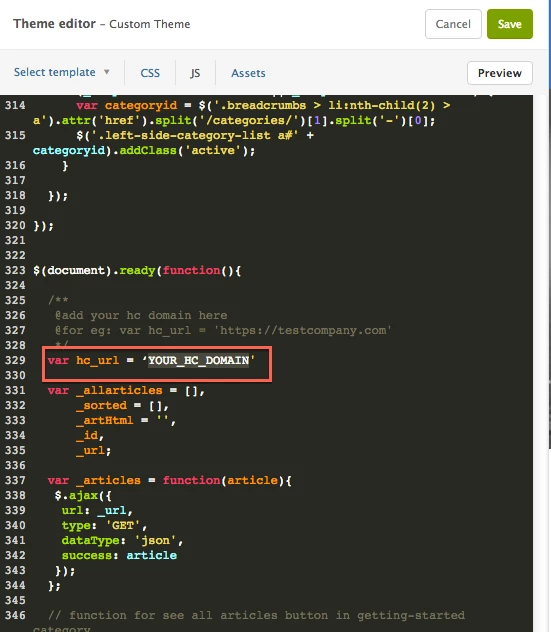
  • There is a variable named var_hc, add your Zendesk URL there.

            for an e.g: var_hc='https://support.zendesk.com'
  • Save and publish the changes.
  • Click see all articles link.

Let us know if you face an issue.

Cheers,

Diziana


49 replies

  • December 20, 2016

Getting an error of:

Cannot read property 'split' of undefined


Vladan
  • February 12, 2017

Very great tip and it works, thanks Diziana! I just have to adapt this row additionally:

$(e.target).parent().find('ul.article-list').html(_arthtml);

to some thing like this

 $(e.target).parent().html(_arthtml);

  • February 17, 2017

Thanks for sharing your adaptation, Vladan. :)


  • April 25, 2017

This was very helpful--for future reference I wanted to share that, in my sandbox, the section title disappeared when the user clicked on "See all articles" and the full list popped up. But, once we implemented in our active help center, this problem disappeared and the section titles remained visible.


  • September 13, 2017

These help me a lot! Also I want to know how to open the category page like the last image Diziana shows originally when I open the category page. "Originally" means without clicking any "see all articles".


  • January 10, 2018

Hi all,

Does anyone know if there's a way to remove the "See all x articles" option completely, on all pages? So even in main page, where it's showing the individual sections, and some get cut off and some don't, I'd like to be able to always have those showing all articles.

Any ideas?

Cheers,

Nick


Vladan
  • January 10, 2018

Hi Nicholas, if you are on Copenhagen theme, this code should do that. Just add it at the bottom of your CSS file:

.see-all-articles {
display: none;
}

Let us know the result ;)


  • January 10, 2018

Vladan,


Thanks, but that just hides the links, so you can't get to all the articles.  I want to to always expand to show all articles, regardless of how many are in a section.


Thanks,

Nick 


  • January 10, 2018

Vladan,

Also, I'm on the older swiftest elk theme.

Thanks,

Nick


Vladan
  • January 10, 2018

Ahh sorry, I didn’t understand what you meant.

That can be achieved with a help of Zendesk API but it would require much more coding. If you have a front-end developer on your side, this link will be helpful for him:
https://developer.zendesk.com/rest_api/docs/help_center/articles#list-articles

Hope this helps.


Trapta
  • January 16, 2018

Randy28
  • October 29, 2018

I changed the two lines like this:

_arthtml = _arthtml + '<li class="'+(itm.promoted==true?'article-promoted':'')+'">

to

_arthtml = _arthtml + '<li class="article-list-item'+(itm.promoted==true?' article-promoted':'')+'">

so that the default CSS formating would remain. Note the "space" before "article-promoted;" it's required for the code to be read correctly.

We don't have any promoted articles yet, so I'm crossing my fingers nothing is broken, but it works very well so far. Thanks Diziana for the original code!


Trapta
  • October 30, 2018

@Randy Schreck,

Thanks for coming back and sharing your code. Glad that you liked it.

Enjoy :)

Team Diziana


  • November 12, 2018

Hello ZenDesk Support Team,

Is there a way to list only one specific Section on home page and a list of the articles within that section?


  • November 15, 2018

Hi Yeny!

You should be able to hide or display just about anything with custom code. Can you give me more detail about what you're trying to accomplish here? We might have some community tips that will help you with you're working on.


  • November 16, 2018

Hello Jessie, thanks for your prompt reply.

I was able to pull up all sections on my home page using {{#each categories}} {{#each sections}} tokens and I used CSS to hide the ones I don't need by using their custom IDs.


Nicole17
  • November 19, 2018

Hi Yeny -

If I'm reading this correctly, it sounds like you got things all sorted. But do let us know if there are additional questions we can answer for you!


  • December 12, 2018

I am looking to do this too, I would like it to show all the articles without needing to click a link. Is there a way to turn off the 6 article limit all together.


Trapta
  • December 12, 2018

Hi Jeremy,

You can increase the count of articles to 30. Please take a look at this post: https://support.zendesk.com/hc/en-us/community/posts/203458986-Show-less-than-6-articles-in-Guide?page=5#community_comment_360000010847

You need to update the UI to update the look and feel of the list on the homepage.

Let me know if this solves your issue.

Team Diziana


  • December 12, 2018

I did this little hack... I had to add a see-all-articles div because that was not in there by default but then just adding something like this loaded them and if it happens too soon I at least get a button that works like you show

setTimeout(function() {
   $('.see-all-articles').click();
}, 100);


  • March 6, 2019

Hi,

Is it possible to have all the articles showing on load without needing to press 'sell all'?

https://outdoorandcountry.zendesk.com/hc/en-us/categories/360000141698--Our-Retail-Stores

I want to view them all there without pressing see all. So onload they're all displayed without going to another page?

Of if that's not possible is there a work around I could use?

Thanks,


Brett13
  • Community Manager
  • March 6, 2019

Hey Dominic,

I recommend taking a look at the following Community Tip posted by Diziani which goes over setting this up in your Help Center: List all articles for each section(s) on the same category page

Hope this helps!


  • March 6, 2019

Hi,

That links back to this post. I want to do it without having to press see all, so on page load, it just shows them there.

Thanks,


Brett13
  • Community Manager
  • March 6, 2019

My mistake Dominic! Had too many windows open in my browser at the time of this post :(

Hopefully someone from Diziana can reply back and offer up some guidance on how to accomplish what you're looking for.

Cheers!


Trapta
  • March 8, 2019