
How to put all sections and articles on home page | Community
Skip to main content

How to put all sections and articles on home page

  • February 23, 2017
  • 26 replies
  • 0 views

Vladan

Please follow this short tutorial about how to put all sections and articles on the home page of your Help Center (according to this post). There are few ways to achieve that, but I will explain one of them, probably the most easiest.

Example: https://support.twilio.com/hc/en-us

So:

  • Put all the content (all sections) in just one category (how to do that)

  • Go to editor for design changes (General / Customize design / Home page)
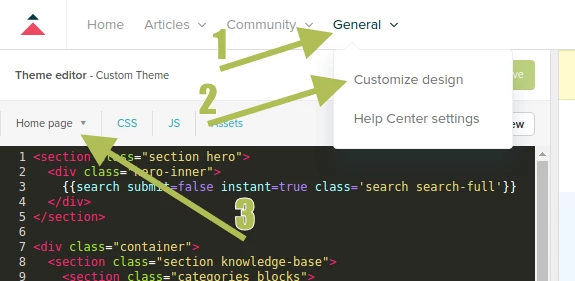
  • Find code row provided under, and remove it and whole code in this section (if you can't find it, just skip this step):
    <section class="knowledge-base">
  • Put here this code
    <section class="knowledge-base">
    {{#if categories}}
    <div class="category-tree">
    {{#each categories}}
    <section class="category">
    {{#if ../has_multiple_categories}}
    <h2><a href="{{url}}">{{name}}</a></h2>
    {{/if}}
    {{#each sections}}
    <section class="section">
    <h3>
    {{#if internal}}
    <span class="visibility-internal" data-title="{{t 'internal'}}">
    <span class="visibility-internal-icon"></span>
    </span>
    {{/if}}
    <a href="{{url}}">{{name}}</a>
    </h3>
    {{#if articles}}
    <ul class="article-list">
    {{#each articles}}
    <li {{#if promoted}} class="article-promoted" {{/if}}>
    {{#if promoted}}
    <span data-title="{{t 'promoted'}}">★</span>
    {{/if}}
    <a href="{{url}}">{{title}}</a>
    </li>
    {{/each}}
    </ul>
    {{#if more_articles}}
    <a href="{{url}}" class="see-all-articles">
    {{t 'show_all_articles' count=article_count}}
    </a>
    {{/if}}
    {{else}}
    <i class="section-empty">
    <a href="{{url}}">{{t 'empty'}}</a>
    </i>
    {{/if}}
    </section>
    {{else}}
    <i class="category-empty">
    <a href="{{url}}">{{t 'empty'}}</a>
    </i>
    {{/each}}

    {{#if more_sections}}
    <div>
    <a href="{{url}}">{{t 'see_all_sections'}}</a>
    </div>
    {{/if}}
    </section>
    {{/each}}

    {{pagination}}
    </div>
    {{/if}}
    </section>
  • Save and Publish changes. You should get your sections and articles on the home page of your Help Center.

    Hope this helps, if not, feel free to put a comment under!


26 replies

  • February 26, 2017

Thank for posting this, Vladan. This is a great help for those who wants to have this on their homepage. Really easy to follow, too. Thumbs up!


Jennifer16

Awesome tip, Vladan. Thanks for sharing!


Thank you very much for this snippet. May I ask you how you would split the content into two columns?

Thanks a lot, 


  • August 2, 2017

A big thanks to you, Vladan! I've been trying to do this and learn HTML5 at the same time by looking things up on the web. Should have known to start with Zendesk Support articles first, you guys are great!


  • January 23, 2018

Hey there, also wondering how to split the content into two columns? Thanks!


Vladan
  • Author
  • January 26, 2018

Hi Matthew, Welcome to the Community!

Just to check are you on Copenhagen theme? Could you share a screenshot of what you got there?


  • March 23, 2018

Is there a way to split it into 2 columns?


Vladan
  • Author
  • March 30, 2018

Hi Edul! Yes, that is possible.
Open CSS file of your Help Center theme (Guide admin / Themes / Select active theme / Edit code),
and find this value (should be the 812th line in this ZD default Copenhagen theme):

flex1 0 340px;

Just make a little change so it looks on this way:

flex: 1 0 420px;


That should be all. If it doesn't work, please provide me here with a link to your help center.
Thanks!


Hi Vladan - Thanks for the info!

Do you happen to know a way to have the "View all XX articles" expand on the homepage, rather than click thru to the category page?

Thanks in advance!


Vladan
  • Author
  • March 31, 2018

Hi Caroline, Yes that is doable and requires much more coding.

If you have a front-end developer in your team just direct him to the Zendesk API documentation, a part which applies to the listing of all articles within a section: https://developer.zendesk.com/rest_api/docs/help_center/articles#list-articles

Hope this helps.


Thanks Vladan! Will give this a try.


Guillaume18

Thanks for sharing this Vladan! One minor detail: I had to wrap {{#each sections}} with <div class="section-tree"> to get everything working perfectly. It fixed a bunch of margins and made the whole thing show up with two columns without even tweaking the CSS code. 

<div class="section-tree">
{{#each sections}}

[...] code removed for readability [...]

{{/each}}
</div>


Vladan
  • Author
  • June 15, 2018

Thanks for the update, Guillaume!


  • March 17, 2020

[SOLVED]

Hello, I am doing some fetch from the API to get all categories and sections, but I have some sections that are private. Is there a way to filter does private categories/sections on the API?

https://developer.zendesk.com/rest_api/docs/help_center/sections


Nicole17
  • March 31, 2020

Have you tried looking at the user_segment_id attribute? 


  • August 6, 2020

Hello i followed all the tips mentioned even in the comments. The section appeared as columns however there's no margin on the left column


Pulkit12
  • August 21, 2020

Hey Kathrina Rivera

Can you please share the URL of your HC where you implemented this so that I can go through it and provide you the exact solution to your problem.

Thanks 

Pulkit

Team Diziana


Ifra
  • August 22, 2020

Hey Kathrina,

You can try this.

Paste this code on home page:

<section class="knowledge-base container">
{{#if categories}}
<div class="category-tree">
{{#each categories}}
<section class="category">
{{#if ../has_multiple_categories}}
<h2><a href="{{url}}">{{name}}</a></h2>
{{/if}}

{{#each sections}}
<section class="section-wrapper">
<section class="section">
<h3>
<a href="{{url}}">{{name}}</a>
</h3>
{{#if articles}}
<ul class="article-list">
{{#each articles}}
<li {{#if promoted}} class="article-promoted" {{/if}}>
{{#if promoted}}
<span data-title="{{t 'promoted'}}">★</span>
{{/if}}
<a href="{{url}}">{{title}}</a>
</li>
{{/each}}
</ul>
{{#if more_articles}}
<a href="{{url}}" class="see-all-articles">
{{t 'show_all_articles' count=article_count}}
</a>
{{/if}}
{{else}}
<i class="section-empty">
<a href="{{url}}">{{t 'empty'}}</a>
</i>
{{/if}}
</section>

{{else}}
<i class="category-empty">
<a href="{{url}}">{{t 'empty'}}</a>
</i>

{{/each}}

{{#if more_sections}}
<div>
<a href="{{url}}">{{t 'see_all_sections'}}</a>
</div>
{{/if}}
</section>
</section>
{{/each}}


{{pagination}}
</div>
{{/if}}
</section>


Paste this CSS code on your stylesheet at the bottom side:

.container{
max-width:1160px; // Container width depends on your theme container, may your container width if 1100px , 1400px etc.
}

.section-wrapper{
display:flex;
flex-direction:row; // It could be flex-direction:column - depends on you
}

.section-wrapper .section{
flex: 1 0 100%; // On mobile devices

}

@media (max-width:1024px){
.section-wrapper .section{
flex: 1 0 340px // On Desktop
margin-right:30px;
}
}

And

Here is section class so if you need to add margin in section columns, you can add like this:

.section{
margin-left:30px; //As per your requirement
}

OR


.section{
margin-right:30px; //As per your requirement
}

Thanks

Team


  • February 18, 2021

Hi there. This no longer works "out of the box" for Copenhagen theme 2.8. Has anyone updated theirs to work with the new theme? Thanks!


  • March 31, 2021

Is there anyway I could filter out articles tagged with a specific label instead of showing promoted articles. Thanks in advance,


Jake18
  • April 14, 2021

Hi Shweta, with the native functionality it is not possible to filter by article labels and present only those articles.


  • December 13, 2023

Hello. I am trying to display all the articles in the sections of a category on the home page, but there is a configuration system which limits the number of articles to 6. What parameter in the code includes and influences this limit?
Because in addition I can reduce this number via ".article-list-item:nth-child(n+3)", 3 for example, but I cannot increase the number by this parameter (by putting .article-list- item:nth-child(n+8) for example, I still only have 6 displayed). Thanks in advance


Ifra
  • December 14, 2023

Hi Anne-Flore Caire,

It is doable by using API as Vlad said above. You can reduce the number of articles using CSS but cannot increase.

Thanks


  • December 14, 2023

Thanks for the quick feedback! @ifra

I was hoping there might be another solution since 2018. There are two issues with the solution: the development effort to implement it, and the fact that maintainability is outside the scope of Zendesk Help Centre administrators alone. So we won't be launching this workaround.


Ifra
  • December 14, 2023

@Anne-Flore Caire, I understand your requirement and concern.

But you can give your feedback here:

https://support.zendesk.com/hc/en-us/community/topics/1260801308530-Feedback-Help-Center-Guide-

Thanks :)