How to include Article in Multiple Sections | Community
Skip to main content

How to include Article in Multiple Sections

  • May 22, 2020
  • 38 replies
  • 0 views

Show first post

38 replies

  • Author
  • October 27, 2020

@Jacob Backerman

One thing I notice is that you modified the code a bit. 

var baseurl = window.location.href.match(/^([\w/:.]*)([/])([hc]+)([/])([\w-]*)/g);

The baseurl is automatically generated when the page loads. So, this line does not need to be modified for the code to work. But, that being said that should still allow the labels to show up in the console. 

----------------------------------------

It looks like you put your code at the very top in the photo. It is important to make sure it is not nested in any other code. In the photo, I cannot confirm it is in "article_page.hbs" but assuming that it is, I am not sure why the code is not working. 

As a troubleshooting step, you can try adding this code to see if anything shows up in the console and rule out some things. 

console.log("This is a test");

Add it below the <script> but before anything else in the existing code. If that does not show up in the console when you go to the page then something is either stopping the code from running or it is not getting pushed to the page. 

-----------------------------------------

I know that sometimes the preview does not always work correctly. Normally, I wouldn't suggest pushing code if it is not working but if you can in this instance. That may help narrow down the issue. 

At this point, the console should show at least "Labels:" because that part of the code is not reliant on anything but javascript. That is what is making me think this might be related to the preview not working correctly.


  • October 27, 2020

Alejandro Colon - Thanks! I will keep playing with it :) appreciate all of your help.


Oren11
  • August 15, 2021

Hi Alejandro,

I have the following:

Category: DRI
Section: Getting Started
Article: Building a Dashboard

I want to have the following:
Category: DMI
Section: Getting Started
Article: Building a Dashboard (redirected to DRI > Getting Started > Building a Dashboard)

How do I do this? Meaning, how do I get it listed in my second example to get redirect to the first example. And, what label do I add to the article? I have many articles I want located physically in one section but linked to different sections.

Any help would be much appreciated,
Oren


  • Author
  • August 16, 2021

@Oren Ben Ami

How far have you gotten with the instructions in the post?

If you have already input the code, did you add an article id to the labels of the post you want to be redirected?


Oren11
  • August 16, 2021

Thanks for getting back to me. I was able to implement the code, but what I am missing is how to include that same article in two places (how do I list it in 2 places, the original section, and then the other section where I want it to be linked from). So, it exists in one place already. I want to put the article link in another place, but I can't figure out how to do that. 


  • Author
  • August 16, 2021

Gotcha. To do that create the article that you want to redirect to the original and add the original article's id to the labels. 

When someone goes to the article the code will see that the label contains an article id and will redirect the end-user to the article. 


Oren11
  • August 16, 2021

Just to clarify:

Category: DRI
Section: Getting Started
Article: Building a Dashboard (ORIGINAL ARTICLE I CREATED)

I want to have the following:
Category: DMI
Section: Getting Started
Article: Building a Dashboard (A NEW ARTICLE I CREATE WITH NO CONTENT. I ADD THE ORIGINAL ARTICLES ID TO THE LABEL). So, when someone clicks that article, they will be redirected. 

Is this correct? Also, do I have to put an article ID of over 200000000 in the original article?


  • Author
  • August 16, 2021

Yes, you are correct. 

Also, You do not have to do anything to the original article. 


Oren11
  • August 16, 2021

Works perfectly! Thanks so much!


  • Author
  • August 16, 2021

No problem. Glad I could help. Have a great day.


Cheyenne11
  • November 22, 2022

Hi Alejandro, thank you for this solution. While in my eyes it should be a basic option to place an article in different sections/categories and even different brand guides, it seems Zendesk doesn't seem to think that way. Unfortunately. Although the solution isn't the most perfect (breadcrumb wise), your solution helps us to at least have to direct information in only one article and direct our customers to one complete article. Joy!


  • January 24, 2025

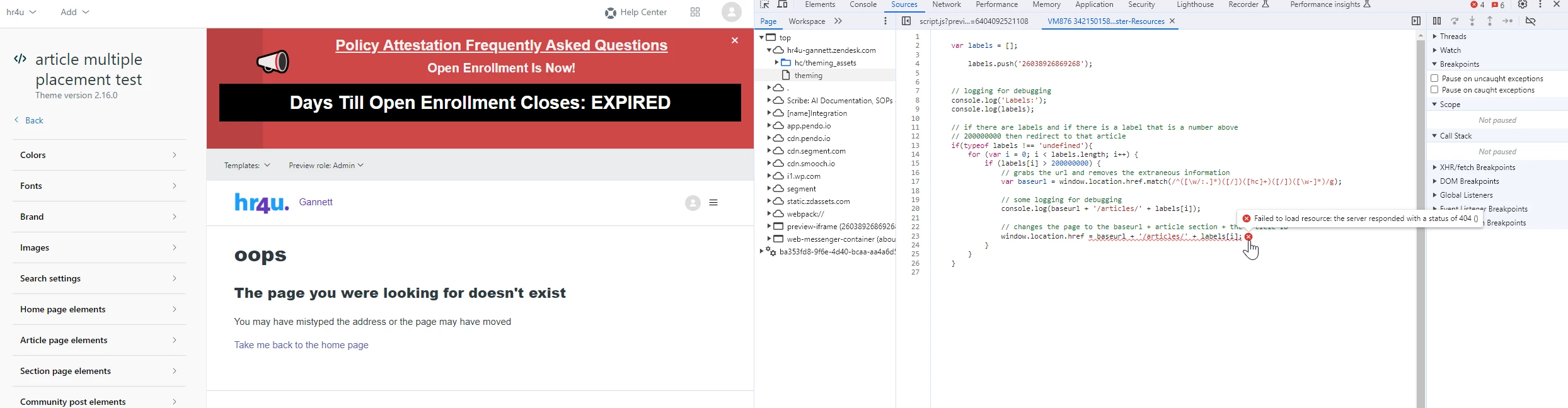
I  keep getting this error. What am I doing wrong? 


Francis14
  • June 23, 2025
Hi Jacquelyn,
 
From the screenshot, the main issue seems to be the redirect URL constructed in your JavaScript:
 
window.location.href = baseurl + '/articles/' + labels[i];
 
But your actual code snippet shows some typo or invalid characters with backslashes and dots:
 
window.location.href = baseurl + '\./articles\./' + labels[i];
 

What is wrong?

  • In JavaScript string concatenation, backslashes (\) and dots (.) without quotes are invalid or change meaning.
  • \. in a string literal doesn't mean a dot, it means escape dot — which is unnecessary and invalid here.
  • The redirect URL is ending up malformed, leading to a 404 (page not found).
  • The error "Failed to load resource: 404" means the URL the browser is trying to load does not exist on the server.
 
To fix this, with the correct string concatenation with the correct string concatenation:
 
window.location.href = baseurl + '/articles/' + labels[i];
 
No backslashes or extra dots are needed.
 

Additional tips:

  • Make sure baseurl is correctly extracted from the current URL (no trailing slashes).
  • Optionally log window.location.href just before redirecting to verify the full URL looks right.