How to export knowledge base content from your Help Center as PDF (no coding required) | Community
Skip to main content

How to export knowledge base content from your Help Center as PDF (no coding required)

  • April 16, 2017
  • 29 replies
  • 0 views

"Hi Patrick, 
we really love your product, could you please send us a
printable user manual so we can have an in-depth look at it? Thanks!"

I was shocked when one of our biggest new customers asked me that question. We just moved to a 21st century solution for all our customer support and knowledge sharing activities (yay Zendesk <3) but struggled to deliver on this request in time.

We really love our customers and don't want that to happen again, so we decided to build a Zendesk app that makes exporting knowledge base content as a PDF a breeze. We hope you can benefit from it too! :) (If you do, please let us know! <3)

How does it work?

It only takes 5 minutes, here is how

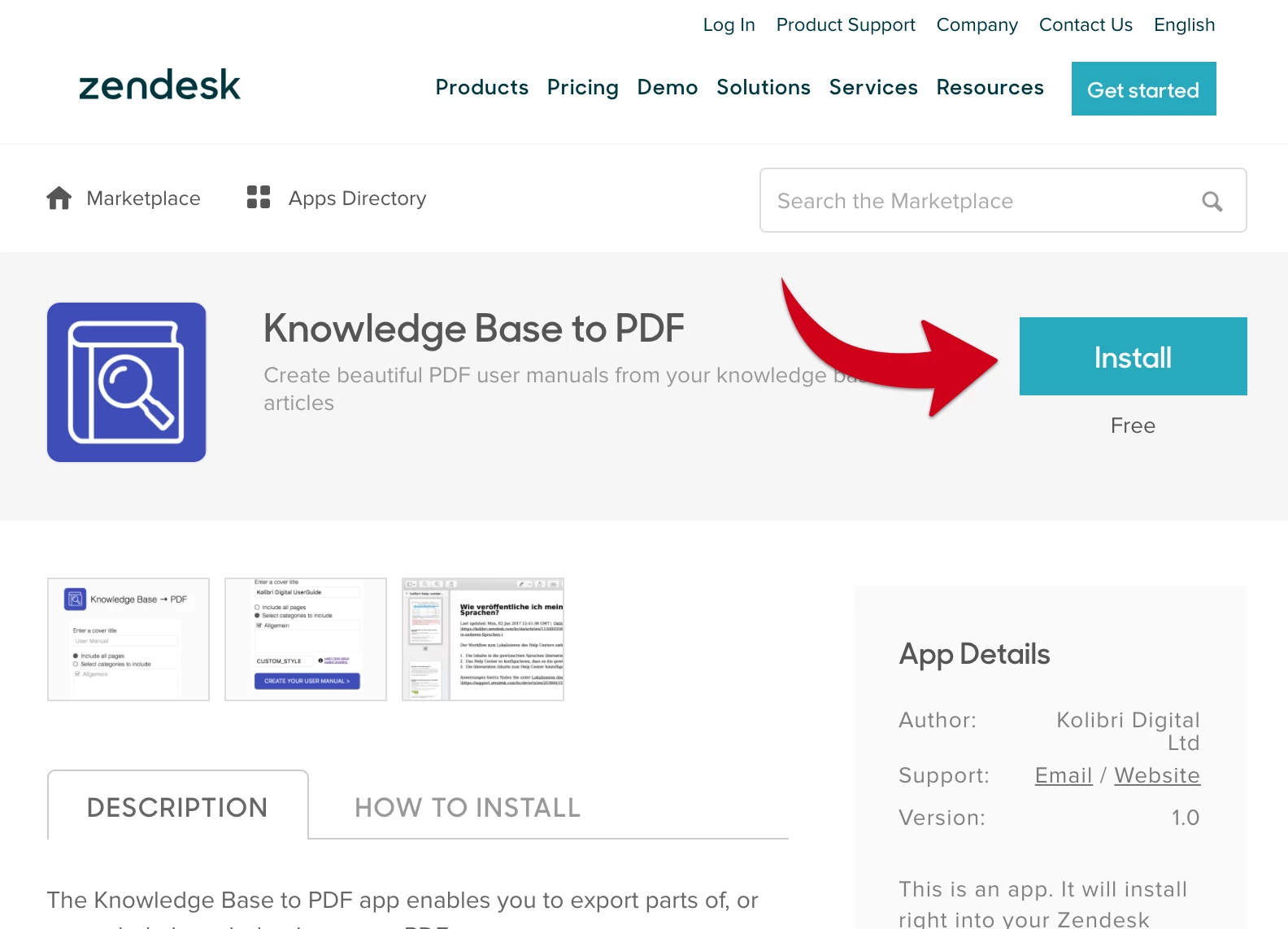
1. Install the Knowledge Base to PDF Zendesk App

You can find the latest version of the app in the Zendesk app directory. Click install
1.1 Private Help Centers

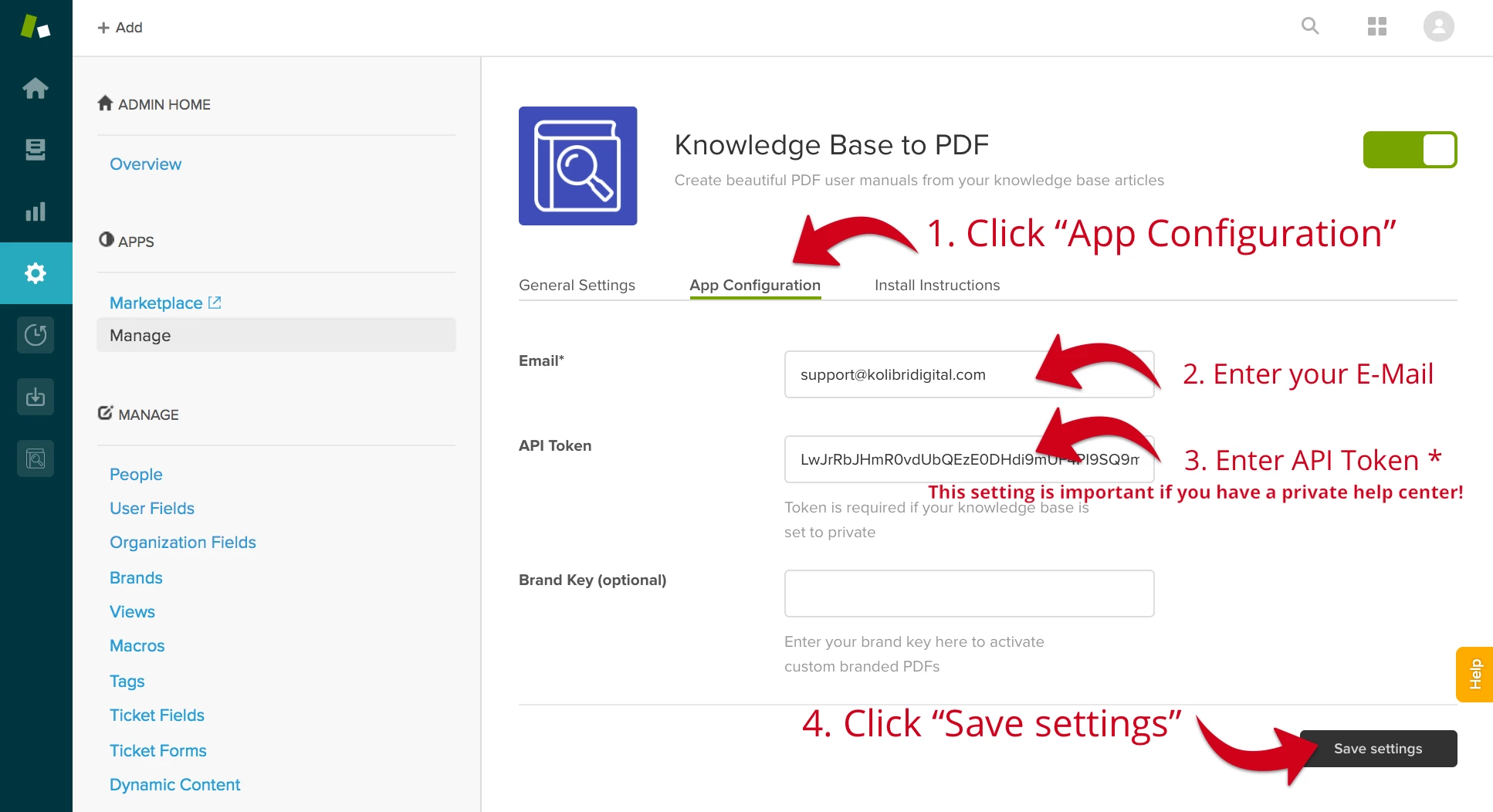
In order to make the app work with a private help center it is required to configure the app's email (your agent's e-mail) and token field.

Here is how you can obtain a token: https://support.zendesk.com/hc/en-us/articles/226022787-Generating-a-new-API-token- 

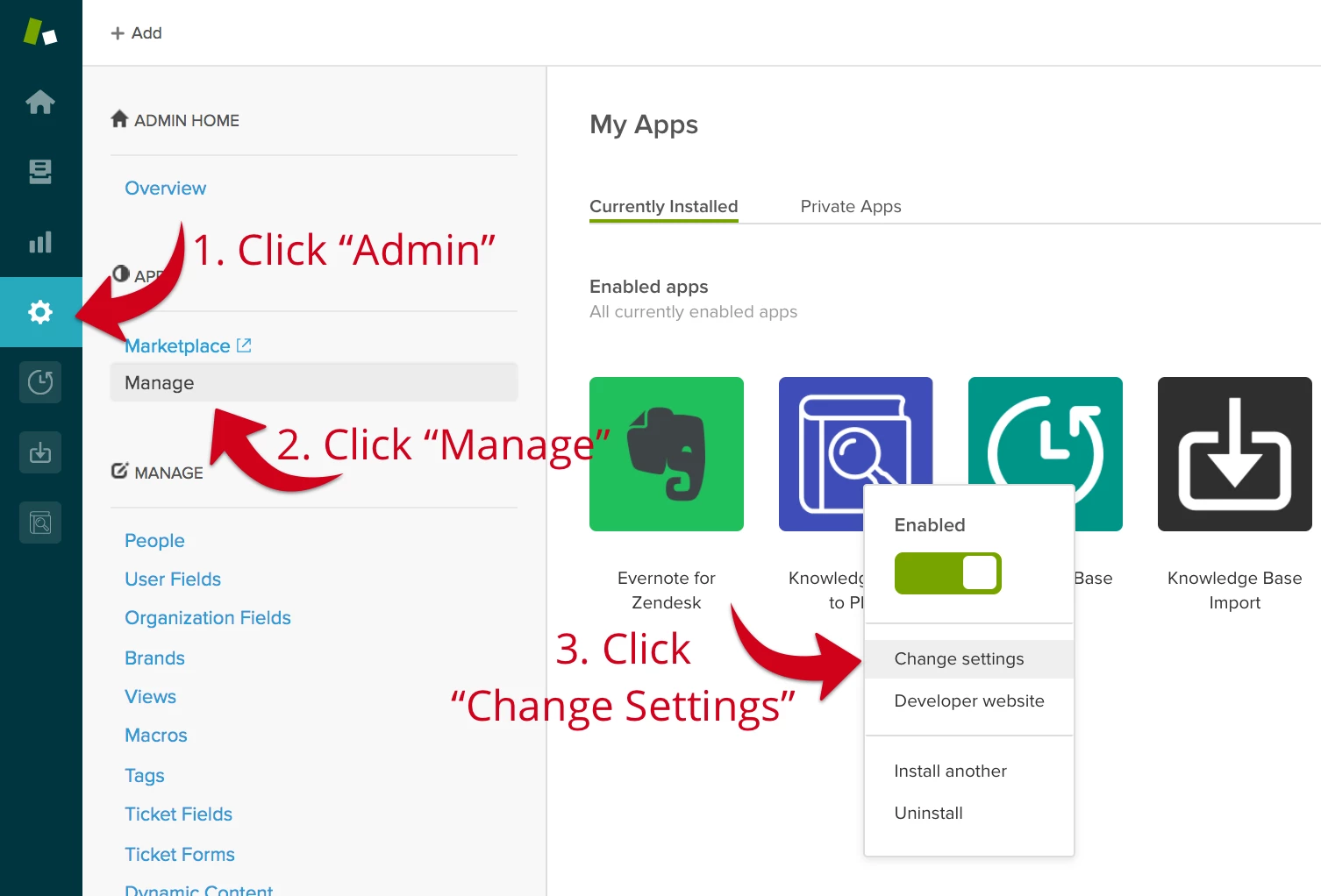
If you already installed the app and want to configure the fields afterwards you can do that at Admin / Manage / Knowledge Base to PDF / Change settings
* The link above explains how to obtain an API token. Make sure to use your agent's e-mail, otherwise the token won't work

---

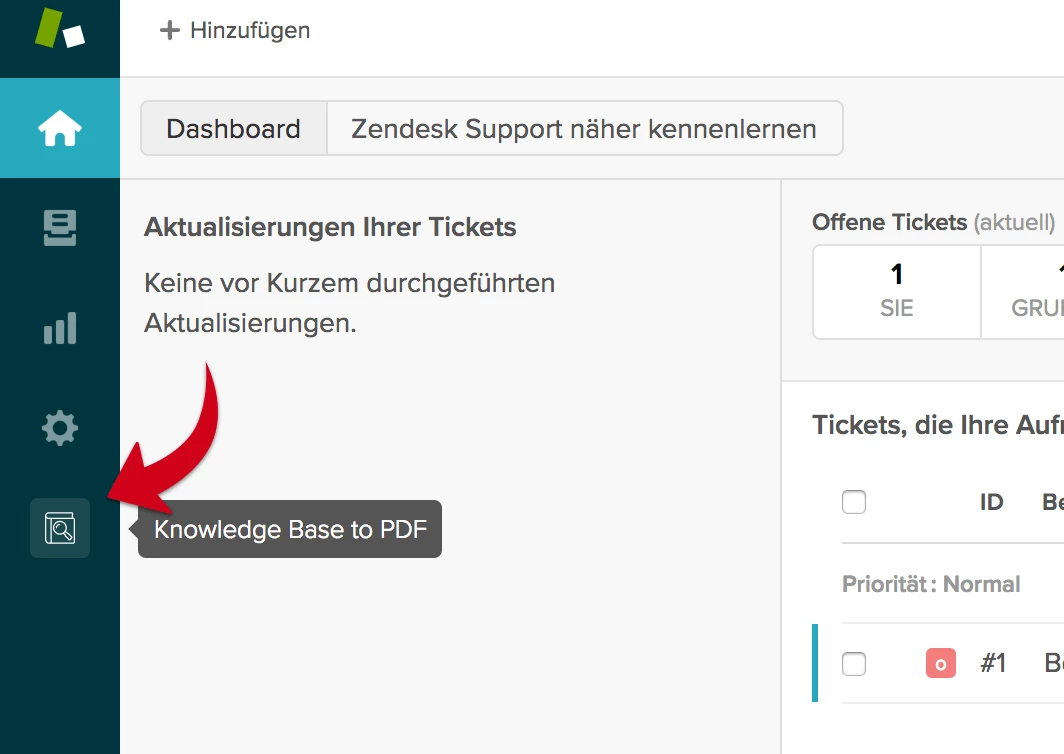
After successfully installing the app you can access it by clicking on its icon in the left navigation bar:

2. Configure your PDF User Manual

Set a PDF front page title

This text will be shown on your first page, it should describe the document. e.g. [MyProductName] User Manual, etc


Optional: Select categories you want to export

Don't want to export your whole knowledge base? No problem!
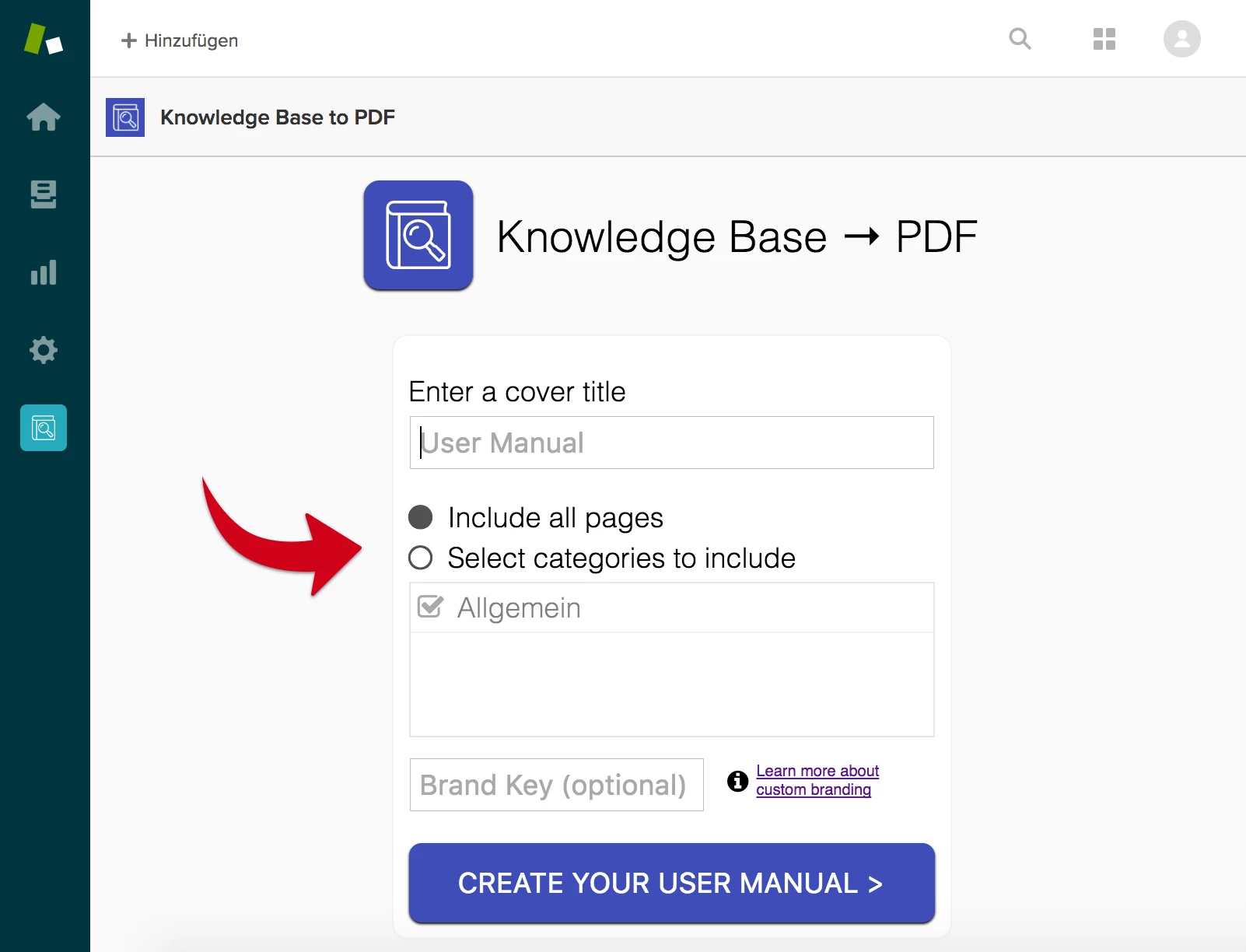
This UI control enables you to filter the content that will be included in your PDF. Select any number of categories by clicking on their label, it will only include articles that are part of your selected categories.

3. Download it

A click on the "CREATE USER MANUAL" button will get you to the next step and the download will trigger automatically. Voila, that's it!


Note: This step can take from a few seconds to a minute depending on the size of your knowledge base.

---

Other popular use cases

Product Knowledge Base Versioning

You just released a new version of your product that will require changes of your knowledge base articles, but you still have to support previous versions of your product.

No problem! Create a snapshot of your whole knowledge base as a PDF user manual before changing the articles for your new product and send it to customers requesting documentation about older versions

---

Updates

2017-05-01: Added support for generating PDFs from private help center content

Contact  

If you have questions, feedback, or love the app, please leave a comment or contact us directly: support@kolibridigital.com 

This topic has been closed for replies.

29 replies

Jennifer16

I'm always surprised when we get the PDF request too!

This sounds like a great app. Thanks for letting us know about it!


David179
  • June 2, 2017

Hi Patrick

Thanks for this App this is filling a gap as not all our customers can access our Help Center online ! this a great work !

For the next stage I fully agree on the improvements raised by Joerg and Chris :

  • Ability to drill down Sections within a Category
  • formatting of the output especially on the page breaks 

other Nice-to-Have but less priority :

  • Ability to insert a Logo on the Front page (or refer to the log stored in Zendesk support)
  • Ability to insert a simple one line Header and Footer delimited by a border line 

Thanks!


  • January 17, 2018

Hi Patrick,

Thanks for putting this together! We'd like to give access to some elements of our Support site to potential clients, but the site is private so that gets a little tricky. This app would do the job perfectly.

I'm having a little trouble getting the export to work--when I configure the settings for the app, there's no option to Include all Pages and the Categories/Sections field doesn't populate with anything from my site. 

I've generated the API token and input our Zendesk support email correctly, so not sure what the issue is. Are you still supporting this app? Do you have any suggestions for troubleshooting this issue?

Thanks!

-Sadie


  • February 9, 2018

We have multiple brands set up for different regions, how can I configure this to pull the articles from each brand, it is currently only pulling articles from our default US brand help center need to pull articles from our other helpcenters


Brett22
  • February 13, 2018

We also have a need for handling multiple brands.


  • February 13, 2018

Hey Phil and Dean!

Since this integration was built and is supported by a third-party developer, I'm afraid we won't be able to help much here in the Community. However, it looks like Patrick included a contact email address so you can reach out to him to find out if he can make an update to the integration!


  • February 16, 2018

I, like Brett and Phil above need the ability to export my knowledge base by a specific brand.

Any advice? Please give me an answer.


  • Author
  • February 16, 2018

Phil, Brett, Cole:

this is currently not supported. There was a trick where you could set your default help center & default language to whichever knowledge base you wanted to export but this recently stopped working. We're working on a new app version that will let you do that properly, I will post here as soon as we have something usable

Mohamed: will get back to you today


  • February 21, 2018

When I try to use this it does not load a list of my categories in Zendesk, it just spins on loading categories, has anyone else ran into this?


Jeff


  • February 26, 2018

Welcome to the Community, Jeff!

Do you have a lot of content in your Help Center? Perhaps it's just taking some time to get everything compiled.


  • February 26, 2018

I only have about 155 articles, so it's not a lot of content.  I did end up getting it to pull in the categories using another web browser.  I found another solution that allowed me to embed the "Print to PDF" button inside of the knowledge base in the help center though, that seemed to work more effectively.


  • February 26, 2018

Jeff--

That is great info! I thought I tried everything to get this to work.

Can you share info about the other solution you used? Is it an app?

Thanks!


  • February 26, 2018

Sadie,

I used Knowledge Print PDF Download Controls from the Marketplace.  It generates a block of Code to place into your help center which adds a button to download the knowledge base document to a PDF or download the full section to PDF. 


Hope that helps you!


Jeff


  • May 2, 2018

Patrick,

I'm having two issues with the Knowledge Base to PDF app:

1. There is no way to select by brand. We have content separated into three brands and I want to be able to select a brand and then select from the categories in that brand.

2. When I generate a PDF, I'm not seeing any page numbers.

Regards,

Diane


  • August 29, 2018

Hi Patrick,

Any progress on selecting which Brand's Knowledge base you're pulling from yet? Only thing I'd need to make this useable for me!

Thanks

John


Hi Patrick,


This sounds pretty good app!! But when I tried, it does nothing. no pdf generation, no error, no message. Can you please tell what I'm doing wrong?

Thanks

Ashok


Ron14
  • March 11, 2019

Hi Patrick, 


Is there a solution already on selecting which Brand the APP chooses to generate? 


Best regards, 

Ron


  • July 25, 2019

This function is exactly what I am looking for. However, after setting up as guided above, when I click on Knowledge Base to PDF, I encountered the Categories section is in constant "Loading". Can please advise how I can resolve this?

Caitlyn


Krista12
  • August 26, 2019

Will you be narrowing the export down to the article at any point? I don't want the entire section for every export, it would be great to be able to pick and choose articles for an export.


  • November 13, 2019

Can't access the Knowledge Base to PDF anymore. We just get an error: "kolibridigital.com took too long to respond"

Reinstalled the app as well and same issue.

Can this please be fixed soon as we were relying on this tool/app. Hopefully their support team sees this since its so hard to get a response back from them via email. 

Thank you!

UPDATE: Apparently they had an outage on their servers. It is working now.


  • June 15, 2020

Hi @Ben Van Iten,


When you install this app you can only export articles from your default brand. You cannot select which brand to export articles from. This is useless for multi-brand users. The only way around this is to switch the default brand which is not ideal.


  • June 15, 2020

Hi @Jamey Pringle,

My apologies as I think I misunderstood originally.

You are correct that this app does not support multibrand in a traditional way, besides the workaround that you mentioned. In this case you might want to contact the app developer directly with that feedback as this app was not developed by us.

I did notice that they have another app on the marketplace as well: https://www.zendesk.com/apps/support/knowledge-print--pdf-download-controls/?source=app_directory

I downloaded this app in my test account and it provides a different way to go about this, where it walks you through adding custom code to your guide theme which creates a download button on each article. I will admit that I don't have experience with these apps, but this might be an alternative depending on how many articles you need to download.

I hope this is helpful.


  • July 9, 2020

We have a bilingual Help Centre, and the app works great for English (default) content, but we can't seem to export the French content.  Anyone else have this issue?  I've tried making French the default language for both the support and help centre, but it still only displays the English content.  What am I missing?


  • Community Manager
  • July 17, 2020

Hi Mandy! Sorry to hear this is happening for you. Unfortunately since this app isn't built by Zendesk we don't have access to the right troubleshooting tools to help resolve it. You'll want to contact the app's developer - if you need help finding that contact info, see Who do I contact about a marketplace app?


  • December 9, 2020

I'm also having an issue that one of the users mentioned in the past.

I cannot select the categories to export since I'm in the neverending spin mode to load the categories to select.

Is there any workaround to this?

Thank you.