
I implemented tabs using jQuery-UI tabs plugin, which makes it quite simple to embed in Zendesk Help Center home-page.
First, download jquery-ui from their website, with your favorite design, and add jquery-ui.css as an asset to your theme.
In the Document Head section add the following:
<script src="//code.jquery.com/ui/1.11.4/jquery-ui.js"></script>
<link rel="stylesheet" href="{{asset 'jquery-ui.css'}}">
<script>
$(function() {
$( "#product_updates_tabs" ).tabs();
});
</script>
In the Home section, add the following:
{{#each categories}}
{{#is name "Product Updates"}}
<h2>{{name}}</h2>
<div id="product_updates_tabs">
<ul>
{{#each sections}}
<li><a href="#{{id}}">{{name}}</a></li>
{{/each}}
</ul>
{{#each sections}}
<div id="{{id}}">
<ul>
{{#each articles}}
<a href="{{url}}"><li>{{title}}</li></a>
{{/each}}
</ul>
</div>
{{/each}}
</div>
{{/is}}
{{/each}}
============
You can of course customize the design by editing the jquery-ui.css.
The above is based on the example in the jquery-ui tabs example page:
https://jqueryui.com/tabs/
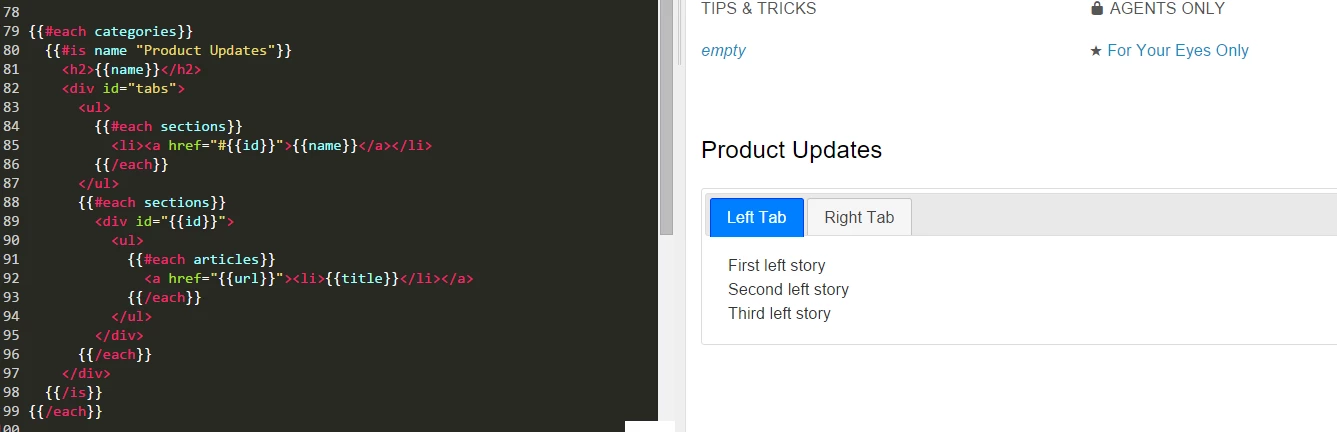
In my example, the category "Product Updates" has two sections - "Left Tab" and "Right Tab" and each have 3 articles in it.
You can add more sections which will added as tabs automatically.
Let me know if you have any questions.


