
Holiday auto-responses made easy | Community
Skip to main content

Holiday auto-responses made easy

  • January 13, 2017
  • 16 replies
  • 0 views

CHALLENGE: Emails are sent to us via a number of different email addresses. We have different (customized/relevant) auto-responses for each of these addresses. When a holiday rolls around, altering all of the triggers manually takes time. And then you have to edit them again after the holiday. Drag.

SOLUTION: Utilize the ability to schedule holidays. Then add holiday conditions to triggers.

HOW?

(1) Set up all holidays.

In brief: Admin > Settings > Schedule > Holidays > Add holiday
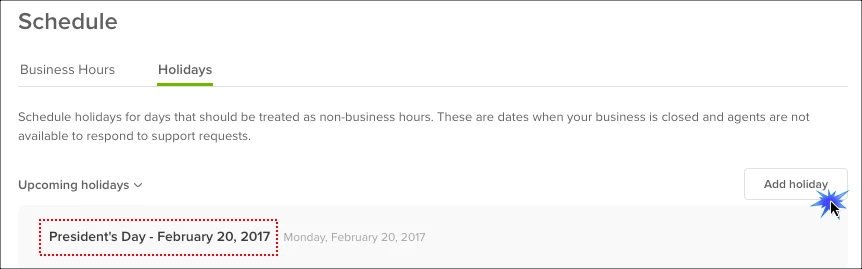

More detailed instructions in Zendesk article: Setting your schedule with business hours and holidays

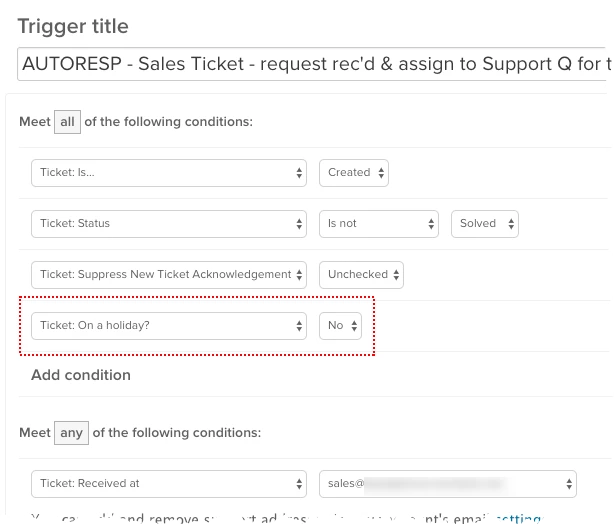
(2) Edit your existing triggers to show that they should be used other than when it's a holiday - by adding the condition "Ticket: On a holiday?" and "No". Looks like this:

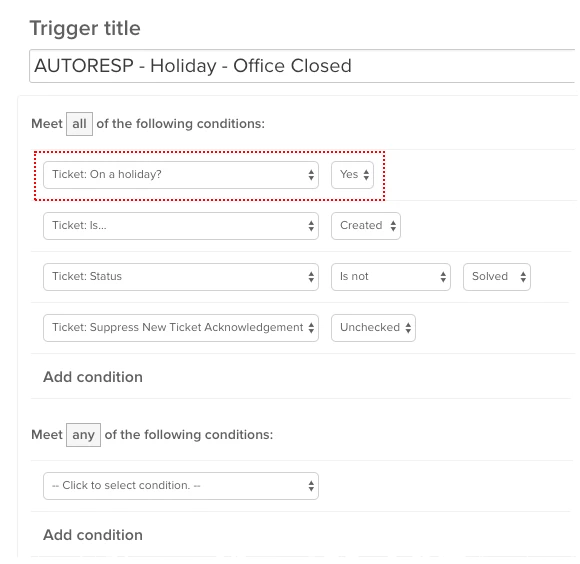
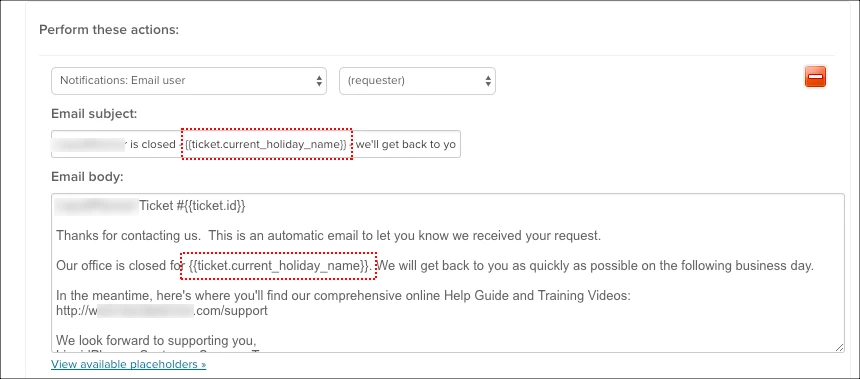
(3) Create one holiday trigger to be used for all holidays. That trigger must have the condition "Ticket: On a holiday?" and "Yes". You can also use a ticket field to insert the name and date of your holiday automatically.
 

16 replies

  • August 28, 2017

Very helpful. Thank you, Liz!


  • November 22, 2017

Sweet!  Thanks LIz!


  • November 21, 2018

For pro subscriptions, it looks like this conditional is only available in the "Meet ANY conditions section".  Fortunately for our auto-response, we don't have anything else in that section, otherwise this would not work reliably.  Thanks for writing the article though, it was great!


  • May 6, 2021

It would be great to have a new trigger condition called something like "Within SLA from a holiday?" that would return true, not just on the holiday date, but during SLA time before it too.

A workaround using a second schedule and switching them with triggers is possible, but sounds unnecessarily complicated. I'm sure Admins would LOVE this.


Nicole17
  • May 6, 2021

HI Ahmend - That is good product feedback. Can you create a post in our Feedback on Support topic, so that other users can up vote it and product managers will see it? If you haven't posted there before, here's information on how to write an effective feedback post and our product feedback guidelines. 


  • September 19, 2021

Hi,

How can I send such a message to inquiries from WhatsApp as well?

Thanks


  • September 25, 2021

Hi Shifi,

The business rules discussed above apply to email notifications. These won't work for sending replies thru other channels such as WhatsApp. If your WhatsApp channel is connected through social messaging in the agent workspace, then you should be able to send out-of-office responses when you are offline via chat triggers. You can check out the comment of our product manager on a separate thread here. The trigger setup mentioned there is outlined in this doc: Creating an out-of-office response for messaging.


  • October 7, 2022

Hello!

I've looked and looked - I cannot find any reference to Holiday in the conditions presented when setting up the trigger. I have no way to indicate to the trigger if it should be used during a holiday - what am I doing wrong?


Mark


Hiedi
  • October 10, 2022

Hey @mark104,

Due to the nature of your concern, I created a ticket on your behalf to assist you better. Please check your email for more information. Speak soon! 


Lou11
  • October 10, 2022

@mark104

Do you have schedules set up? If they're not, you won't see that condition.

Setting your schedule with business hours and holidays


  • October 10, 2022

Lou,

I do, did it right before I tried to setup a holiday message. Was sure to refresh pages as well. 

Mark


Lou11
  • October 10, 2022

@mark104

Weird. What plan do you have?

I have schedules set up even though we don't use them yet, and I see the condition. We have Enterprise plan, so maybe that has something to do with it.


  • October 10, 2022

Lou - Professional IIRC


Chelsie
  • December 22, 2022

Would love it if there was a placeholder like {{ticket.current_holiday_dates}}. Otherwise we have to manually update the auto-reply every holiday to specify which dates we will be closed.


Ian41
  • November 15, 2023

@chelsie I know this is almost a year later, but just in case it helps someone else! I ended up modifying the name of the holidays so it makes sense in the context of the email. For example, I have a holiday named "Thanksgiving Break from Nov 23 - Nov 24" which will show up in the email as:


Our office is closed for Thanksgiving Break from Nov 23 - Nov 24. We'll get back to you as soon as possible on the next business day!


Nicole17
  • November 16, 2023

Thanks for sharing, Ian!