Help Center Tutorial: Add a home icon to your breadcrumb navigation | Community
Skip to main content

Help Center Tutorial: Add a home icon to your breadcrumb navigation

  • May 5, 2017
  • 13 replies
  • 0 views

This tutorial will show you how to add a friendly home icon to your Help Center breadcrumb navigation using only CSS.

Before: 

After: 

Directions:

All you need to do is add a small snippet of text to your CSS.

  1. Open Admin Guide > Settings > Customize Design.  
  2. Click the Edit Theme link.

  3. Open the CSS tab
  4. We can add our snippet between any element on the CSS page. CSS doesn't care where you place your elements. But for hygiene sake, let's place the snippet near the existing breadcrumb elements. Find the line between the .breadcrumbs li  element and the .breadcrumbs li + li::before element. See the example below.   
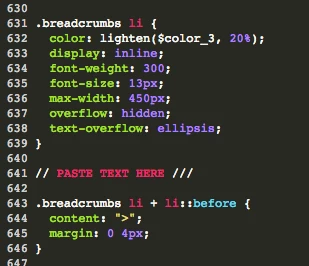
  5. Paste the following text between in this space.
    .breadcrumbs li:first-child a:before {
    display: inline-block;
    font-family: "entypo";
    content: '\2302';
    padding-right: 5px;
    }

I tested this on the Copenhagen and Swiftest Elk themes. Let me know if you have any issues.

13 replies

  • May 5, 2017

Thanks for the great Tip, Baruch! And welcome to the Zendesk Community. :)


Heather13
  • May 9, 2017

This is great, thank you! Do you happen to know how to customize the house icon to something different? Thanks in advance.


  • Author
  • May 9, 2017

Hey Heather, 

Yes, you can customize the icon. The icons are part of a library called Entypo. The library is included with your Zendesk theme by default. So you can choose any of the Entypo icons without having to add another library to your theme. Here is a full Entypo character map: http://fontello.github.io/entypo/demo.html

So you just need to replace the \2302 text with the desired character code.


Dan28
  • May 9, 2017

@Baruch, the github link in your comment doesn't appear to be working when clicked on, but you can typing in the link works. 


  • Author
  • May 9, 2017

@Daniel, good catch. I updated the link. 


Jacob20
  • May 10, 2017

Great tip Baruch I love it!


Heather13
  • June 22, 2017

Tried it and it works! Thank you again!


  • March 28, 2019

Hello there!


Thank you for the tip.

I'm wondering if there is a way to remove the help center name. We'd like to have only the icon instead.

Thank you very much in advance.


Brett13
  • Community Manager
  • March 29, 2019

Hi Manuel,

Looks like Trapta replied to your other post regarding this question: Updating the breadcrumbs in Help Center to match a custom Community name

Hope this helps!


  • April 12, 2022

Tried this on but the Home icon doesn't look the same and it's not so apparent. Is there anything I can do to make it look exactly as it's shown above?


Hi Harshita,
 
I'm not seeing this in my testing.  Can you share the CSS snippet that you're adding?
 
Best,

  • April 15, 2022

Hey @christopher53 !, yes I removed it when it wasn't appearing alright. I have put it again on the help center. You may check it now. https://help.engagedly.com/hc/en-us/categories/4408636104473-Employee-Guide-Home-

I have added the exact same CSS snippet as referred above. 

.breadcrumbs li:first-child a:before {
display: inline-block;
font-family: "entypo";
content: '\2302';
padding-right: 5px;
}

Thanks in advance!


Hi Harshita,
 
Thanks for the update.  I was able to pin down what you're seeing.  Entypo is no longer included as a theme font in v2 of the Templating API that themes are currently using.  Though it's possible for you to create an SVG image for the icon to use, as noted in  Entypo's FAQ.
 
Best,