Guide Tip: New way to request feedback for article downvotes | Community
Skip to main content

Guide Tip: New way to request feedback for article downvotes

  • December 12, 2023
  • 22 replies
  • 12 views

Edward13

Prerequisite:
* Admin access Support & Guide
* Default Copenhagen Theme
* Turn-on anonymous ticket submission
* Custom form
* Custom fields editable by end users


Steps:
1. Go to article_page.hbs
2. Paste html code (a) in line 162
3. Paste script code (b) at the bottom
4. Go to style.css (c) then add css code at the bottom
5. Publish the changes and test your new theme in Incognito mode


a. HTML - replace subdomain, change the options, values, and spiels as needed

{{!-- Article Feedback --}}
    <form class="request-form hide" id="article-vote-down-form">
        <label for="reason">Sorry about that! What was the issue?</label>
        <input type="hidden" value="Article feedback: {{article.title}}" class="hide" name="subject">
      <input type="hidden" value="https://subdomain.zendesk.com/{{help_center.url}}/articles/{{article.id}}" name="url">
        
        <select class="custom-form-field" id="reason" name="reason" required>
            <option value="" disabled selected>-- Please choose an option --</option>
            <option value="incorrect_information">Incorrect or missing information</option>
            <option value="unclear_content">Hard to understand</option>
            <option value="typos_broken_links">There are typos or broken links</option>
            <option value="resources_issue">Issues with images, GIFs, or videos</option>
            <option value="feature_feedback">I wish the feature worked a different way</option>
            <option value="general">Something else</option>
        </select>
        
        <textarea name="description" placeholder="Tell us more" required></textarea>
        <button type="submit" class="button feedback-button">Submit article feedback</button>
            </form>

<div id="feedback-success" class="hide">
    <p>We use your article feedback to improve our help content—thank you!</p>
</div>


b. JS - make sure to change ticket_form_ID and custom_fields: [

<script>
document.onreadystatechange = () => {
  if (document.readyState === "complete") {
    const voteButtonUp = document.querySelector(".article-vote-up");
    const voteButtonDown = document.querySelector(".article-vote-down");
    const successMessage = document.querySelector("#feedback-success");
    const voteDownForm = document.querySelector("#article-vote-down-form");

    function hideForm() {
      voteDownForm.classList.add("hide");
    }

    function showForm() {
      voteDownForm.classList.remove("hide");
    }

    hideForm();

    async function submitRequest(e) {
      const formData = new FormData(e.target);
      const form = Object.fromEntries(formData);
      const reason = form.reason || "";

      let body = {
        request: {
          subject: form.subject,
          comment: { body: form.description },
          custom_fields: [
          { id: 12386706806425, value: form.url }, //article URL, replace ID with your custom field
          { id: 900005760523, value: reason }, //feedback reason, replace ID with your custom field
          ],
          ticket_form_id: 900000044103, //your article feedback form, replace with your custom form ID
        },
      };

      let headers = new Headers();
      headers.append("Content-Type", "application/json");
      headers.append("Accept", "application/json");

      body.request.requester = { name: "Anonymous" }; //you can replace the name of the requester if need (e.g Help Center Feedback)

      await fetch("/hc/api/internal/csrf_token.json")
        .then((data) => data.json())
        .then((res) => {
          headers.append("X-CSRF-Token", res.current_session.csrf_token);
          headers.append("X-REQUESTED-WITH", "XMLHttpRequest");
        });

      await fetch("/api/v2/requests", {
        method: "POST",
        headers: headers,
        body: JSON.stringify(body),
      }).then((res) => {
        if (res.status == 201) {
          hideForm();
          successMessage.classList.remove("hide");
        } else {
          console.log("Error submitting request");
        }
      });
    }

    voteDownForm.addEventListener("submit", (e) => {
      e.preventDefault();
      submitRequest(e);
      return false;
    });

    if (voteButtonUp) {
      voteButtonUp.addEventListener("click", function (event) {
        event.preventDefault();
        successMessage.classList.remove("hide");
        hideForm();
      });
    }

    if (voteButtonDown) {
      voteButtonDown.addEventListener("click", function (event) {
        event.preventDefault();
        successMessage.classList.add("hide");
        showForm();
      });
    }
  }
};
</script>


c. CSS - no action needed, but you can design if needed

/***** Article Feedback *****/
.hide {
  display: none;
}

select.custom-form-field,
textarea {
    width: 100%;
    padding: 10px;
    margin-bottom: 10px;
    border: 1px solid #ccc;
    border-radius: 3px;
}


Snippets:
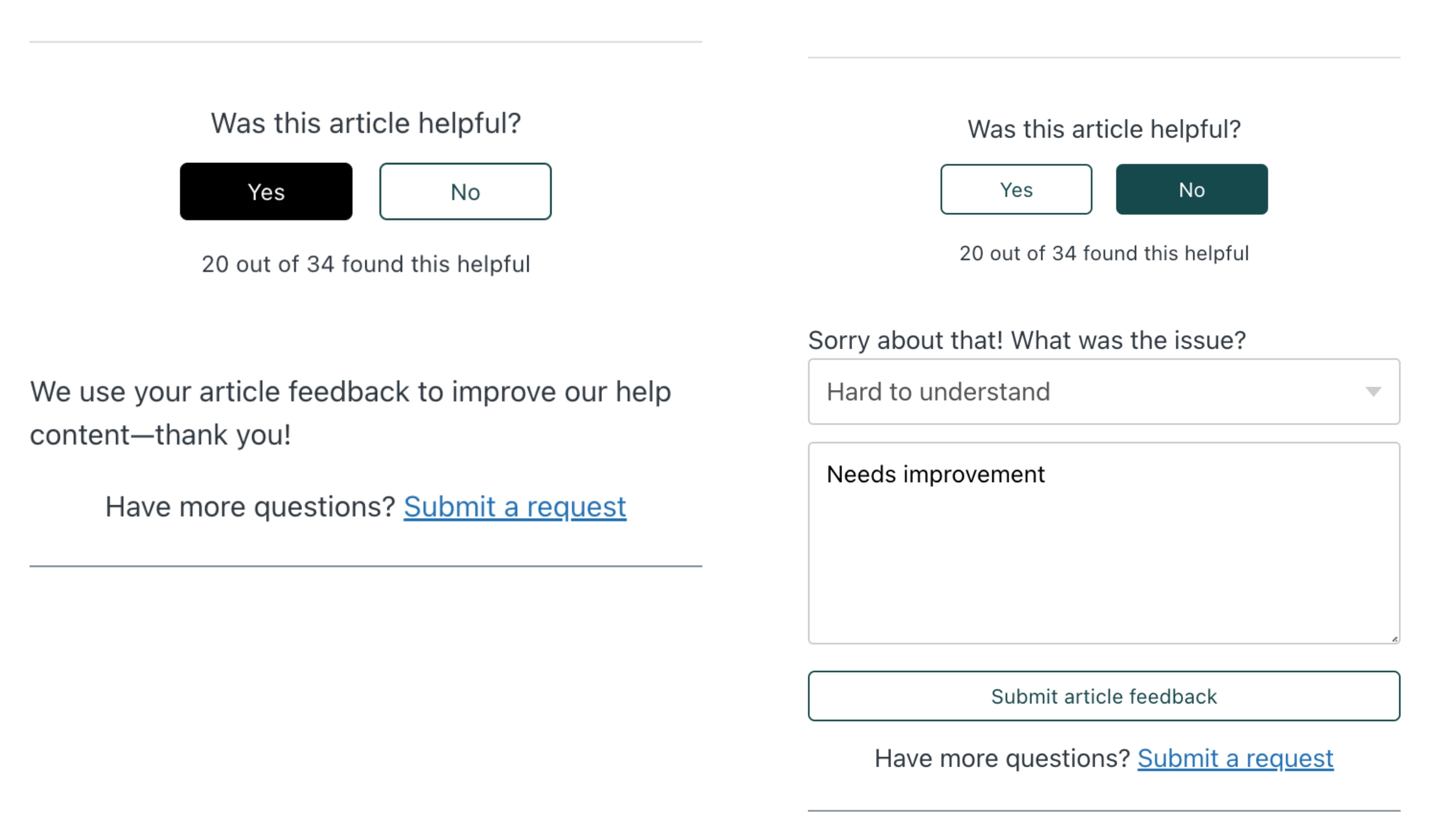
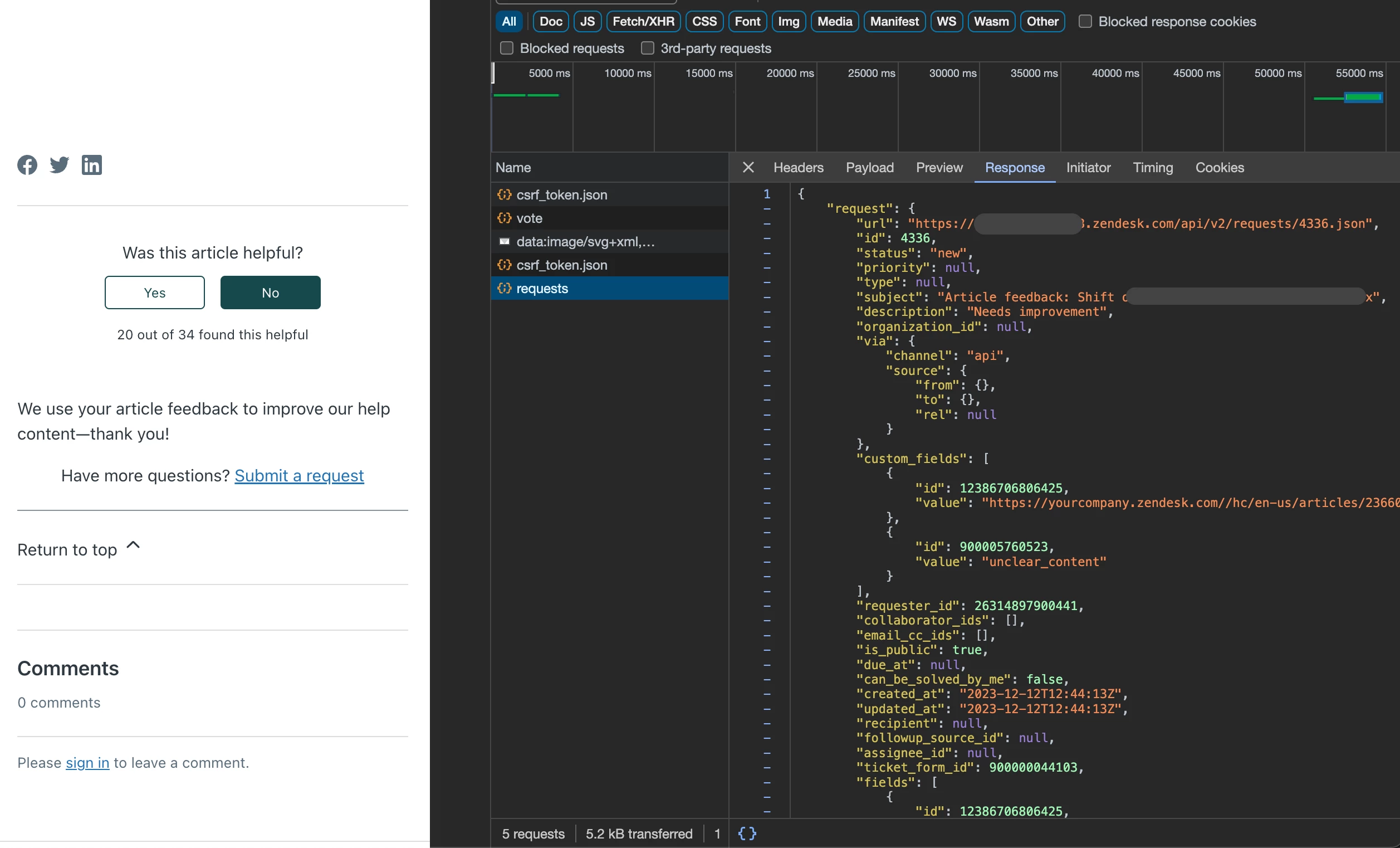

22 replies

Brett13
  • Community Manager
  • December 12, 2023

This is awesome! Thanks so much for sharing @edward13!


Harper11
  • December 14, 2023

Hi @edward13 — thank you again for posting this solution.

I've been testing this in our Sandbox environment, but unfortunately when I click "Send Feedback," nothing happens.

I've performed set-up in the following way:

1. Verified anonymous ticket submission is on and authentication is not required
2. Created the relevant custom ticket fields, ensured they are editable by End Users, and replaced their IDs in the code. Those are: 
  -  Article Feedback Reason (dropdown field)
  -  Help Article URL (text field)
3. Started with a fresh Copenhagen theme (no other customizations)

Because of our workflow, we can't add a new Form (we need to use the existing one, which is the only customer-facing Form we allow). So the one place I've deviated from your instructions is to add this to our existing Customer Support form rather than creating a form just for article feedback.

When I click "Submit Feedback," I receive the below console error in Chrome (403/Forbidden on our contact page). I've replaced our actual Sandbox subdomain in the error log as OUR_SUBDOMAIN.

Could this error be occurring because there are other required fields on our Customer Support form that I should be adding to the HTML? Any guidance would be appreciated!

/hc/activity:1 
        
        
       Failed to load resource: net::ERR_BLOCKED_BY_CLIENT
/api/v2/requests:1 
        
        
       Failed to load resource: the server responded with a status of 403 ()
/api/v2/requests:1 
        
        
       Failed to load resource: the server responded with a status of 403 ()
/api/v2/requests:1 
        
        
       Failed to load resource: the server responded with a status of 403 ()
/api/v2/requests:1 
        
        
       Failed to load resource: the server responded with a status of 403 ()
20381657578779--SANDBOX-Contact-Us:456 
        
        
       POST https://OUR_SUBDOMAIN.zendesk.com/api/v2/requests 403 (Forbidden)
submitRequest @ 20381657578779--SANDBOX-Contact-Us:456
await in submitRequest (async)
(anonymous) @ 20381657578779--SANDBOX-Contact-Us:472

Edward13
  • Author
  • January 9, 2024

Hello @harper11

1. In order for your feedback to recorded the required field(s) must have a value in the payload. You don't have to add it in the html but instead in the script part. Just add the field ID and use a default value(string or tag). I presume since you're only using a single form, you'll just hide these new fields for feedback collection from your end users.

2. The script only allows anonymous requester (not signed-in). That's why you get the error below when sending the payload in Sandbox. So, publish first the changes and test it on your public sandbox help center without signing-in.

P.S. And ohh, make sure you add <meta name="robots" content="noindex, nofollow"> in your document_head.hbs to prevent search engines in crawling your public help portal (in this case your sandbox).

If your customer based are mostly signed-in, (i'm still developing a solution to this...). 

Console Error Message: POST https://OUR_SUBDOMAIN.zendesk.com/api/v2/requests 403 (Forbidden)
submitRequest @ 20381657578779--SANDBOX-Contact-Us:456
await in submitRequest (async)
(anonymous) @ 20381657578779--SANDBOX-Contact-Us:472


code reference for topic 1

let body = {
        request: {
          subject: form.subject,
          comment: { body: form.description },
          custom_fields: [
            { id: 12386706806425, value: form.url },
            { id: 900005760523, value: reason },
            { id: 22166324567833, value: 'selection_-_go_to_agent' }, // this is a required field
          ],
          ticket_form_id: 900000044103,
        },
      };


Ivan11
  • February 26, 2024

Hi @edward13, this is a great form! Thank you for sharing. I was able to modify your code to capture a user's name and email so we can get more valuable feedback, track these feedback tickets more closely, and follow up with the submitter if needed. However, I noticed it's not working for signed-in users. Curious to know if you've developed a way for the form to work for signed-in users?


Edward13
  • Author
  • February 26, 2024

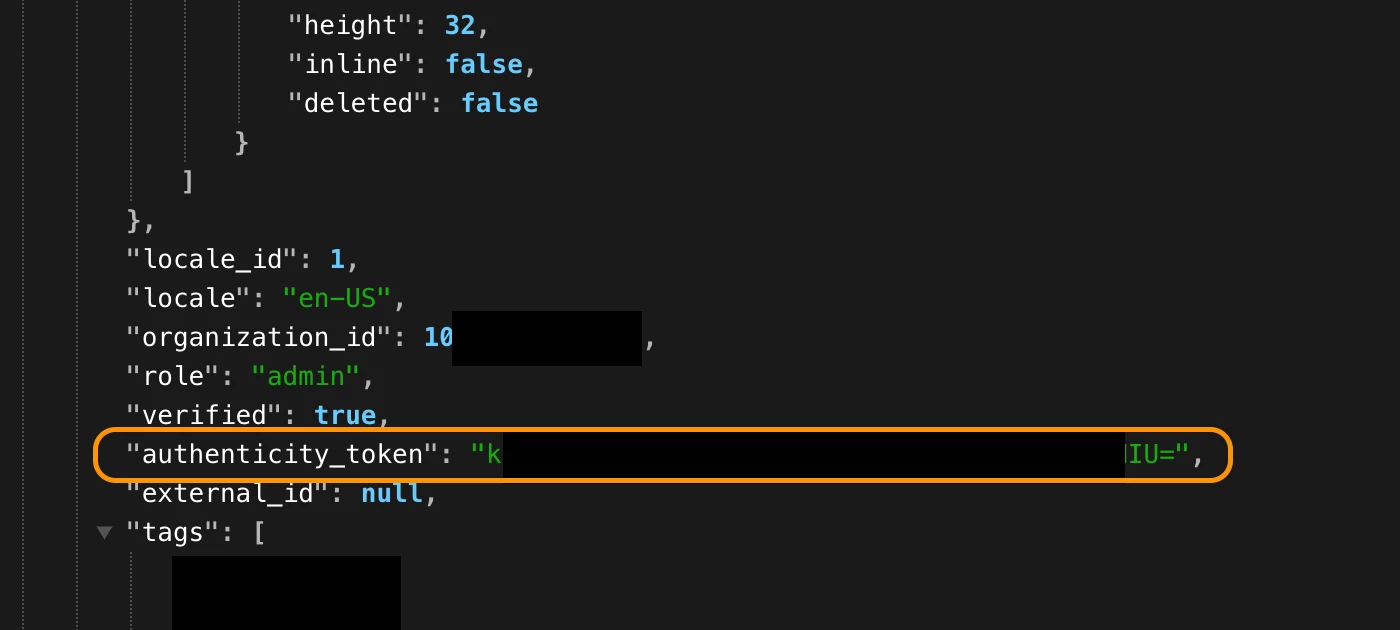
Hey @ivan11 I know using the endpoint https://{subdomain}.zendesk.com/api/v2/users/me.json can get you around the signed-in user error. I'll update you later this week once I figure out a solution.

usual error for signed-in user:

API response:


  • April 2, 2024

Hey Edward, thank you for posting this solution! Been searching for a conditional feedback form like this for a while now. 


For the prerequisites, I'm a bit confused. What are the Custom form and Custom fields editable by end users; is this the submit a request form from Zendesk Support?  


Paolo14
  • April 4, 2024
Hi Tasneem,
 
The Custom form and Custom fields editable by end users can be created in the Admin Center. More information below: 
 
Adding custom fields to your tickets and support request form
Creating multiple ticket forms
 
And yes, these are also used in the Submit a Request form in the Help Center and ficket forms in Zendesk Support.
 
Best,
Paolo | Technical Support Engineer | Zendesk

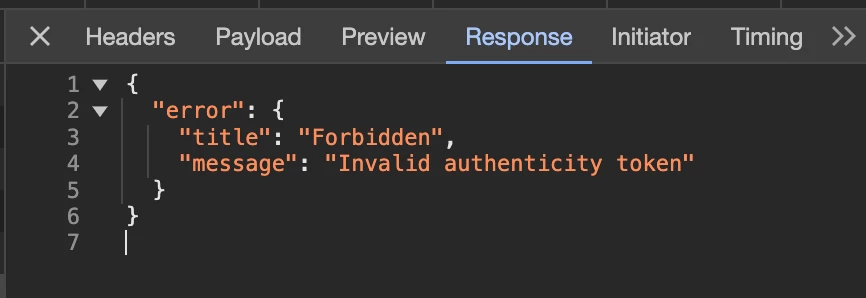
Hi @edward13 ! Any update on getting this to work for signed-in users? I'm also seeing the following error on my end: 

{
 "error": {
   "title": "Forbidden",
   "message": "Invalid authenticity token"
 }
}

Thank you for your help!


papaefthymiou

Hello! If we implement this, where in reports will we able to see the reasons and comments that the users typed for downvotes? Thank you!


Edward13
  • Author
  • May 8, 2024

Hello @tasneem12 and @Ivan - I didn't have spare time the past few months. I will update you guys here as soon as I figure it out for signed-in users.


Edward13
  • Author
  • May 8, 2024

Hello @papaefthymiou ,  you will have to create a custom report and dashboard in Explore to see the comments and votes.


papaefthymiou

@paolo14, regarding your comment above about custom forms, when we created a form for help center feedback, this appeared as a dropdown option on our new request page for users to choose when contacting support. We don't want that, we only need this appearing when people click the thumbs down icon in articles. Is there a way to go around this? Thank you!


Richard11
  • January 29, 2025

I've added this to our KB for signed in users if anyone is still looking to do it. It's explained here how you need to fetch the user token and send along with the request


https://developer.zendesk.com/documentation/help_center/help-center-api/secured-requests/#making-zendesk-api-requests-with-csrf-tokens


Edward13
  • Author
  • January 29, 2025

Hey @richard11 - Thanks for the save! We're u able to make it work for users using SSO (e.g. Google)?


Richard11
  • January 30, 2025

Yes @edward13 we only use Google SSO so that is all I've tested with. We wanted logged in users to be able send feedback anonymously.

This is the important bit right


  fetch("/api/v2/users/me.json")
       .then(response => response.json())
       .then(data => {
         const csrfToken = data.user.authenticity_token;
         
         // Send feedback as a new Zendesk request (ticket)
         fetch("https://[subdomain].zendesk.com/api/v2/requests.json", {
           method: "POST",
           headers: {
             "X-CSRF-Token": csrfToken,
             "Content-Type": "application/json"
           },
           body: JSON.stringify({
             request: {
               subject: "Article Feedback",
               comment: { 
                 body: `Feedback for the article: ${articleUrl}\n\nComment:\n${comment}`,
               },
               requester: { name: "Anonymous User" }
             }
           })
         })

Aleksandra12

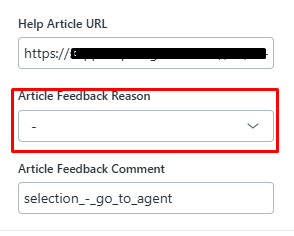
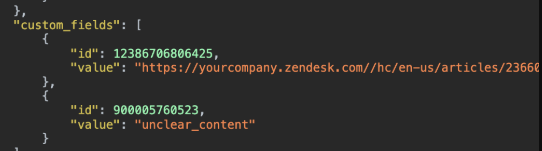
Hello! @edward13 Thanks a lot for your code, it helped us a lot. I just have a problem, and I wanted to ask maybe you could help. 
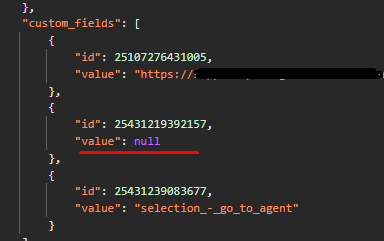
The thing is that the reason value is shown as ‘null’, so the reason for the downvote doesn't appear in the feedback ticket (the second screenshot is taken from yours for comparison).  What can be a potential cause of the issue? 
Thank you in advance!


Edward13
  • Author
  • March 22, 2025

Hello @aleksandra12 , this looks like a drop-down field value related. Try to mirror the values of the field from the HTML to the value you have set on Zendesk Admin Field. In my case below they are the option values.

     <select class="custom-form-field" id="reason" name="reason" required>
           <option value="" disabled selected>-- Please choose an option --</option>
           <option value="incorrect_information">Incorrect or missing information</option>
           <option value="unclear_content">Hard to understand</option>
           <option value="typos_broken_links">There are typos or broken links</option>
           <option value="resources_issue">Issues with images, GIFs, or videos</option>
           <option value="feature_feedback">I wish the feature worked a different way</option>
           <option value="general">Something else</option>
       </select>


Aleksandra12

Thank you, that worked!


  • June 12, 2025

How do I capture the Feedback Option the client selected in my ticket/form?


  • June 12, 2025

@edward14 Can you help me with this section? How do I get these options to prefil into the ticket form?
When an article is downvoted, the user is asked to submit feedback, a new ticket is created but it only contains the additional information they typed in. 
I want to also capture the option they selected in the list in my ticket form.

Thank you!


  <select class="custom-form-field" id="reason" name="reason" required>
           <option value="" disabled selected>-- Please choose an option --</option>
           <option value="incorrect_information">Incorrect or missing information</option>
           <option value="unclear_content">Hard to understand</option>
           <option value="typos_broken_links">There are typos or broken links</option>
           <option value="resources_issue">Issues with images, GIFs, or videos</option>
           <option value="feature_feedback">I wish the feature worked a different way</option>
           <option value="general">Something else</option>
       </select>


  • June 13, 2025

Does anyone monitor community comments? I have raised questions but haven't heard from anyone. I am also unable to find my comments in this thread now. Please help!


  • June 13, 2025

This can be closed.