[Gather] Adding agent badge in Communities | Community
Skip to main content

[Gather] Adding agent badge in Communities

  • February 6, 2018
  • 54 replies
  • 0 views

Show first post

54 replies

  • April 23, 2019

@jeremy 

I'm trying to see if i can replicate the correct and your issue

Seeing if anyone who has implemented this recently can help out


update: i see the script.js isn't passing the data (moderators) to our template pages

trying to pass the data. pretty new to hbs


  • April 23, 2019

Thanks @McCabe Tonna! That would explain why it's not working correctly if it's not passing that data. I appreciate you looking at this to see if we can get it going in the Copenhagen theme as it's such a small change but adds a lot of value to our customers to know who the moderators are if they need to reach out to them.


  • April 23, 2019

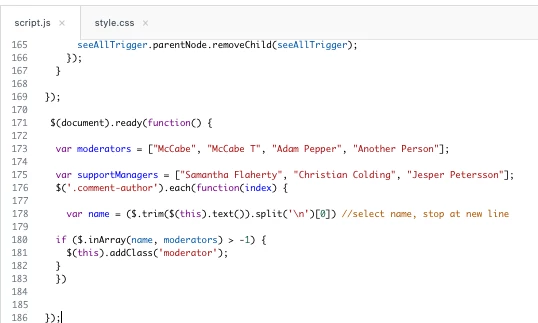
Okay I got it working. This was for articles (article_page,hbs) where the class is known as "comment-author".


Added this to the script.js file(plain text to add at bottom)

the css


and I didn't change anything to the article_page.hbs or any other page. 


(added to bottom of script.js file)

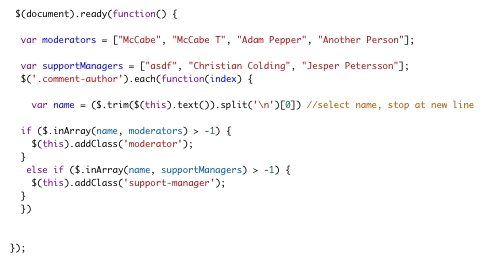
 $(document).ready(function() {
 
  var moderators = ["McCabe", "McCabe T", "Adam Pepper", "Another Person"];
 
var supportManagers = ["Samantha Flaherty", "Christian Colding", "Jesper Petersson"];
  $('.comment-author').each(function(index) {
    
    var name = ($.trim($(this).text()).split('\n')[0]) //select name, stop at new line
    
if ($.inArray(name, moderators) > -1) {
$(this).addClass('moderator');
}
  })
 
 
});
 
 
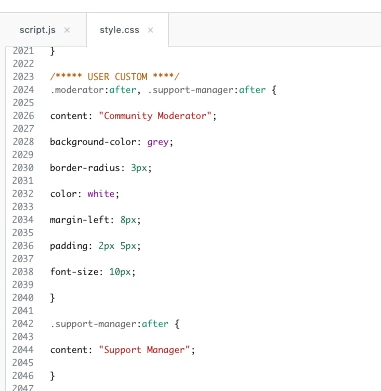
/////******** CSS 
/***** USER CUSTOM ****/
.moderator:after, .support-manager:after {
 
content: "Community Moderator";
 
background-color: grey;
 
border-radius: 3px;
 
color: white;
 
margin-left: 8px;
 
padding: 2px 5px;
 
font-size: 10px;
 
}
 
.support-manager:after {
 
content: "Support Manager";
 
}
 
 
--- FWIW using this method, if someone mirrored another users' name, they too could be a community moderator

  • April 23, 2019

I have a question similar to @Marcel's a few months ago: We set up SSO for our help center, so anyone with a log-in to our service can participate in the community. I've set up badges for our agents, but I'd like to add a badge or image for any of our employees that participate in the forum.

I've created an organization that includes anyone with our company's email address—Can I set the organization up as a target (like this example does with "agents") to create a specific badge?

Would it be something like:

{{#is post.author.organization 'Grow Employees'}}...

I tried this, but "organization" wasn't something I could reference this way. Is there a way to do this?


  • April 23, 2019

Thank you @McCabe Tonna. That makes sense, and so far gets me where I am headed. I only see it working for moderators, but at least I have a starting point to investigate further now. I appreciate your work in looking into this and getting it in a more functional state for me.


  • April 23, 2019

Got it working for both

I tested someone's name "asdf"

same css


Brett13
  • Community Manager
  • April 23, 2019

Thanks for testing this McCabe and following up :)


  • April 24, 2019

I have a question similar to @Marcel's a few months ago: We set up SSO for our help center, so anyone with a log-in to our service can participate in the community. I've set up badges for our agents, but I'd like to add a badge or image for any of our employees that participate in the forum.

I've created an organization that includes anyone with our company's email address—Can I set the organization up as a target (like this example does with "agents") to create a specific badge?

Would it be something like:

{{#is post.author.organization 'Grow Employees'}}...

I tried this, but "organization" wasn't something I could reference this way. Is there a way to do this?

Tricky one indeed. We also use SSO in our organization and what I ended up doing was this:

script.js

 // Adds custom badges for individual community forum users
var supportEngineer = ["Support Engineer Name 1", "Support Engineer Name 2"];
var developer = ["Developer Name 1", "Developer Name 2"];
$('.add-badge').each(function(index) {
if ($.inArray($.trim($(this).text()), supportEngineer) > -1) {
$(this).addClass('supportEngineer');
}
else if ($.inArray($.trim($(this).text()), developer) > -1) {
$(this).addClass('developer');
}
});
if ($.inArray($.trim($('.post-author').text()), supportEngineer) > -1 ) {
$('.post-author').addClass('supportEngineer');
}
else if ($.inArray($.trim($('.post-author').text()), developer) > -1 ) {
$('.post-author').addClass('developer');
}
});

style.css

/* Add custom badges to individual users */
.add-badge {
/* Empty class for badges; for reference only */
}

.moderator:after {
content: "Moderator";
background-color: #EB553C;
border-radius: 3px;
color: white;
margin-left: 8px;
padding: 2px 5px;
font-size: 10px;
}

.supportEngineer:after {
content: "Support Engineer";
background-color: #EB553C;
border-radius: 3px;
color: white;
margin-left: 8px;
padding: 2px 5px;
font-size: 10px;
}

.developer:after {
content: "Developer";
background-color: #EB553C;
border-radius: 3px;
color: white;
margin-left: 8px;
padding: 2px 5px;
font-size: 10px;
}

Works well so far and I use 2 additional roles in our live environment. The only downside so far is, that you have to manually add every employee, who does not have an agent role in Zendesk, although they are part of our organization (while moderators are getting flagged with the badge automatically due to their role).

But it looks like you simply cannot reference an organization in the script.js, at least I did not find a reference in Zendesk's Objects for Help Center templates.

Would absolutely love, if someone here found a way to reference organizations here, so we can automatically assign them badges.

Best,
Marcel


  • April 24, 2019

Thanks Marcel! I was also hoping to skip that process of adding each person in JS, but I can do this for now. I appreciate you sharing your example!


Dan32
  • April 24, 2019

Hey Marcel,

Unfortunately, the user object in the Guide only doesn't return the default org of the user in the response That could be a good feature request though that would solve this use case, and i'm sure many others!

Not sure if there's a safe way to do this with JS, since you'd need to make an API call to Zendesk if you wanted to get organization data.

Since JS is client-side and there's limited control over the environment of Guide, your credentials would be visible to anyone who knows how to look at the source JS files in browser. This is a Bad Thingâ„¢and I wouldn't advise it. 


  • April 25, 2019

Hi Dan,

Not sure if there's a safe way to do this with JS, since you'd need to make an API call to Zendesk if you wanted to get organization data.

Since JS is client-side and there's limited control over the environment of Guide, your credentials would be visible to anyone who knows how to look at the source JS files in browser. This is a Bad Thingâ„¢and I wouldn't advise it. 

Thank you for the detailed background info, fair enough.

Best,
Marcel


  • September 9, 2019

So I added @Marcel's JS and CSS code to specify specific users that should have a badge and it works great (thanks again!) when they create a new post, but I noticed that when they comment on a post the badge doesn't show up. I've tried adding some JS to catch the ".comment-author" class, but it doesn't do anything (see code below).

I've also removed the code that refers to ".post-author" or switched the order and the badge still shows up next to their name as the post author, but still not the ".comment-author"

// Adds custom badges for individual community forum users
var productTeam = ["Name1", "Name2", "Name3"];
var csTeam = ["Name4", "Name5", "Name6"];
$('.add-badge').each(function(index) {
if ($.inArray($.trim($(this).text()), productTeam) > -1) {
$(this).addClass('productTeam');
}
else if ($.inArray($.trim($(this).text()), csTeam) > -1) {
$(this).addClass('csTeam');
}
});
if ($.inArray($.trim($('.post-author').text()), productTeam) > -1 ) {
$('.post-author').addClass('productTeam');
}
else if ($.inArray($.trim($('.post-author').text()), csTeam) > -1 ) {
$('.post-author').addClass('csTeam');
}
if ($.inArray($.trim($('.comment-author').text()), productTeam) > -1 ) {
$('.comment-author').addClass('productTeam');
}
else if ($.inArray($.trim($('.comment-author').text()), csTeam) > -1 ) {
$('.comment-author').addClass('csTeam');
}

});

Ad17
  • September 25, 2019

Does this only work on agents, or is it possible to assign badges to end users? 


  • September 25, 2019

Melody - 

You can make this work for end users as well, you would just need to determine how you are entering their information (name, user ID, etc.) and pass that detail through. We have a "super user" badge and a "thought leader" badge that we use for identified end users, and it works well for incentivizing them, because certain people want to be seen as the "go-to" brains for some topics.


Ad17
  • September 25, 2019

Hi Jeremy, Thanks for your quick response. I am pretty new to adding code, but have been able to do a few things. When I added the following code, the "Submit" button for adding comments was removed from the community post pages: 


Script.js

// Adds custom badges for individual community forum users

  var supportEngineer = ["Nicole Willson"];

              $('.add-badge').each(function(index) {

              if ($.inArray($.trim($(this).text()), supportEngineer) > -1) {

              $(this).addClass('supportEngineer');

              }

              });

              if ($.inArray($.trim($('.post-author').text()), supportEngineer) > -1 ) {

              $('.post-author').addClass('supportEngineer');

              }

});


Style.css

/* Add custom badges to individual users */

.add-badge {

/* Empty class for badges; for reference only */

}


.moderator:after {

content: "Moderator";

background-color: #EB553C;

border-radius: 3px;

color: white;

margin-left: 8px;

padding: 2px 5px;

font-size: 10px;

}


.supportEngineer:after {

content: "Support Engineer";

background-color: #EB553C;

border-radius: 3px;

color: white;

margin-left: 8px;

padding: 2px 5px;

font-size: 10px;

}


  • September 25, 2019

Hi Melody, no worries at all, I was the same when I started my Zendesk journey, and still feel that way when looking to do cool customizations to our HC. After doing one more review of this code and how we are using badges on our end through customization, this topic works, but feels a little limited. We us a slightly modified JS snippet that works better, minus the alignment that we haven't figured out(yet). 

Below is the script and CSS that we use, slightly modified from what you are using, and it works well.

//These two arrays hold the names of our moderators and support managers
var moderators = ["Jeremy Robinson", "jonny"];
var teammembers = ["Harriett", "Andrea"];
var thoughtleader = ["Katie"];
var superusers = ["Patrick", "Philip"]

//First we find every element with the .comment-author class and run the following function for all elements
$('.comment-author').each(function(index) {

//If the name is found in our teammembers array
if ($.inArray($(this).find(':nth-child(2)').find(':nth-child(1)').attr("title"), teammembers) > -1) {
//...we add the teammember class to the element
$(this).addClass('teammembers');
} //If the name is found in our moderators array...
else if ($.inArray($(this).find(':nth-child(2)').find(':nth-child(1)').attr("title"), moderators) > -1) {
//...we add the moderator class to the element
$(this).addClass('moderator');
} else if ($.inArray($(this).find(':nth-child(2)').find(':nth-child(1)').attr("title"), thoughtleader) > -1) {
//...we add the moderator class to the element
$(this).addClass('thoughtleader');
} else if ($.inArray($(this).find(':nth-child(2)').find(':nth-child(1)').attr("title"), superusers) > -1) {
//...we add the moderator class to the element
$(this).addClass('superusers');
}
});

//Next we will check the author of the post
if ($.inArray($('.post-author').find(':nth-child(2)').find(':nth-child(1)').attr("title"), moderators) > -1) {
$('.post-author').addClass('moderator');
} else if ($.inArray($('.post-author').find(':nth-child(2)').find(':nth-child(1)').attr("title"), teammembers) > -1) {
$('.post-author').addClass('teammembers');
} else if ($.inArray($('.post-author').find(':nth-child(2)').find(':nth-child(1)').attr("title"), thoughtleader) > -1) {
$('.post-author').addClass('thoughtleader');
} else if ($.inArray($('.post-author').find(':nth-child(2)').find(':nth-child(1)').attr("title"), superusers) > -1) {
$('.post-author').addClass('superusers');
}

})


The CSS for this looks like:

/* Badges for Help Center Forums/Community */

.moderator:after, .teammembers:after, .superusers:after, .thoughtleader:after {
content: "Community Admin";
background-color: #DECDFF;
border-radius: 5px;
color: black;
margin-left: 8px;
padding: 2px 5px;
font-size: 12px;
}

.teammembers:after {
content: "Team Member";
}

.superusers:after {
content: "Super User";
}

.thoughtleader:after {
content: "Thought Leader";
}


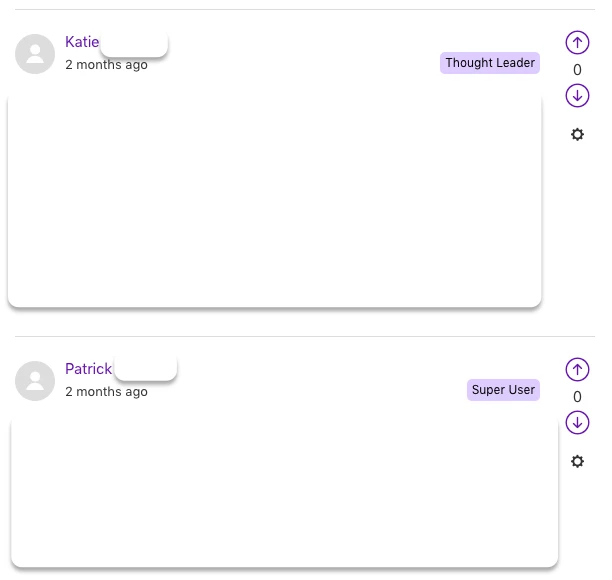
Here's what it looks like when implemented 


Ad17
  • September 25, 2019

I tried that code too and the submit button disappears. Any ideas?


  • September 25, 2019

Without looking at your code directly, it would be hard to pinpoint what's causing that other than something not being closed properly...


Looking back, you mentioned you're editing the community post page code... I apologize, I should have prefaced that the JS I provided only needs to go into the script.js file, and the CSS in the style.css file in your Zendesk theme to work correctly. You will not need to add any code to the community_post_page.hbs file for this to work, as the script runs and does all the heavy lifting automagically for you.  


Ad17
  • September 25, 2019

I could have explained that I bit better. I was referring to the comment submit button disappearing from community page. The only code I added was to script.js and style.css like you described. 


Ad17
  • September 25, 2019

Using the instructions in this article, I was able to get the Submit button to appear, however the badges are not showing. 


  • September 25, 2019

In your script.js file, can you make sure this script is configured after the Document Ready function?

$(document).ready(function() {

//all the script code provided in previous response


Ad17
  • September 26, 2019

Jeremy - 

It worked! Thank you so much! Very helpful!


  • September 26, 2019

Melody - 

Glad to hear you got it working! :)

In my dealings and growth through Zendesk since really diving into it 6 months ago, some of the things that would be ideal and easier if an OOTB solution were available can be real finicky when you have to rely on coding it yourself or code samples from others while ensuring it all plays nicely with each other. 


Nicole17
  • September 27, 2019

Thanks for sharing your answers, Jeremy.

I can't say for sure if/when it'll be built in, but I do know that the product team has at least looked at badging as an item for the backlog.

I'd encourage everyone interested to add your votes and details about your use-case or how you would need to implement badges (i.e. is just 1 badge per user enough, or would you want multiple? Do you want the ability to include colors or logos, or is just a text badge adequate? etc.) in this feedback conversation: Plans for badges in Communities


  • January 31, 2020

@Jeremy Robinson - Great tip & thanks for the code!

Did you ever get the alignment issue fixed so that the badge shows right next to the user's name rather than to the right of the screen ?