Embed Videos in Help Center Articles with Two Easy Steps (using video.js) | Community
Skip to main content

Embed Videos in Help Center Articles with Two Easy Steps (using video.js)

  • October 11, 2013
  • 112 replies
  • 0 views

Show first post
This topic has been closed for replies.

112 replies

Keiron
  • January 26, 2017

Initially I just wanted to add Youtube videos, and found your repeated instructions regarding the unsafe html option.  But, also, embed code must be entered via the <> source code!  Thanks for that!

But, I also used your code here - and WOW what a bonus!  I hadn't thought about doing this until reading through the thread here.

https://gist.github.com/moderatorwes/9f20dabd77e4257887a9

Now, adding the Font Awesome YouTube icon to all relevant lists, titles and search results :)  Makes for a very clean, eye-catching, short-hand for video resources on the site!


Thanks so much!


ModeratorWes

@Keiron - Glad to hear that you found some of my other tips and tricks useful.  My notification tip uses article labels and the API to display notifications so eventually I will get around to updating the icon tip so you could just put a label on the article and it would add the icon based on the label.  Just have alot on my plate right now but I will get to it at some point in time.  Best of luck customizing your Help Center as it sounds like you are on your way to great looking HC.


  • January 30, 2017

I am having an issue where the video player is visible, but there is no sign of a playable video. The only two things I did was
copy and paste those two bits of code.


ModeratorWes

@Ryan did you make sure to do the following:

Before you can embed videos in your articles, you must enable unsafe HTML in pages


  • February 1, 2017

@Wes Yes it is enabled.


ModeratorWes

@Ryan - Did you link to one of your own videos as the links in my code were just an example which they may have moved.


  • February 2, 2017

The option doesnt appear to be available for the Community section of the help section, any idea how customers an post their videos?


  • February 8, 2017

Hey Ian!

The community area isn't set up to embed videos...customers would need to upload their videos to an online service and provide a link in their post.


  • February 20, 2017

I have been able to get it working, however, the player has the option to download the video which I would like to remove.

is there any way to avoid the video player offering the download option?


  • February 27, 2017

Hey Jonathan!

I'm fairly certain that this would be controlled through whatever service you're using to host the videos, but Wes might need to correct me on that...


ModeratorWes
  • Author
  • February 27, 2017

@Jonathan - Jessie is correct, do a search for Video.JS remove download and I'm sure there is some JQuery that you can use that will disable that option.


  • February 28, 2017

Hi Jessie/Wes many thanks for your messages.Yes it is controlled by the video.js player. I have searched for that unsuccessfully so far. If you are aware of any solution please let me know. 

I have also noticed that the download option is only available in chrome because in safari and explorer there's no download button.


  • March 3, 2017

Hey Jonathan, 

I believe that at least some video hosting services actually have a setting that you can change to indicate whether or not you want people to be able to download your videos. So it might be worthwhile to look for that.

Have you tried actually downloading the video through Chrome? Maybe from an incognito window? It could be that the option to download shows up in Chrome but won't actually let you download the video...


We have uploaded the video to zendesk assets and used the video.js player to display them within our help centre, we don't use any video hosting. It works perfectly however when watching the video in chrome the download button is available in the player and unfortunately it does work and allow you to download the video, which we would like to avoid.

I guess that the only option would by try with a different version of the player but I have tried several versions and the download option is always present in chrome.


Hi,

Please could you upgrade this article and write "https" (and not http) for all the links ? Chrome doesn't like http over https, and as I didnt notice it at the first time our helpcenter was considered as "dangerous" by Chrome #NotGoodForOurClient :)

Thx


@Wes - I know this article is a bit old, but I was trying to implement your suggestion regarding the video icon showing on help articles that contain the word video. I have added the code you indicated in the document head, css and js but I am not seeing anything. Any suggestions on how to troubleshoot this further? Really appreciate your help!


  • March 17, 2017

Hey Sébastian!

Thanks for the heads up on this! I'll send it over to our Documentation team so they can take a look. :)


Ok super, since this article was written browser's security evolved a lot 😀


  • March 20, 2017

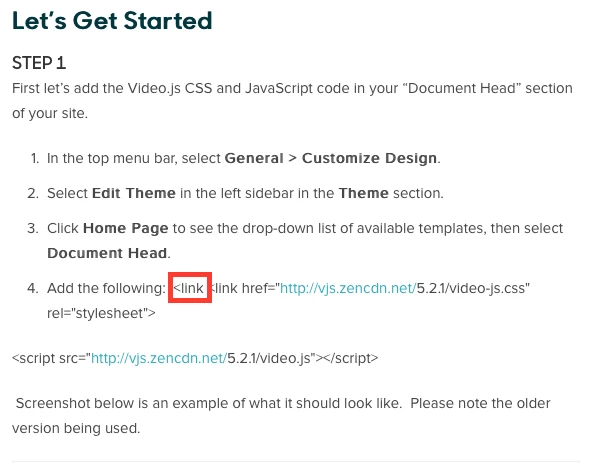
You have an error in your instructions:

<link is duplicated.


ModeratorWes

@Shanti - Thanks for catching the error :-)


  • August 15, 2017

Where and in what format does the video need to be stored in order to be able to embed it like this?


  • August 28, 2017

Is all this necessary if I just want to embed a vimeo video with an iframe?


Jennifer16
  • August 28, 2017

Hi Nate,

No, you don't need to do this if your video is hosted on Vimeo.

To add that video to an article, you just need to paste the embed code into the source code of the article.

Good luck! 


  • February 28, 2018

Hey @Wes. Thanks for this tutorial! I have a quick question. We only offer our product via our mobile (IOS) app, and so that is where most of our customer base views help articles. We are starting to put videos in the articles and have been hosting them on Youtube, but I am looking for an unbranded solution.

From what I can remember, HTML videos will not play on IOS unless they are in an iFrame, is that correct? (Because there is no flash player)

If so, do you have any other suggestions for embedding videos that do not require HTML and will be mobile friendly?


ModeratorWes

@Sunee - Sorry I'm not an expert on videos or IOS so I don't know all the rules.  I'm sure there is something out there that will meet your needs if the solution I provided does not work.