Embed Videos in Help Center Articles with Two Easy Steps (using video.js) | Community
Skip to main content

Embed Videos in Help Center Articles with Two Easy Steps (using video.js)

  • October 11, 2013
  • 112 replies
  • 0 views

Show first post
This topic has been closed for replies.

112 replies

ModeratorWes
  • Author
  • February 25, 2015

Pretty much just copy and paste the code and then edit the code to do whatever key word that you would like.  You also would need to add the CSS code for the new icon.


  • February 25, 2015

Awesome thanks! Another question: where can I edit the text (Search) displayed in the background of the search box field on the home page of my help center?

https://www.dropbox.com/s/3dlqv7buoha8hqb/Screenshot%202015-02-25%2015.30.57.png?dl=0


ModeratorWes
  • Author
  • February 25, 2015

  • March 4, 2015

@Wes - I ran into another issue with my customizations.

Following you instructions I copied two sets of codes in my JS under the "$(document).ready(function() {" line, one for the Video: icon and one for the search box placeholder.

My problem is that only the customization with the code directly under that line is working and not the ones that come right below. I'm pretty sure it's just a question of misplaced punctuation in the code but I'm not familiar enough to find what and where.

Can you help? Below are the first 20 lines of my JS tab.

Thanks!


/*
* jQuery v1.9.1 included
*/

$(document).ready(function() {
//Find Video: replace with video icon in Article List
$('ul.article-list li').html(function (i, t) {
return t.replace('Video:', '<span class="video"></span>');
$('#query').attr('placeholder','Search AQUAOVO Support');

if(currentLanguage === 'Français') {
$('input').attr('placeholder','Recherche Support AQUAOVO');}
});

// social share popups
$(".share a").click(function(e) {
e.preventDefault();
window.open(this.href, "", "height = 500, width = 500");
});


ModeratorWes

@Manuel - It should be like this, you are missing an end bracket.

//Find Video

$('ul.article-list li').html(function(i, t) {

return t.replace('Video:', '<span class="video"></span>');
});

//Change Search Placeholder
$('#query').attr('placeholder', 'Recherche Support AQUAOVO');


I will need to play around with the language code as I need to enable it for my account but you should be able to do something like below and could remove the last line of code however the above code was tested and verified to work.  I need to work on the below code as I cannot verify it as working as of yet but you can give it a try if you would like.

if (currentLanguage === 'Français') {

$('#query').attr('placeholder', 'Recherche Support AQUAOVO');
}
else {
$('#query').attr('placeholder', 'Search AQUAOVO Support');
}


  • March 5, 2015

@Wes - So I got the icon and the English search placeholder to work both at the same time with the code you gave me but the French translation still won't show after I tried a few more options.

Let me know if you find how to make this work.

Here's the active code I have now:

//Find Video

$('ul.article-list li').html(function(i, t) {

return t.replace('Video:', '<span class="video"></span>');

});

//Change Search Placeholder

$('#query').attr('placeholder', 'Search AQUAOVO Support');

if (currentLanguage === 'Français') {

$('#query').attr('placeholder', 'Recherche Support AQUAOVO');

}


  • June 18, 2015

Hi Wes

I have the code in place and have your video working in our help centre.

However, I have no idea how to get my video on there?

Am I supposed to upload it via Video.js? I can't see any areas to do this.

I've also clicked the 'Get Started' link on the Video.js page and it asks to download a RAR file, i did and none of the attached files I got worked?

Can you help as I need to get this video up ASAP.

Thanks

Daragh


ModeratorWes

@Daragh - You don't need to download any RAR files as we are using the CDN so all you need to do is add the two lines of code in the Document Head.  Once that is in place you are good to go.  You will need to upload the videos to your Assets area and then link to them or you can link to them from any external website that you upload them to.  


Hi Wes!  


Thanks for the code.  I currently am working on embedding some videos into our posts, and I seem to be stuck.  

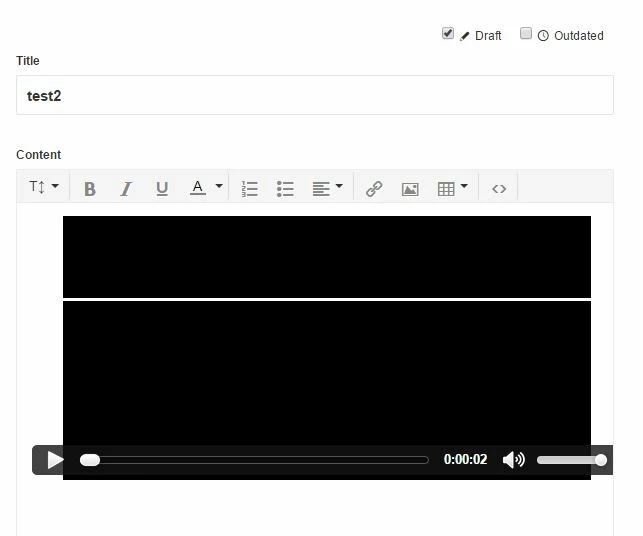
I pasted the code in that was in your article, and now I have a goofy situation.  The audio is playing, but the video is stuck on a black screen (below). 


The code I have in there is: 


<video id="" class="video-js vjs-default-skin" poster="" preload="auto" controls="controls" width="600" height="264" data-setup="{&quot;example_option&quot;:true}">

<source src="https://s3.amazonaws.com/efk-live/video/webinars/affectivedomain.mp4" type="video/mp4" />

<source src="https://s3.amazonaws.com/efk-live/video/webinars/affectivedomain.webmhd.webm" type="video/webm" />

<source src="https://s3.amazonaws.com/efk-live/video/webinars/affectivedomain.oggtheora.ogv" type="video/ogg" />

</video>


What did I do wrong?


Thanks!


ModeratorWes

@JGlessner - Two things to check.  Make sure you have the latest version located in the Document Head.

<link href="//vjs.zencdn.net/4.12/video-js.css" rel="stylesheet">
<script src="//vjs.zencdn.net/4.12/video.js"></script>

Also make sure that you have "Unsafe Content" checked in your settings.

Hi Wes!  Thanks for the quick response.


No dice.  I copied and pasted the code above, and confirmed that unsafe content is checked.  Still staring at a black screen with the audio playing.


https://efksupport.zendesk.com/hc/en-us/articles/205259089


Our videos are hosted on s3.  I have made the links public.  Anything else to try?


ModeratorWes

I don't know of anything else to try as it seems to be working fine on my end and I'm not able to log into your Help Center so I can check the code.  Do you get the same result on a different browser.


You can see them fine on your end?  Are you in Chrome?


Hmmm, they work in firefox...dangit.  What could be causing this in Chrome?


Laura48
  • October 23, 2015

Hi @jglessner - I'd love to look into this further for you! I've created a ticket for you from support@zendesk.com and you should have received an email. 


  • November 20, 2015

I tried with a video located in my Google Drive. I set it so it is visible to anyone with the link, and used the link in the video player src attribute. But it doesn't play or offer any visible error, it just spins and spins as if it's buffering the file. The same thing happens if I upload a video to our Help Center's Assets area.


ModeratorWes
  • Author
  • November 20, 2015

@Alan - Did you ensure that you you  "enable unsafe HTML in pages".  I also updated the version information so make sure you use 5.2.1 in your document head


ModeratorWes
  • Author
  • November 20, 2015

@Alen - another thing that I read about Google Drive.  

Yo can modify the Google Drive URL to get a direct link - see e.g. http://www.labnol.org/internet/direct-links-for-google-drive/28356/

<source src="https://drive.google.com/uc?export=download&id=0B-zKk5F6hm6rOXJicnBSOHIyd28" type='video/mp4'>

  • November 20, 2015

@Wes, thanks! Yeah, unsafe HTML is enabled. I'll take a look at modifying the Google Drive link. The one in the assets folder turned out to have failed to upload completely and was just an empty file. I tried again with a short video and that worked fine. Is there a limit on the size of files one can upload to the Assets folder? The first video I tried was about 60 MB.


  • November 25, 2015

Hey Alan!

The size limit for asset files is 50MB regardless of what plan you're on. So in this particular case your upload would have failed because of the file size.

Hope that helps!


  • November 25, 2015

@Jessie, thanks. Shouldn't the upload control tell me a file is too big, rather than apparently create an empty file there in the Assets folder?

And @Wes, modifying the link to the video on Google Drive made no difference; the video player just spins and spins as if it's loading something. I also had no luck trying to play a video off our YouTube account.


ModeratorWes
  • Author
  • November 26, 2015

@Alan - This tutorial was really written when you have internal videos like mp4,webm, and obv video extensions.  We host our own videos on our internal servers as we can't post them to youtube.  This video player works perfect for that type of scenario as we use this tool today in our Help Center.  If you want to use YouTube videos then you can just embed the youtube player straight into your article as you don't need this player.


  • January 25, 2017

@Wes - Hi

I have a link to a video on our google drive.

I allowed unsafe html in the document head.

How do I include the URL to the video in the code so it's embedded?


ModeratorWes

@ludovic - I would assume Google Drive should give you some embed code, just paste that code into your Help Center article using the "Source icon" which should be the last icon on the right hand side of the editor.


Keiron
  • January 26, 2017

Thanks Wes for all your help here!


ModeratorWes

@Kieron - Its my pleasure to be able to help and assist in any way that I can.  :-)  If you ever need anything just let me know.