Create a Table of Contents automatically | Community
Skip to main content

Create a Table of Contents automatically

  • August 18, 2016
  • 55 replies
  • 0 views

Show first post

55 replies

Vladan
  • July 16, 2018

Thanks for the quick reply! I see an error in your JS file.

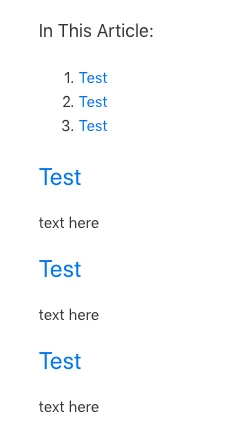
Could you please try to add the following code at the end of your Article page template? This will create a TOC like on this screenshot https://cl.ly/syw3

<script>
/* ============================================================================================== */ /* ============================== Custom Article Table of Contents ============================== */ /* ============================================================================================== */ var $headers = $('.article-body:first h1'); if ($headers.length == 0) $headers = $('.article-body:first h2'); if ($headers.length > 0) { var $toc = $('<div class="toc" style="margin-bottom: 25px">'); var $firstUl = $('<ul>'); var $currentUl = $firstUl; var previous_level = 1; var $arrayUl = []; $firstUl.appendTo($toc); $('#table-of-contents').length > 0 ? $toc.appendTo('#table-of-contents') : $toc.prependTo('.article-body:first'); // start with first H1 insertHeading($headers[0]); } function insertHeading(heading) { var $heading = $(heading); // what level heading are we on? var current_level = headingLevel(heading); // if it's an H1, add it to the original list if (current_level === 1) { newLi($heading, $firstUl); $currentUl = $firstUl; $arrayUl = []; $arrayUl.push($firstUl); } // if it's the same as the one before it, add it to the current list else if (current_level === previous_level) { newLi($heading, $currentUl); } // if it's one level higher than the one before it... time to make a new nested list else if (current_level > previous_level) { nestUl(); $arrayUl.push($currentUl); newLi($heading, $currentUl); } else if (current_level<previous_level){ for (i = 0; i < (previous_level-current_level); i++) { $arrayUl.pop(); } $currentUl = $arrayUl[$arrayUl.length-1]; newLi($heading, $currentUl); } previous_level = current_level; var $nextHeading = $heading.nextAll("h1, h2, h3, h4, h5, h6").first()[0]; // if there's any headings left... run this again if ($nextHeading) insertHeading($nextHeading); } // adds a new UL to the current UL function nestUl() { var $newUl = $('<ul>'); $newUl.appendTo($currentUl); $currentUl = $newUl; } // returns a numerical value for each heading function headingLevel(heading) { switch (heading.nodeName) { case 'H1': return 1; break; case 'H2': return 2; break; case 'H3': return 3; break; case 'H4': return 4; break; case 'H5': return 5; break; case 'H6': return 6; break; default: return 0; } } // inserts a new line to the current list function newLi(heading, $list) { var $heading = $(heading); if ($heading.text().replace(/\s/g, '') == '') return null; var $wrapper = $('<li></li>'); //var $link = $('<a>').prop('href', '#' + $heading.prop('id')); var $anchorname = $heading[0].outerText.replace (/\s/g,''); var $link = $('<a>').prop('href', '#' + $anchorname); $link.html($heading.text()); $link.appendTo($wrapper); $wrapper.appendTo($list); var place_in_parent = $list.children('li').length; $heading.html("<a name=\"" + $anchorname + "\"></a>" + $link.find('.index').text() + ' ' + $heading.text()); }
</script>

  • July 17, 2018

Hi Vladan,

This worked! Thank you for your help :-)


Vladan
  • July 17, 2018

Thanks for the feedback! Let us know if any further help needed ;)


  • September 18, 2018

This script hyperlinks to the header name, which means that if I cross-link from article A to a subsection in article B, if that header name is ever updated the cross-link breaks.

Is it possible to hyperlink to the header ID instead? For example:

Header Name hyperlink:

...hc/en-us/articles/360000297868#ConfigureTrustedSender

Header ID hyperlink:

...hc/en-us/articles/360000297868#h_97516510121537301054444

FWIW, you can find the header ID while editing an article - in Article A, select text, insert link, choose a header in the dropdown, then look at the URL. I was using this method to manually create Tables of Content, which I could then refer to when creating a cross-link from another article to the subsection (just copy the URL). 


  • November 13, 2018

Thank you Vladan for the code! 

This is the first TOC code I found on the platform that actually worked! Quick question, is it possible to have it appear on the right side of the article?  


Thanks!


Vladan
  • November 13, 2018

Hey Iris, glad to hear it works!

Yes, it is doable to have it on the right or left side but that requires some design/CSS changes in the layout.

If you have someone in your team familiar with CSS he/she can do that for sure.


  • February 18, 2019

Vladan, thank you very much for sharing. I've incorporated the code into the article_page.hbs template of our HC and it works great. I had played around a bit with the JS version but couldn't get it to run properly (could be due to a highly customized HC with category accordians, etc). 

Thanks again for a fantastic ToC solution!


  • March 21, 2019

Hey all,


Just an FYI this line:

var $anchorname = $heading[0].outerText.replace (/\s/g,'');

should be changed to:

var $anchorname = $heading[0].innerText.replace (/\s/g,'');

This will make it work on Firefox browsers.


<script>
/* ============================================================================================== */
/* ============================== Custom Article Table of Contents ============================== */
/* ============================================================================================== */

var $headers = $('.article-body:first h1');

if ($headers.length == 0) $headers = $('.article-body:first h2');

if ($headers.length > 0) {
var $toc = $('<div class="toc" style="margin-bottom: 25px">');
var $firstUl = $('<ul>');
var $currentUl = $firstUl;
var previous_level = 1;
var $arrayUl = [];


$firstUl.appendTo($toc);
$('#table-of-contents').length > 0 ? $toc.appendTo('#table-of-contents') : $toc.prependTo('.article-body:first');

// start with first H1
insertHeading($headers[0]);
}

function insertHeading(heading) {
var $heading = $(heading);
// what level heading are we on?
var current_level = headingLevel(heading);


// if it's an H1, add it to the original list
if (current_level === 1) {
newLi($heading, $firstUl);
$currentUl = $firstUl;
$arrayUl = [];
$arrayUl.push($firstUl);
}

// if it's the same as the one before it, add it to the current list
else if (current_level === previous_level) {
newLi($heading, $currentUl);
}

// if it's one level higher than the one before it... time to make a new nested list
else if (current_level > previous_level) {
nestUl();
$arrayUl.push($currentUl);
newLi($heading, $currentUl);
}

else if (current_level<previous_level){
for (i = 0; i < (previous_level-current_level); i++) {
$arrayUl.pop();
}
$currentUl = $arrayUl[$arrayUl.length-1];
newLi($heading, $currentUl);
}

previous_level = current_level;

var $nextHeading = $heading.nextAll("h1, h2, h3, h4, h5, h6").first()[0];
// if there's any headings left... run this again
if ($nextHeading) insertHeading($nextHeading);
}

// adds a new UL to the current UL
function nestUl() {
var $newUl = $('<ul>');
$newUl.appendTo($currentUl);
$currentUl = $newUl;
}

// returns a numerical value for each heading
function headingLevel(heading) {
switch (heading.nodeName) {
case 'H1':
return 1;
break;
case 'H2':
return 2;
break;
case 'H3':
return 3;
break;
case 'H4':
return 4;
break;
case 'H5':
return 5;
break;
case 'H6':
return 6;
break;
default:
return 0;
}
}

// inserts a new line to the current list
function newLi(heading, $list) {
var $heading = $(heading);
if ($heading.text().replace(/\s/g, '') == '') return null;
var $wrapper = $('<li></li>');
//var $link = $('<a>').prop('href', '#' + $heading.prop('id'));
var $anchorname = $heading[0].innerText.replace (/\s/g,'');
var $link = $('<a>').prop('href', '#' + $anchorname);

$link.html($heading.text());
$link.appendTo($wrapper);

$wrapper.appendTo($list);

var place_in_parent = $list.children('li').length;

$heading.html("<a name=\"" + $anchorname + "\"></a>" + $link.find('.index').text() + ' ' + $heading.text());
}
</script>

  • June 17, 2019

Am I missing something with implementing this code?

Reading the thread, and taking the last post from @Tim, I understand the totality of the implementation path being this:

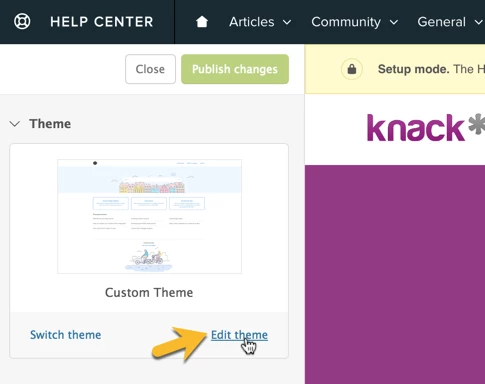
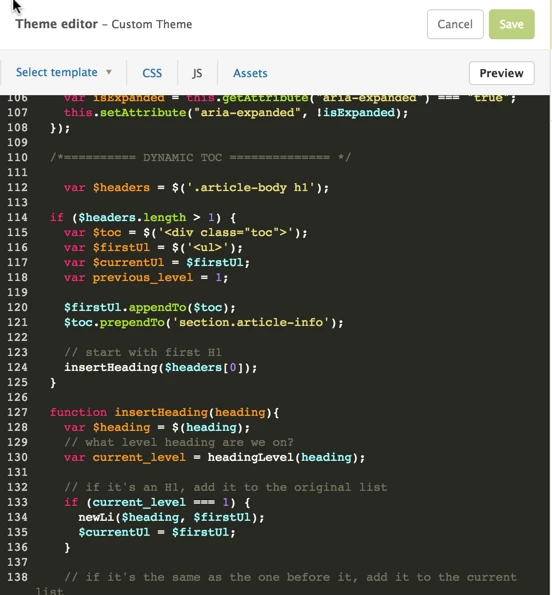
  1. In Guide, go to /theming/workbench
  2. Select your theme, and press view theme.
  3. press Edit code.
  4. Edit script.js, and add the code to the end of the file. Save changes.

And that's it - it should display right?

Having followed these steps on my Guide instance, running the Copenhagen theme, I don't get anything let alone the change i'm expected.

Here's a page from my Guide instance which I would hope gets this auto TOC:
https://help.wafresh.com.au/hc/en-au/articles/360007488692-What-happens-if-an-item-is-out-of-stock-or-unavailable-

Appreciate any help or feedback to understand where I'm going wrong.


  • June 17, 2019

@Michael H


You want to put it in the article_page.hbs file, not script.js


  • June 27, 2019

@Tim Capone

Does it matter where in article-Page.hbs you put this script? I've tried adding this to a default Copenhagen theme, and I'm not seeing anything.


I used Vladan's script and it worked fine. 


  • July 3, 2019

@Paul LaBarbera

I put my code on the bottom of the script.


It's working on Firefox, Chrome, Internet Explorer, and Edge for me.


Stephen23
  • July 10, 2019

Hi,

Per Tim's comment from last week:

>> It's working on Firefox, Chrome, Internet Explorer, and Edge for me.

Does anyone know if this code is browser-dependent? A former colleague who contributed to this thread (Nick Smolnehy) implemented this feature here. I believe he made some additions to the original code.

Using Chrome, it's been working great, but I started using Firefos yesterday, and:

1. The TOC itself does not display.
2. The headings throughout the document are not auto-numbered  e.g

2.1.3 Modify Vendor

appears as

Modify Vendor

Thanks.


  • August 23, 2019

Hey everyone, check out this article which has a modified Javascript code that uses "H2" size for TOC headings. The original source code can be found in Github here which uses the WYSIWYG editor "Huge" size for the TOC. Both worked for my Help Center in wonderful fashion. I prefer the original source code since it allowed the ability to give the TOC a custom placeholder name and hyperlinks the "Huge" headings. Highly recommend for anyone looking to add a nice looking Table of Contents.

To install, simply add the code snippet to your "Script.js" page below "$(document).ready(function() {" in your theme editor. 

You can see an example below:


Brett13
  • Community Manager
  • August 26, 2019

Thanks for taking the time to share this with everyone Matthew!


  • March 6, 2020

Can a community team member assist me with adding a table of contents to my knowledge base? The above does not seem to work in 2020. Also, I am using H2 for my main headers.


Brett13
  • Community Manager
  • March 9, 2020

Hey Tyler,

This would require some custom code in your Guide theme which is not something we can help with from our end. I would recommend taking a look at the following documentation we have available:

If you don't have the necessary resources available to assist with customizing your Help Center, we do have a Professional Services team that can assist at an additional cost. This is something you'll want to discuss with your account manager so if you're interested, I'm happy to get you in touch if needed.

Cheers!


  • April 24, 2020

I added @Lily Svetnik code and it worked but is there any way I can make this into side navigation and not the first thing on the article - does that make sense?


Here is a link to an article: https://helpcenter.enalyzer.com/hc/en-us/articles/360012608599#HowdoIcreateateam?


  • September 17, 2020

Vladan - This works great in Chrome and Safari, but in Firefox the li elements are not created - have you noticed this? 


Vladan
  • September 18, 2020

Hey Ami, I didn't notice, to be honest. Do you have it on live and can share the URL with us so I can check? 


  • September 21, 2020

I've noticed that this code breaks if I wrap the H2 with a div or section.  The toc only shows the first H2 but none of the subsequent H2s. Has anyone else experienced this? 


  • September 23, 2020

Hey Ami, yes that is the case. I suggest not wrapping the H2s in divs. If you need to add divs within content, just add it around the <p>s inside the H2/H3s


This solution works in most ZD environments, but if you have a very customized theme it may not.


Jordan20
  • January 20, 2021

in response to 454757487's post here: https://support.zendesk.com/hc/en-us/community/posts/213641488/comments/360001878568

This was the only code snippet I could get to work for our instance of ZenDesk. Thank you for that!

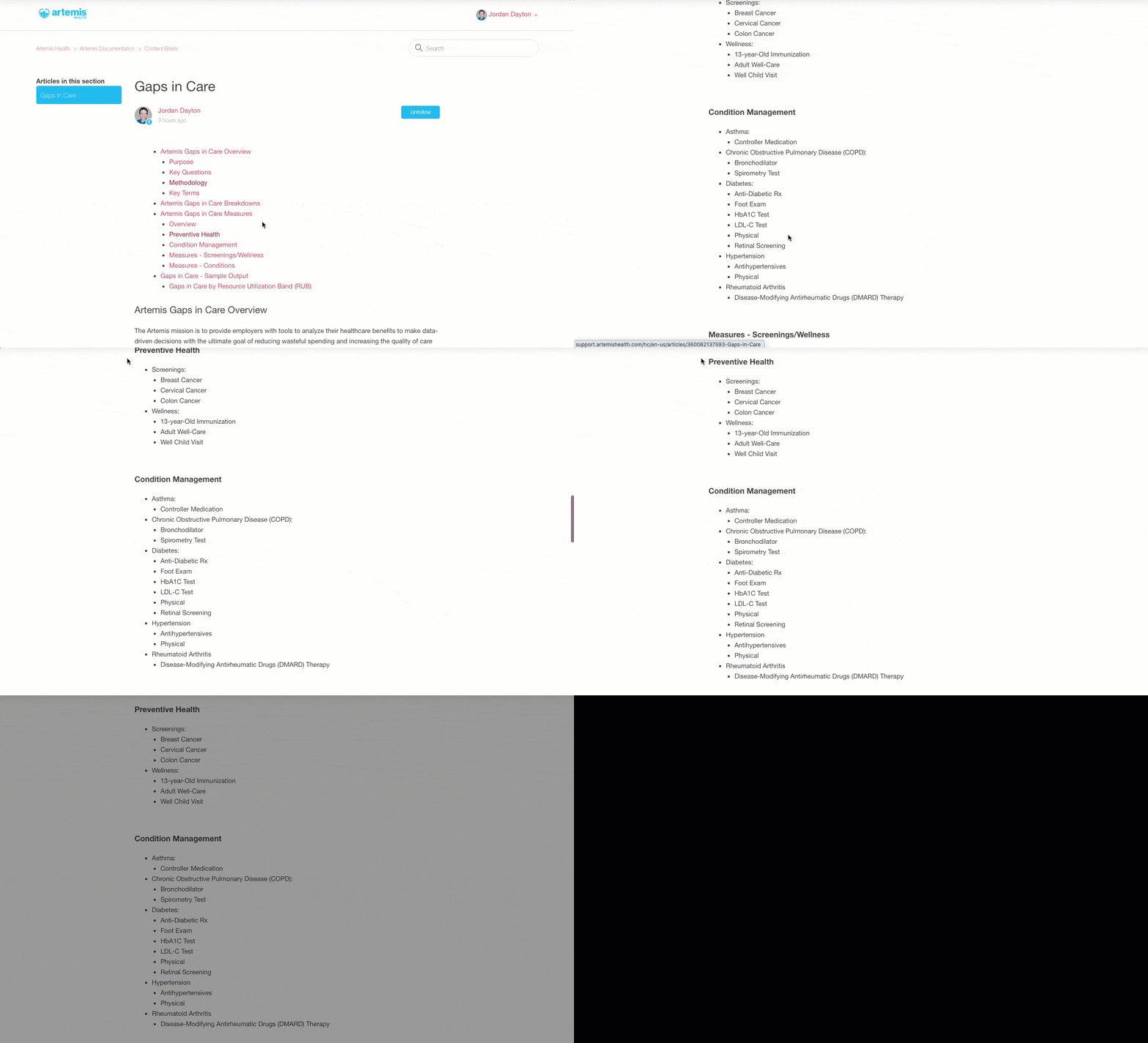
Now I've noticed that when we click one of the links in the TOC it takes us to the respective heading, but the viewport of the screen is about 30 pixels below the actual header.  (see the GIF below). 

20980975327 posted a link to her Guides here and as I looked at the Enalyzer TOC it works perfectly... taking you right to the respective header... placing it perfectly at the top of the screen viewport. 

What modifications could I add to the code below, to adjust the script to make the anchor have the header appear at the top of the viewport?


Jordan20
  • January 22, 2021

In addition to my last question (previous post) I am just now noticing that the table of contents does not render/display when I visit a page. However, when I press the "refresh" button on that page, the TOC then appears. Any idea what I could change, in the code, to make the TOC render immediately, the first time the page loads? @Vladan Jovic?


Vladan
  • January 24, 2021

Hey Jordan, regarding this issue "but the viewport of the screen is about 30 pixels below the actual header." - it could be fixed with pure CSS (padding-top and negative margin-top).

It's really hard to tell from this point why the TOC doesn't work from the 1st visit of the page; maybe it would help if you can share your HC URL so I can take a closer look. Thanks!