Create a Table of Contents automatically | Community
Skip to main content

Create a Table of Contents automatically

  • August 18, 2016
  • 55 replies
  • 0 views

Much like the author of this article, our company needs a way to automatically generate a table of contents for large articles. After finding out we can use jQuery, I put together a script that will automagically create a tiered table of contents based on the Header tags used in the article.

All you need to do is paste the Javascript in this page into the Javascript section of your Articles:

 

Click on the JS tab, then paste in the code at the end:
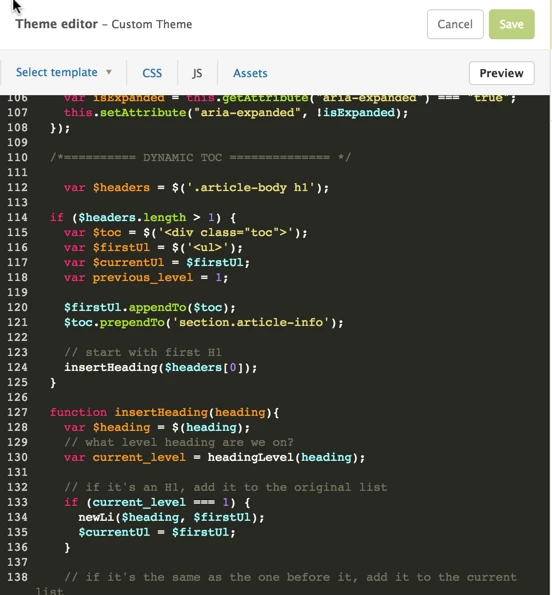
 

That should do it.. as long as you've used proper heading tags (H1, H2, etc), a Table of Contents will be created any time you load the article.

You can see a live example here: http://codepen.io/ngalluzzo/pen/kXqyVQ?editors=1010

55 replies

Jennifer16
  • August 18, 2016

ooooh, a lot of users will love this. Thanks for sharing this tip, Nicolas!


  • August 18, 2016

Awesome tip Nicolas!


  • September 15, 2016

Doesn't work when having more HTML elements between them :(


  • July 18, 2017

That's a great tip, but it doesn't work :-(

First, the ".appendTo($wrapper);" line gives a syntax error. What should be here before the '.appendTo'?

Second, the code doesn't seem to be called at all. How should it be activated?

Third, isn't ZenDesk responsible for checking and publishing these kind of tips? TOC is a basic feature in most platforms, so at least ZenDesk should guide users on how to do this as the ZD Guide doesn't provide it.


  • July 18, 2017

Iggy, could you send me a codepen with the HTML you're using? Happy to review that for you.


  • July 18, 2017

Ziv,


Are you referring to line 81? The full line is: $link.appendTo($wrapper);


As long as you've corrected that type error and added it to the Custom Theme, that's all you need


  • July 19, 2017

Nicolas, thanks a lot for your swift answer. I really appreciate it.

Yes, I was referring to line 81. The addition of $link makes sense. 

You run on the headers which you get by:
var $headers = $('.article-body h1');

The problems:
1. '.article-body h1' doesn't exist in the article template. 
When I changed the code to 'h1' at least it found the main header.

2. It doesn't find any other h2, h3 etc. in the html so that's the reason why it doesn't do much.

Any idea how to fix this?


  • August 3, 2017

Nicolas, thanks again for this code.

I made a few small changes and now it works great.

If you have anymore such cool snippets to share don't be shy :-)


Jennifer16

Hi Zivbs,

Have you seen our complete list of Help Center tips?

Check it out for more goodies.

And be sure to follow the post so you get updates.


  • August 10, 2017

Ziv, would you mind sharing the working code here? Thank you!! 😀


  • August 13, 2017

Sure, Ashwini. Here it goes:

/*** Table of contents code ***/
var $headers = $('.article-body h2');

if ($headers.length > 0) {
var $toc = $('<div class="toc">');
var $firstUl = $('<ul>');
var $currentUl = $firstUl;
var previous_level = 2;

$firstUl.appendTo($toc);
$toc.prependTo('section.article-info');

// start with first H1
insertHeading($headers[0]);
}


function insertHeading(heading) {
var $heading = $(heading);
// what level heading are we on?
var current_level = headingLevel(heading);

// if it's an H2, add it to the original list
if (current_level === 2) {
newLi($heading, $firstUl);
$currentUl = $firstUl;
}

// if it's the same as the one before it, add it to the current list
else if (current_level === previous_level) {
newLi($heading, $currentUl);
}

// if it's one level higher than the one before it... time to make a new nested list
else if (current_level > previous_level) {
nestUl();
newLi($heading, $currentUl);
}

previous_level = current_level;

var $nextHeading = $heading.nextAll("h1, h2, h3, h4, h5, h6").first()[0];
// if there's any headings left... run this again
if ($nextHeading) insertHeading($nextHeading);
}

// adds a new UL to the current UL
function nestUl() {
var $newUl = $('<ul>');
$newUl.appendTo($currentUl);
$currentUl = $newUl;
}

// returns a numerical value for each heading
function headingLevel(heading) {
switch (heading.nodeName) {
case 'H1':
return 1;
break;
case 'H2':
return 2;
break;
case 'H3':
return 3;
break;
case 'H4':
return 4;
break;
case 'H5':
return 1;
break;
case 'H6':
return 6;
break;
default:
return 0;
}
}

// inserts a new line to the current list
function newLi(heading, $list) {
var $heading = $(heading);
var $wrapper = $('<li></li>');
//var $link = $('<a>').prop('href', '#' + $heading.prop('id'));
var $anchorname = $heading[0].outerText.replace (/\s/g,'')
var $link = $('<a>').prop('href', '#' + $anchorname);

$link.html('<span class="index"></span> ' + $heading.text());
$link.appendTo($wrapper);

$wrapper.appendTo($list);

var place_in_parent = $list.children('li').length;

if ($list.parent()[0].nodeName === 'DIV') {
$link.find('.index').text(place_in_parent)
} else {
$link.find('.index').text($wrapper.parent().prev('li').find('.index').text() + '.' + place_in_parent)
}

$heading.html("<a name=\"" + $anchorname + "\"></a>" + $link.find('.index').text() + ' ' + $heading.text());

}
/*** End of Table of contents code ***/


  • September 8, 2017

Hi -  Has anyone created a TOC w/o errors?  I'm having problems with the script not recognizing all header tags and also creating run-on hierarchies like that depicted below.  Is there an updated, tested script?  Also, it seems to be hit-and-miss in executing.   Anything missing in the first few JS lines?  Anything required in the document head or header templates?  Thanks.  Dave

/*
* jQuery v1.9.1 included
*/
$(document).ready(function() {
var $headers = $('.article-body h1');

if ($headers.length > 1) {

--------------------------


  • September 14, 2017

Welcome to the Community, Dave! I'm going to check with our Community Moderators to see if they have any insight on this. Otherwise, hopefully some of our other awesome Community members will be able to help!


  • October 14, 2017

Hi -  can anyone share the latest working TOC js?   I'm still having issues with it executing within the custom theme.  Is it picking up jquery properly?   I also see an 'unexpected end of script error' but all brackets and such are correct.  Is something else happening?  Dave


  • November 27, 2017

Hi Zivbs and Nicolas,

I tried to use the same code from Zivbs but I can only output as the following without the TOC/links. Do I need to update the CSS or what did I do wrong? Any idea?


Result:


1 Title

2 Second Titles

3 Subtitle

3.1 Subtitle2

3.1.1 Sub Sub3

3.1.1.1 Sub Sub4

4 Sub Sub5
4.1 Sub Sub6

5 Third Title

5.1 The sub 


Hey Dave, see below for how I addressed this:

Basically the code didn't account for the case when your next heading is going back a level (current_level < previous_level), so I added that case and added an array to keep track of the previous levels.

/*** Table of contents code ***/
var $headers = $('.article-body h1');

if ($headers.length > 0) {
var $toc = $('<div class="toc">');
var $firstUl = $('<ul>');
var $currentUl = $firstUl;
var previous_level = 1;
var $arrayUl = [];


$firstUl.appendTo($toc);
$toc.prependTo('section.article-info');

// start with first H1
insertHeading($headers[0]);
}

function insertHeading(heading) {
var $heading = $(heading);
// what level heading are we on?
var current_level = headingLevel(heading);


// if it's an H1, add it to the original list
if (current_level === 1) {
newLi($heading, $firstUl);
$currentUl = $firstUl;
$arrayUl = [];
$arrayUl.push($firstUl);
}

// if it's the same as the one before it, add it to the current list
else if (current_level === previous_level) {
newLi($heading, $currentUl);
}

// if it's one level higher than the one before it... time to make a new nested list
else if (current_level > previous_level) {
nestUl();
$arrayUl.push($currentUl);
newLi($heading, $currentUl);
}

else if (current_level<previous_level){
for (i = 0; i < (previous_level-current_level); i++) {
$arrayUl.pop();
}
$currentUl = $arrayUl[$arrayUl.length-1];
newLi($heading, $currentUl);
}

previous_level = current_level;

var $nextHeading = $heading.nextAll("h1, h2, h3, h4, h5, h6").first()[0];
// if there's any headings left... run this again
if ($nextHeading) insertHeading($nextHeading);
}

// adds a new UL to the current UL
function nestUl() {
var $newUl = $('<ul>');
$newUl.appendTo($currentUl);
$currentUl = $newUl;
}

// returns a numerical value for each heading
function headingLevel(heading) {
switch (heading.nodeName) {
case 'H1':
return 1;
break;
case 'H2':
return 2;
break;
case 'H3':
return 3;
break;
case 'H4':
return 4;
break;
case 'H5':
return 5;
break;
case 'H6':
return 6;
break;
default:
return 0;
}
}

// inserts a new line to the current list
function newLi(heading, $list) {
var $heading = $(heading);
var $wrapper = $('<li></li>');
//var $link = $('<a>').prop('href', '#' + $heading.prop('id'));
var $anchorname = $heading[0].outerText.replace (/\s/g,'');
var $link = $('<a>').prop('href', '#' + $anchorname);

$link.html('<span class="index"></span> ' + $heading.text());
$link.appendTo($wrapper);

$wrapper.appendTo($list);

var place_in_parent = $list.children('li').length;

if ($list.parent()[0].nodeName === 'DIV') {
$link.find('.index').text(place_in_parent)
} else {
$link.find('.index').text($wrapper.parent().prev('li').find('.index').text() + '.' + place_in_parent)
}

$heading.html("<a name=\"" + $anchorname + "\"></a>" + $link.find('.index').text() + ' ' + $heading.text());


}
});


and if anyone else is interested, I made a small addition to my css file to indent for subsequent levels


.toc ul{
padding-left: 20px;
}


Nicole17
  • May 30, 2018

Thanks for sharing those updates!


  • June 20, 2018

Hi, can someone please post a working version of this script? I've tested all of them from original to the last one and unfortunately nothing happens at all with my articles :( 


Thank you in advance


  • June 22, 2018

Hi Lily!

Can you post a screencap of the code you're using? That'll make it easier for us to figure out what's going wrong!


  • June 25, 2018

Hi Jessie!

I was using the latest code that was posted here. Apparently, it wasn't working mostly because of syntax errors and other minor issues. 

We've corrected and slightly modified the script, it's working perfectly fine now and I'm loving it!


Here's my version if anyone else is looking for a solution:


/*** Table of contents code ***/
var $headers = $('.article-body:first h1');

if ($headers.length == 0) $headers = $('.article-body:first h2');

if ($headers.length > 0) {
var $toc = $('<div class="toc" style="margin-bottom: 25px">');
var $firstUl = $('<ul>');
var $currentUl = $firstUl;
var previous_level = 1;
var $arrayUl = [];


$firstUl.appendTo($toc);
$('#table-of-contents').length > 0 ? $toc.appendTo('#table-of-contents') : $toc.prependTo('.article-body:first');

// start with first H1
insertHeading($headers[0]);
}

function insertHeading(heading) {
var $heading = $(heading);
// what level heading are we on?
var current_level = headingLevel(heading);


// if it's an H1, add it to the original list
if (current_level === 1) {
newLi($heading, $firstUl);
$currentUl = $firstUl;
$arrayUl = [];
$arrayUl.push($firstUl);
}

// if it's the same as the one before it, add it to the current list
else if (current_level === previous_level) {
newLi($heading, $currentUl);
}

// if it's one level higher than the one before it... time to make a new nested list
else if (current_level > previous_level) {
nestUl();
$arrayUl.push($currentUl);
newLi($heading, $currentUl);
}

else if (current_level<previous_level){
for (i = 0; i < (previous_level-current_level); i++) {
$arrayUl.pop();
}
$currentUl = $arrayUl[$arrayUl.length-1];
newLi($heading, $currentUl);
}

previous_level = current_level;

var $nextHeading = $heading.nextAll("h1, h2, h3, h4, h5, h6").first()[0];
// if there's any headings left... run this again
if ($nextHeading) insertHeading($nextHeading);
}

// adds a new UL to the current UL
function nestUl() {
var $newUl = $('<ul>');
$newUl.appendTo($currentUl);
$currentUl = $newUl;
}

// returns a numerical value for each heading
function headingLevel(heading) {
switch (heading.nodeName) {
case 'H1':
return 1;
break;
case 'H2':
return 2;
break;
case 'H3':
return 3;
break;
case 'H4':
return 4;
break;
case 'H5':
return 5;
break;
case 'H6':
return 6;
break;
default:
return 0;
}
}

// inserts a new line to the current list
function newLi(heading, $list) {
var $heading = $(heading);
if ($heading.text().replace(/\s/g, '') == '') return null;
var $wrapper = $('<li></li>');
//var $link = $('<a>').prop('href', '#' + $heading.prop('id'));
var $anchorname = $heading[0].outerText.replace (/\s/g,'');
var $link = $('<a>').prop('href', '#' + $anchorname);

$link.html($heading.text());
$link.appendTo($wrapper);

$wrapper.appendTo($list);

var place_in_parent = $list.children('li').length;

$heading.html("<a name=\"" + $anchorname + "\"></a>" + $link.find('.index').text() + ' ' + $heading.text());
}
});


Nicole17
  • June 25, 2018

Thanks for sharing the resolved code, Lily!


  • July 16, 2018

Hello All,

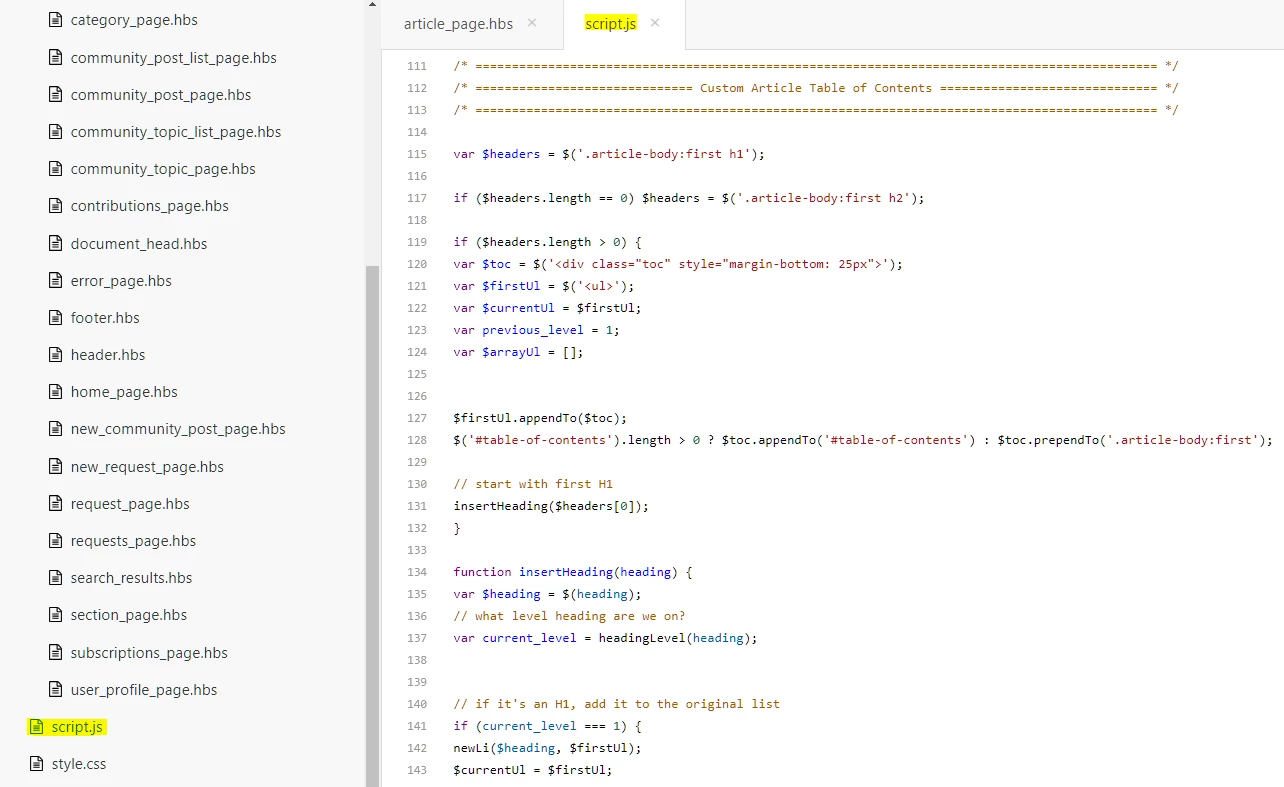
I'm using the code Lily Svetnik posted June 25, 2018, t 10:58, but nothing is happening to my articles. Am I posting the code in the correct place? I've added it to the end of the "Script.js" asset, as shown below:


Vladan
  • July 16, 2018

Hi Ariana, for debugging it would be much easier if any chance you can share a link to your article or help center here.


  • July 16, 2018

Hi Vladan,

Thanks for the response. A good example of an article in our Help Center with multiple levels of headers can be found here:

[Link removed after the issue was resolved]