Create a private comment automatically | Community
Skip to main content

Create a private comment automatically

  • June 6, 2019
  • 32 replies
  • 0 views

Step One - Create a URL Target

By creating a URL target as below (settings/extensions/add target/URL target) this will allow you to set a trigger to carry out a certain action upon the ticket that the trigger or automation ran on. 

URLhttps://domainname.zendesk.com/api/v2/tickets/{{ticket.id}}.json?ticket[comment][public]=false+

Method: PUT

Attribute name: ticket[comment][body]

Save the URL Target to something like "Auto Private Comment" and then you can use it as a target using the NOTIFICATIONS: Target trigger option.

Step Two - Create the trigger

Now set up your trigger or automation with your relevant trigger options. In the 'actions' section you can select the 'notifications: Notify Target' option and select the target you created in step one. 

Next, add the comment you want to be posted for example:

CUSTOMER HAS RECEIVED 24 HOUR NOTIFICATION EMAIL.

----

<p>Hi {{ticket.requester.first_name}}</p>

<p>We just wanted to see if you have had time to take a look at our recent email? We haven’t heard back from you and wanted to make sure we hadn’t missed you.</p>

<p>If you want to get in touch with any questions or comments you may have when you get a moment, or if you want to let us know if you need a little more time to digest the information, just hit reply. </p>

<blockquote>{{ticket.latest_public_comment_formatted}}</blockquote>

This comment will now be added as a private comment whenever the trigger actions run. 

It's excellent for setting reminders for agents who aren't using email much as it will reopen in their views. And also good for keeping track of automated messages sent to customers without needing to interpret the 'events' section of the ticket view.

32 replies

Brett13
  • Community Manager
  • June 6, 2019

This is awesome!

Thanks for sharing Kev :)


  • June 20, 2019

Hey Kev! 

I've followed your instructions but the client call is failing- not super familiar with setting up an extension, do you have any tips on how to make sure it works?

Cheers!


Brett13
  • Community Manager
  • June 24, 2019

Hey Ayryn,

Looks like there haven't been any updates on this post regarding your question.

Have you navigated to Admin>Channels>API>Target Failures to confirm the failure type you're running into?

You'll also want to be careful when using triggers to provide updates on tickets as there can be some odd behavior. I'd recommend taking a look at the following article for more information: Can I use a trigger and a target to update tickets?

Hope this points you in the right direction!


  • July 8, 2019

Thanks Kev!

This is exactly what i needed to do.  I will still need to test it but it is pretty straight forward.

Thanks again,

Yami  :=]


  • July 9, 2019

Hi Kev,

I tested and i am getting HTTP Errors; can it be because i did not place a User/Password?  If so, what would this be, my sign on ID and Password?

Thanks,

Yami


Brett13
  • Community Manager
  • July 9, 2019

Hey Yamile,

Credentials shouldn't be required here but you can try adding them to see if that resolves the issue. Username would be the email address you use to log into your Support account and the password would be the same as your login password.

Hope this helps!


  • July 9, 2019

Hi Kev,

Thanks for the confirmation, 

I am still having the same error 401

"error": "Couldn't authenticate you"

I am not sure where to go from here?


HTTP/1.1 401 Unauthorized  
Date Tue, 09 Jul 2019 15:01:49 GMT
Content-Type application/json; charset=UTF-8
Content-Length 37
Connection close
Set-Cookie __cfduid=de597194bed2891a892a0a2b059df58151562684509; expires=Wed, 08-Jul-20 15:01:49 GMT; path=/; domain=.farelogixpartnersupport.zendesk.com; HttpOnly
WWW-Authenticate Basic realm="Web Password"
Strict-Transport-Security max-age=31536000;
Cache-Control no-cache
X-Zendesk-Origin-Server app59.pod13.usw2.zdsys.com
X-Request-Id 4f3b2ce6a8a72a47-SEA
X-Runtime 0.054535
X-Zendesk-Request-Id 53013f6df620e5fa7293
Expect-CT max-age=604800, report-uri="https://report-uri.cloudflare.com/cdn-cgi/beacon/expect-ct"
Server cloudflare
CF-RAY 4f3b2ce6a8a72a47-SEA
{
  "error": "Couldn't authenticate you"
}

  • Author
  • July 9, 2019

I’ll take a quick look at my settings in the office tomorrow and hopefully get back with a solution :-)


  • July 9, 2019

Thanks Kev! 


Dan28
  • July 15, 2019

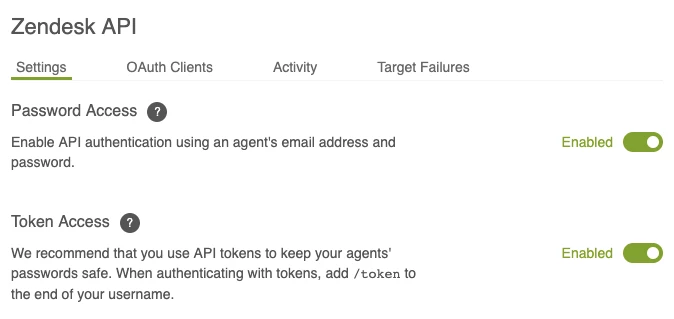
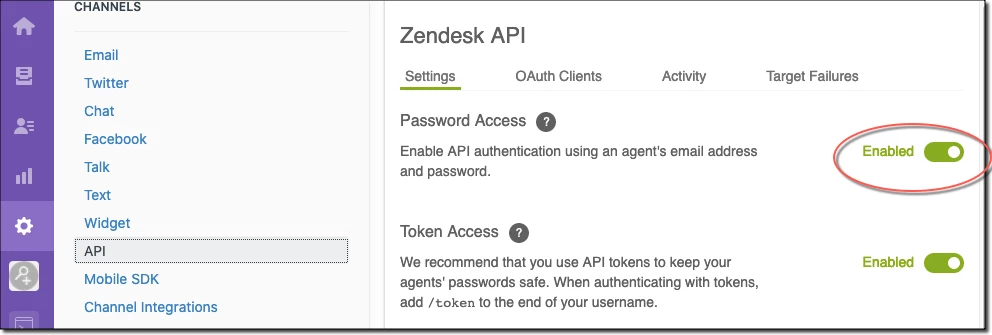
You may need to check your API Admin page to ensure you have password access enabled.  

You might also consider using a token instead of an agent password. If you use a token your user name would be email@domain.com/token (replacing the email address with your address of course). Your password would be your API token. 


  • August 26, 2019

Hi All

Need help, we have the same use case, where we want to add "private" note if certain conditions are met.

Has anybody experienced any issues with this method since Zendesk does not support this method due to race condition (Link below).

If yes, what kind of impact we are looking at?

https://support.zendesk.com/hc/en-us/articles/234658247-Can-I-use-a-trigger-and-a-target-to-update-tickets-


Hello

Does any one succesfully use this method ?

I have the same issu, Error during transmission: HTTP client call failed

I try with token, no token (my account), no accourt, always the same error

In API Admin page to ensure you have password access enabled has been check, OK

Any idea or clue ?

Thank you,

Best regard


  • January 23, 2020

Hi @Jean-Edouard Leblond -- I suggest submitting a ticket, so your specific account can be examined more closely. 

Know that this particular workflow is not officially supported. See Can I use a trigger and a target to update tickets? for more details.


  • March 26, 2020

I am trying to test the PUT command in Postman and a command terminal, when I run the URL with text after "false+", nothing is added to the ticket.

Is there a way different call I should be making to test this manually?

https://domainname.zendesk.com/api/v2/tickets/{{ticket.id}}.json?ticket[comment][public]=false+test comment


  • March 30, 2020

I know the approach in the original post has seemed to have worked in the past (passing field names and field values as query parameters) but it's not a supported or documented approach to updating a ticket. The official way of updating a ticket is to use the PUT /api/v2/tickets/{id}.json API.

Revamping the above instructions to use the documented API call, you would:

1. Create an "HTTP" target extension (not a "URL" target) using PUT method and Content Type of JSON.

2. Give the target extension a URL value of: https://your_subdomain.zendesk.com/api/v2/tickets/{{ticket.id}}

3.Enable Basic authentication and enter an agent level email and password. If you are using an "API token", the format for the email should be john@example.com/token with the password being the API token. See reference documentation for details.

4. Then, similar to the above, create a Trigger that fires on ticket creation. Have a "Notify target" action that calls the above HTTP target extension created in steps 1 thru 3

5. For the body of the trigger action's request you pass a JSON payload, similar to what's documented at PUT /api/v2/tickets/{id}.json

The trigger action's JSON for the above example would look like:

{
"ticket":{
"comment": {
"html_body": "CUSTOMER HAS RECEIVED 24 HOUR NOTIFICATION EMAIL.\r\n\r\n<hr>\r\n\r\n<p>Hi {{ticket.requester.first_name}}</p>\r\n\r\n<p>We just wanted to see if you have had time to take a look at our recent email? We haven't heard back from you and wanted to make sure we hadn't missed you.</p>\r\n\r\n<p>If you want to get in touch with any questions or comments you may have when you get a moment, or if you want to let us know if you need a little more time to digest the information, just hit reply. </p>\r\n\r\n<blockquote>{{ticket.latest_public_comment_formatted}}</blockquote>",
"public" : false
}
}
}

Note: If you're passing HTML in the JSON body, you need to set the "html_body" attribute and pass a valid JSON string.

Another note is that, technically, calling into your Zendesk instance from a target extension is not officially supported. It can work, but there are possible issues depending on the action, what other triggers are doing, and the expectation of the agent on seeing those background changes surface in the UI.

All that said, the above steps should accomplish the same action as the original post. Try that instead @Pete and let us know how it works!


  • April 21, 2020

Thanks Bryan followed this to a T and still cannot authenticate. So weird. Could this be related to Google SSO being the only method at which agents can sign in?


  • April 24, 2020

Ah, yes 24054238927 -- that's no doubt it. I didn't think of that. Because the trigger method only allows for "Basic" (i.e. Zendesk username/password credentials), not having that turned on would explain 401/unable to authenticate errors. Thanks for pointing that out!

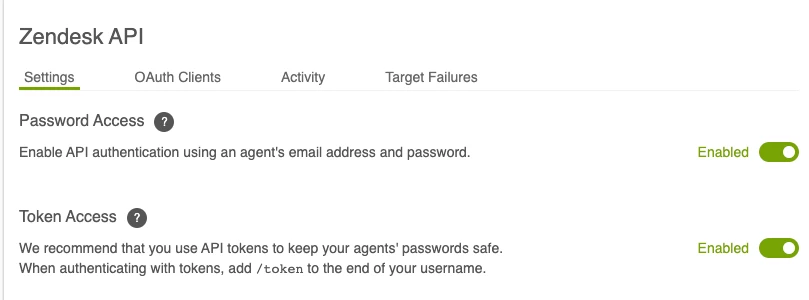
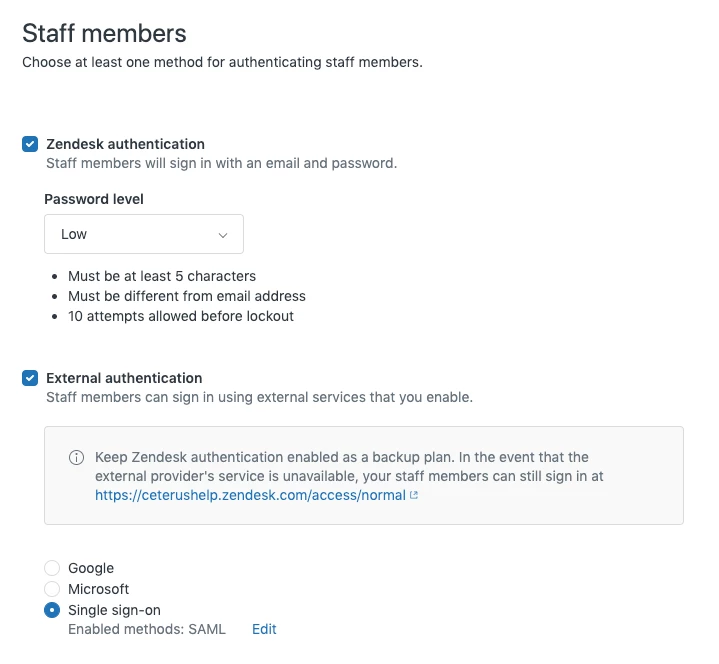
If you need to use basic authentication (as in this case), you need to have password access enabled:

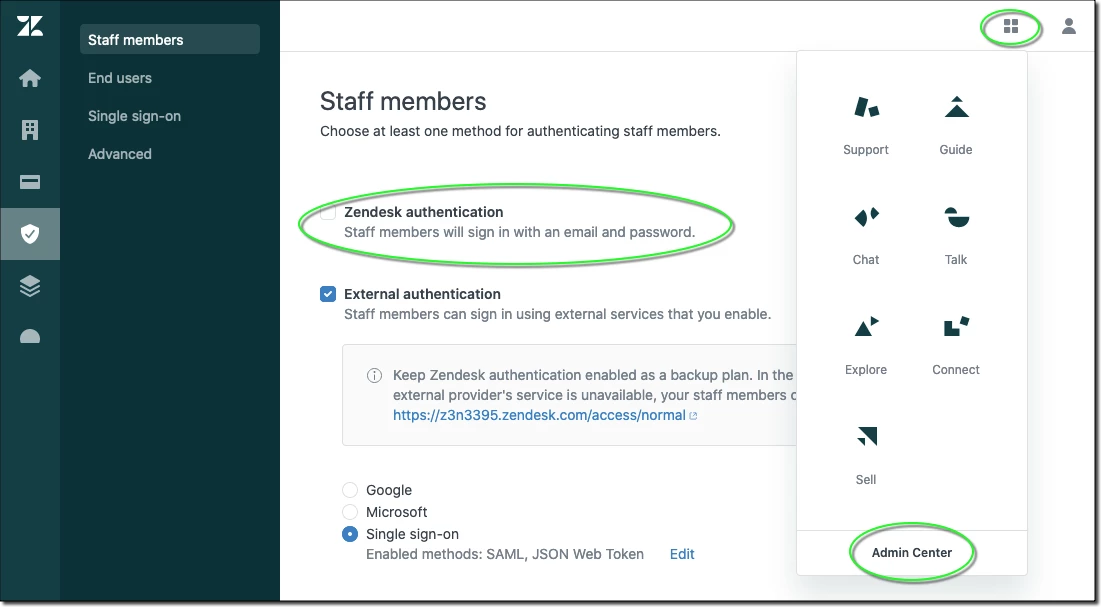
Having some other auth mechanism turned on (and Zendesk auth turned off) I could see also creating this issue:

Definitely check these things.


  • April 27, 2020

Thanks 6482129967. So I now have settings as shown in my two screenshots. I can successfully log in to my Zendesk as an admin without going through my SSO service. But when I use that same username and password for the basic authentication for the HTTP target, I still get the "cannot authenticate you" error. I have submitted a ticket to Zendesk early last week but have not heard back at all.


  • April 27, 2020

For whatever reason I can authenticate with POST but not with PUT. However, POST does not work in that while it authenticates, it returns and invalid end point and therefore the comment does not post.


  • April 30, 2020

Just closing the loop to confirm that I was able to get this to work. Austin with Zendesk Support helped me make sure I had this set-up correctly. So it does work!


Greg29
  • April 30, 2020

Thanks for the update and thanks to Austin forgetting you in the right spot! Apologies for the delay on our side!

Greg Katechis | Developer Support and Enablement Engineer


  • October 9, 2020

This solved a huge headache for my team!


Thank you so much!


Jack48
  • September 10, 2021

Seems like this would be so much easier if Zendesk just added 'set private comment' as an action choice for a trigger. Seems like a lot of hoops to go through for a simple task.


  • Author
  • September 10, 2021

You aint wrong jack :-)

Although once the initial URL target is set up the "notify target" command is effectively acts the same as a "set private comment" option would. You don't need to create the target link everytime you want to create a new private comment trigger. so not a massive faff.


Flair
  • October 22, 2021

When I try this I'm getting a target error:

HTTP/1.1 401 Unauthorized

I've entered my username and password into the URL Target.

Anything else I need to do?

@Kev Walsh any ideas?