Change text for "My Activities" in HC | Community
Skip to main content

Change text for "My Activities" in HC

  • October 24, 2013
  • 35 replies
  • 0 views

I've seen this question posted quite a bit in the forums, so here is a little how-to on how to change the string for 'My Activities' in HC, as done on http://support.amilia.com

Here's how to change the "My Activities" text

  1. In Guide, click the Customize design icon in the sidebar
  2. Click on Edit Theme to access your template's code
  3. Click the script.js file and add the following code:

//Change string for My Activities

$('.user-nav .my-activities').html(' See my requests');
$('.sub-nav').find('li').filter(":last");

As you see, this allows you to change the string to "See my requests"
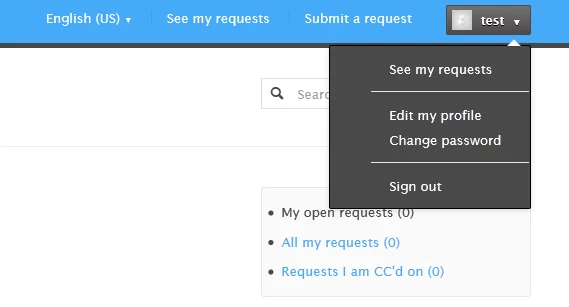
Here's how to change the text in multiple languages

Follow the steps above but use this code: 

if(currentLanguage === 'Français') {
$('.user-nav .my-activities').html(' Voir mes demandes');
$('.sub-nav').find('li').filter(":last");
}

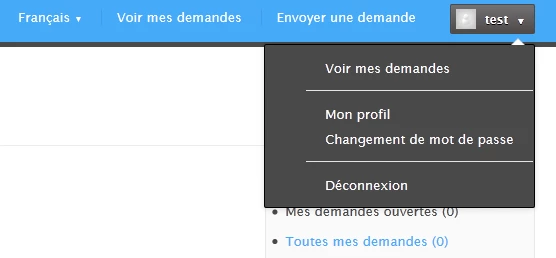
 This automatically updates the user drop-down menu and the subnav breadcrumbs as well!

Here's what it looks like!
This topic has been closed for replies.

35 replies

  • Author
  • October 24, 2013

Update: I am currently modifying this code + the code for personalized breadcrumbs in HC so that they are all updated with appropriate encoding and reflect the page navigation. Please to stand by!


ModeratorWes

@Andrea - thanks for the updates, you've been very busy today!!


  • Author
  • October 25, 2013

Not me, the props go to my team :) I just learn, post, and share with you guys!


  • Author
  • October 28, 2013

Just updated it - 

subnav breadcrumb should show

$('.sub-nav').find('li').filter(":last");


  • November 14, 2013

Hello,

I am going mad trying to figure out a little issue I am having with the cache storing our SSO sessions after a user is authenticated from our SSO script. Once a user logs into the Help Center, they are unable to click on the Sign Out link from the {{user-nav}} drop-down menu.

I figured out (more or less) how to resolved this, but sadly I am stuck.
Essentially, the URL when clicked is "/access/logout" the authenticated user is kicked to the home page and then continues to be authenticated.
This can be resolved if I could only figure out how to replace the URL with "/access/logout.json".
I found the article below on how to change the text for My Activities... arg..... Please help if you can! Would much appreciate it.

Here's how to change the "My Activities" text
1) At the bottom of your HC, click on Customize Design
2) Click on Edit Theme to access your template's code

3) Navigate to the JS tab and add the following code:

//Change string for My Activities
$('.user-nav .my-activities').html(' See my requests');

$('.sub-nav').find('li').filter(":last");

Failed Attempt:
//Change string for anchor tag to force logout
$('.user-nav .li a').html('/access/logout.json');
$('.sub-nav').find('li a').filter("/access/logout");


  • November 27, 2013

Hi Justin,

I'm not sure that this approach is correct for changing the URL that the Sign Out link goes to. The example from Andrea is for replacing the displayed text, not modifying where this link goes. Since you have JWT set up, you may want to review where your Remote logout URL is pointing to. That setting is located here: Admin>Settings>Security. It sounds like your users are getting directed to the remote logout URL, your script determines that they are authenticated and then sends them right back to Zendesk. If that is the case you may need to modify your authentication script. You can find good examples here:

https://github.com/zendesk/zendesk_jwt_sso_examples


  • Author
  • November 27, 2013

Thanks for jumping in Bob.

@Justin - as Bob said, this tutorial is simply for changing the text name, not where the link goes. 


  • December 23, 2013

Thanks for the details on changing My Activites!


  • March 20, 2014

Thanks gang. Is there any possibility this workaround only works with certain themes? Or perhaps things have changed in the last few months which prevents the js tweak from working? I can't get it to take.


  • Author
  • March 21, 2014

Hi Jon,

What theme are you using? 


  • March 21, 2014

Thanks much Andrea!

We're using "The Humble Squid" with some light customizations.


  • Author
  • March 21, 2014

Hi Jon,

I got it to work. Make sure you add it after the last bracket

See image attached:


  • March 21, 2014

Hi Andrea. I'm a bonehead. You were right on. Thanks for the assist and have a great day.


  • Author
  • March 21, 2014

That makes us both boneheads, cause it took me a second to figure out too :P

Happy Friday!


  • March 31, 2014

@Andrea - How did you add the "Submit A Request" link next to the "See My Requests" link?


  • March 31, 2014

@Andrea - Disregard my last comment.


  • April 1, 2015

This is very helpful, thank you!


Benjamin.kassentoft

@Andrea, Do you know how to apply localize to a mailto button?

We are using different languages with different support email, and I want to change the email depending on what language is being used.


  • June 17, 2016

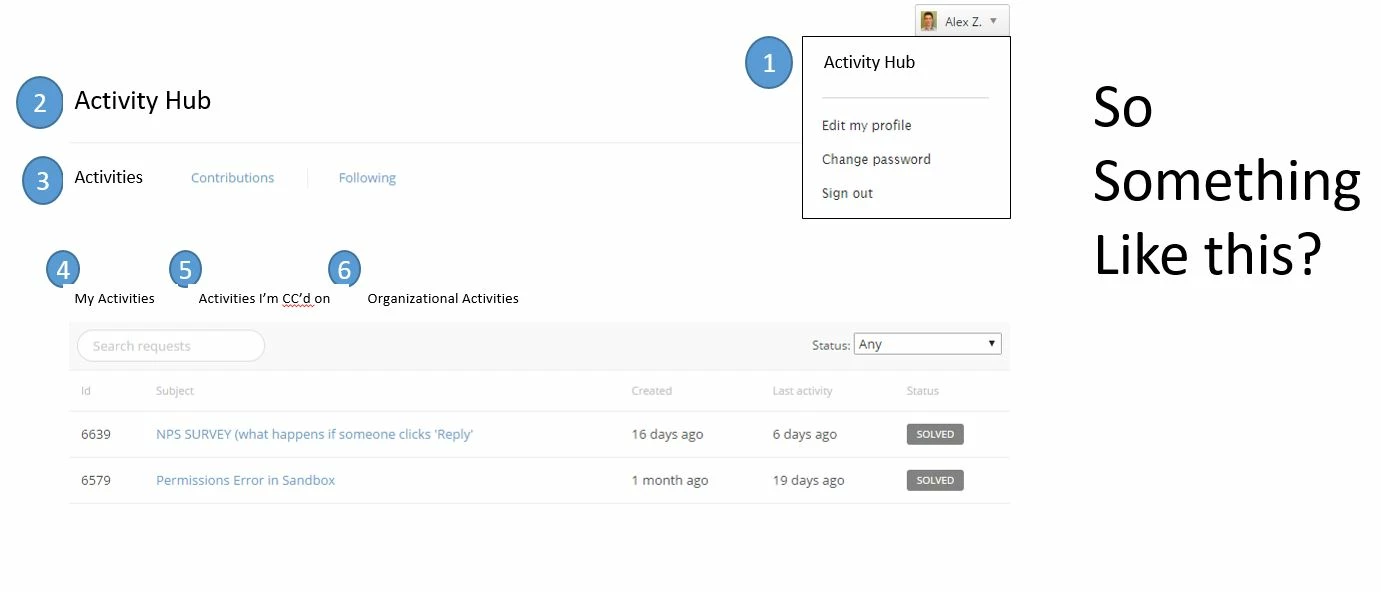
Is there any way to change the text for all of the following areas? see attachment


  • June 20, 2016

Hey Alex!

It may be possible to do this by customizing the code in your Help Center, but that outside my area of expertise. We have several folks here who are good at customizing the Help Center, so hopefully one of them will be able to jump in!


Rafael23
  • September 13, 2016

I'm also trying to change the text for all the areas Alex Zlatkus asked for, but up till know I could't do it.


Mart12
  • May 16, 2017

:( I tried this modification, but where it should say "My Activities" it says "Liquid error: undefined method..."

I added this above snippet after the final closing brackets..

Then Inside the final brackets. Same error.

Now I have removed it altogether, but the error persists across multiple devices.. so its not a cache thing.

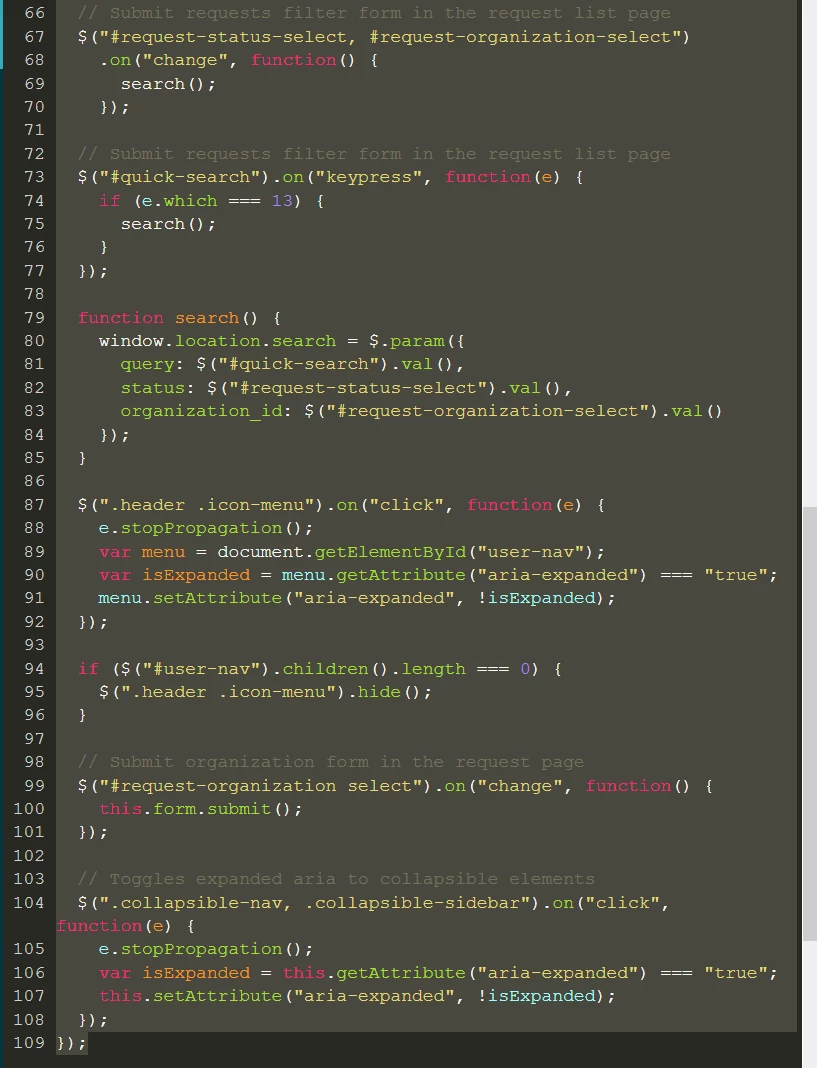
I don't know what I did.. here is the js code. perhaps I deleted one character too many.. I didn't grab the code before I started... :/


Mart12
  • May 16, 2017

it seems it was a cache issue. appears to have gone away


Nicole17
  • May 16, 2017

Glad to hear it seems to have resolved itself. Let us know if you have further questions. 


  • May 30, 2017

Hi, 

I copied the first code and in the English version it was everything ok, but when I tried to do it for the french one it didn't appear. In fact, now we have only the Eglish text for all the other languages. 


May I see how did you insert it to the JS tab? 


Thanks!