Back up your Help Center articles at the click of a button! | Community
Skip to main content

Back up your Help Center articles at the click of a button!


Show first post

257 replies

  • March 6, 2017

@ Felix, thanks for doing this as I have had to rely on one of our Devs to run something using the API and they don't do it very often. It'll be great to run this myself.

I see there should be a log file, but I haven't got one, & I have set Windows 7 to see hidden files and folders.

I sent you an email with further information, but thank you for doing this. It will be very useful. :)


Felix11
  • Author
  • March 6, 2017

@Sue - Thank you for checking out kBackup, I have received your email and have gotten back to you. Speak to you soon!


  • April 13, 2017

Hello!

I’m a developer with experience with C# and the Zendesk API.

I’m wondering if there’s some way that I could use what you’ve already written to write code to do automated backups for all of our subdomains. Either through a code library, or something similar. I’m looking at it, and it looks like I might just be able to automate the use of the GUI… But, that’s clearly not ideal.

Thanks!


Felix11
  • Author
  • April 13, 2017

@Alex - Hey there! Thanks for checking out kBackup. My code is not currently public but I definitely see the demand for such a feature and it's something that I am looking into. At the moment it's not something that could be easily edited as it would mean that credentials need to be saved locally and this is not something kBackup currently does. That being said, there will be a new version of kBackup with a lot more functionality and features which will allow you to remember credentials and in turn also complete automated backups. For more info on features that are already on the roadmap check out this post here. I hope this helps, but let me know if you have any other questions. 


  • April 13, 2017

Thanks for the quick response!

Trust me, I understand the dangers/challenge of making code publicly available; especially if it wasn’t designed to be public in the first place.

Any idea on when those new features will be ready/released? I’m just trying to figure out if it’s worth it to try to implement something basic (either using GUI hacks to use your program, or implementing my own calls to Zendesk’s API) for automated backups.

And yeah, having the code be publicly available would be fantastic!

Thanks!


Felix11
  • Author
  • April 14, 2017

@Alex - No worries at all. Yep for sure, it can be a little tough. The new version is still very much a work-in-progress, but I spent some time last night enhancing the current version to allow you to run kBackup through CMD. This should then allow you to create a scheduled task and simply pass in your credentials via arguments. If you want to email me at felix.stubner@gmail.com I can send you a version to test once I have completed this functionality. I look forward to hearing from you. 


Dave58
  • April 30, 2017

Hi, Felix:

My export stalls at 95 out of 158 articles.  I get this error: "The general exception was hit: The specified path, file name, or both are too long.  The fully qualified file name must be less than 260 characters, and the directory name must be less than 248 characters."

corganic.zendesk.com

Thanks,
Dave


Felix11
  • Author
  • April 30, 2017

@David - Hey there. I've had a look at this issue and ran through it with my dev version. This issue appears as a result of the way kBackup saves files. It takes the title of an article and then uses that as the file name with certain characters removed (as they are not allowed in file names). However, in this case, a handful of the articles in corganic.zendesk.com have a very long title which is exceeding the character limit of file names/paths in Windows. I will need to look into this further as I would need to either truncate the names for those files or change the way files are being saved. 


Dave58
  • May 1, 2017

Felix:

Yea, I thought it might be the long article titles.  If you come up with a solution, please let me know. 

Thanks,
Dave


Felix11
  • Author
  • May 25, 2017

@David - I hope you are keeping well! I am currently finishing up on some functionality that will, by default, shorten file names to a max character length. This should resolve the issue of files not being backed up as a result of file names that exceed the maximum number of characters allowed by Windows. If you want to email me at felix.stubner@gmail.com I will send you a version as soon as it's ready. Speak to you soon!


  • May 26, 2017

Hi Felix,

I wanted to try your app, but the download link seems to be inactive now - http://dstats.net/download/http:/www.fail2reap.com/downloads/kbackup.zip 

I'd appreciate any help you can provide.

Thanks,

Ryan


Felix11
  • Author
  • May 26, 2017

@Ryan - Thanks for letting me know, I am migrating to a new hosting provider at the moment so some links need rebuilding. I have updated the download links. Let me know if you run into any issues. Have a good weekend!


  • February 1, 2018

Hello Felix - Hope you're doing well. 

We might be migrating to Multibrand in the coming months, and I was wondering what would be the impact on your app. Will it be able to export the content from all brands guides? or not at all?

Thanks!


Felix11
  • Author
  • February 2, 2018

@Rim - Thanks for stopping by to try out kBackup. I am not very familiar with Multibrand but from what I understand, each brand has its own subdomain. As such simply using the appropriate brands' subdomain when running the backup should allow you to download the content from each brand. I hope this helps to answer your question but if there is anything else, don't hesitate to reach out to me by email. Have a lovely weekend!


  • February 2, 2018

Ok then Felix! As always, thanks for your prompt answer and have a nice one!


  • February 9, 2018

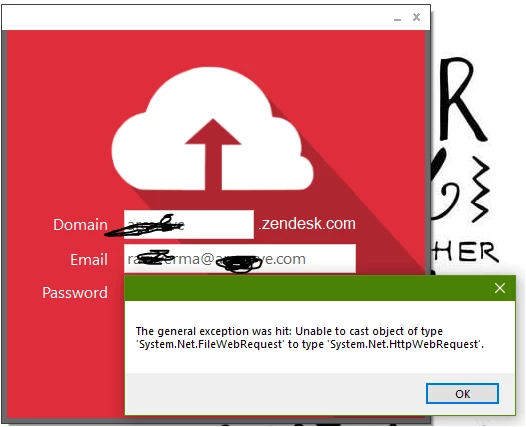
Hit an error

Any suggestions?


Felix11
  • Author
  • February 9, 2018

@Ravi - Thanks for getting in touch. To investigate this error could I ask you to send me an email at felix.stubner@gmail.com with your domain name and a username/password if access to it is not public. From there I'll be able to debug the issue and get to the bottom of it. Speak to you soon and have a good weekend!


  • March 22, 2018

Hi Felix, thanks for teh APP which is very usefull. Therefore I cannot get backup of all my articles.

It looks it backs up only articles which are both translated in FR and EN. Actually, I would like to get all of them (FR only, EN only & FR/EN ones). Is this possible? Worse to be able to select what we what to back up.

Many tahnks for your help


Felix11
  • Author
  • March 22, 2018

@Cedric - Thanks for your email, I've gone ahead and responded. Speak to you soon!


  • April 10, 2018

Looks like a great app! Any plans to release a Mac version?


Felix11
  • Author
  • April 11, 2018

@Marci - Thanks for reaching out! At the moment I haven't been actively developing kBackup as other projects have taken up most of my time. Mostly fixing bugs that users had come across. At some point, I would like for the app to be cross-platform but no specific timeline on that yet. Lemme know if you have any other questions, you can also drop me an email at felix.stubner(@)gmail.com. Have a good evening!  


  • May 21, 2018

HI Felix, Great tool, seems to be downloading ATM so I hope it all works out!

I wonder if you have a similar tool for uploading?

Im looking to upload to a sandbox so would love to be able to do this with minimal fuss - just as kBackup appears to achieve!


thanks

Howie


Felix11
  • Author
  • May 21, 2018

@Howie - Thanks for getting in touch, glad to hear all is well with kBackup. At the moment I don't have a tool available for easily reuploading all the data. Should something like that be available in the future I'll keep the post updated. If you have any other questions lemme know, have a lovely week!


  • August 3, 2018

I just downloaded and installed.  When I plug in my creds, it continues to tell me my user and password are incorrect.

That is not the case.  I tested with ZD.  I cannot figure out why my credentials are not working for this app.  Am I missing something in the setup?


Brian


Felix11
  • Author
  • August 3, 2018

@Brian - Thanks for giving kBackup a try. Before downloading the app had you reviewed the requirements to ensure your account has access to the API?

If that all checks out I can debug the issue. Feel free to reach out to me by email to felix.stubner(at)gmail.com and I can review the issue further. Have a great weekend!