Back up your Help Center articles at the click of a button! | Community
Skip to main content

Back up your Help Center articles at the click of a button!


Show first post

257 replies

  • November 28, 2016

Hi Felix,

Tool works fine, thank you.

For some reason it seems to backup only english artcles at the moment.

I have also Finnish translations of almost every article, but any of those are not being exported.

This isn´t really any problem, most important thing is to have base materials backed up and it´s easy to translate again if needed.

I just noticed another thing that should be noticed. I was able to also download all the articles restricted to Agents and Managers when I used End-user account. This can be issue if some customer would find this tool and have access to all data.


Felix11
  • Author
  • November 28, 2016

@Joni - Thanks for getting in touch and trying out kBackup. Multiple localizations of the same content is something that slipped my mind when I was writing the post above. However it is something I have though about and would require a bit of work. I'll note it down for a future release.

Regarding your ability to download content that should be locked. I have done some testing on this when I first created the app. The way that it works for Zendesk is that if you do not provide valid credentials to a user account when logging in through kBackup, you will still be able to retrieve all content that is visible publicly by anyone. You should not be seeing content that the user should not have access too. If this was the case then it would be an issue with the Zendesk API that

If you have any additional questions or if there's anything else I can do for you please don't hesitate to get back to me.

Kindest regards,

Felix S.


  • November 28, 2016

Migration & restoring backups would be amazing! My company is going through a rebranding effort & these features would make rebranding our Help Center content infinitely easier. Any estimate on when the next release might occur?


Felix11
  • Author
  • November 28, 2016

@Jenny - Yep it does seem to be a widely requested feature ^.^ The deadline I have give myself is mid to late December so I hope to have this functionality available by then. Hope this helps.


  • November 28, 2016

That might be a little late for my deadline, but just knowing it's forthcoming is huge. My company likes to rebrand often, so I'm sure I will have more chances to make use of it!

Thanks for all your hard work!!


Felix11
  • Author
  • November 28, 2016

I'm sorry to hear that Jenny, well hopefully it will be something you can leverage in the future.


  • November 29, 2016

Thank you Felix!  Exciting news on the refinements on the horizon.  Question for you on the automatic backups.  Anyway to we can utilize some command line parameters to have the auto-backup on a network share instead of just locally on the PC?


  • November 29, 2016

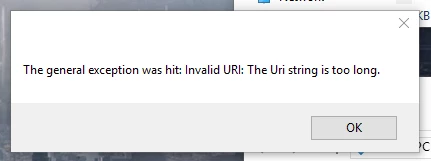
When doing a backup, I'm getting the following message: The general exception was hit: Invalid URI: The URistring is too long.

I click OK then it says backup completed to path: ...date_time

- and only one article is backed up.

Backup log has one line: article_206417067: https://riseinc.zendesk.com/hc/en-us/articles/232057588-How-to-fix-PDF-files-not-opening-with-Adobe-Acrobat-Reader


Felix11
  • Author
  • November 29, 2016

@Corrin - You will be able to select any drive that your PC has access to, however I still need to do some testing whether or not there are any implications when backing up to network drives specifically.

@Kim - Sorry to hear you are running into some trouble there, could you email me your Zendesk domain name to felix.stubner@gmail.com and I can look into this for you.


  • November 29, 2016

@Felix

Thanks for the update!  I will look forward to hearing more to see if we can backup direct to our FTP location.


  • December 16, 2016

Heya! I love this tool, but am having an issue. Only about half of our articles get backed up (I'm using v0.6). The ones not getting backed up seem to be random, though I wonder if it's related to this message:


Felix11
  • Author
  • December 16, 2016

@Duke - Hey, thanks so much for giving kBackup a try. Sorry to hear that you are having an issue here. It appears that the way that images are backed up varies very widely from user to user. This is like a way images are stored which I did not account for.

I will need to investigate what exactly gets returned and what the URL string is, could you email me at felix.stubner@gmail.com with your Zendesk sub-domain.

Speak to you soon!


  • January 11, 2017

Hello Felix,

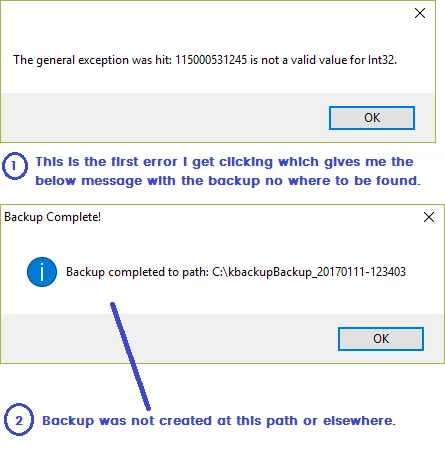
I tried taking a backup of my help center but it did not work and got the attached error message.

"The general exception was hit: 115000531245 is not a valid value for Int32."

I am using Windows10


  • January 11, 2017

Felix - Is it technically feasible to perform a backup of a Custom Help Center theme?  If so, it would be a great addition to your tool.  

Currently, the process is painstaking, where you need to copy HTML from each of your 14 custom files, put the code into backup files locally, then do the same with CSS, JS, then backup all assets.  

It currently takes about a half-hour to do a backup.  Instead, if a Zip file could be created with all of that info, it would take less than 1 minute for each backup.  

Zendesk has been dragging their feet in creating a tool for a couple years now (see https://support.zendesk.com/hc/en-us/community/posts/203452656-Save-a-copy-of-your-Custom-Theme-in-Help-Center).

Anyway, just thought I'd ask.


Felix11
  • Author
  • January 11, 2017

@Neal - Thanks for checking out the tool. I am it 100% sure if this information is available through the api. If it is then I don't think it would be difficult to do. I will add it to my list but there are some other features I'd like I get completed first. Thanks again for getting in touch! :)


Felix11
  • Author
  • January 12, 2017

@Kamlesh - Thanks for checking out kBackup, sorry to hear that you are running into an error with it. It appears that a number of users have had a similar issue as a result of one of one of the integers that get's returned from the API is now int64 and no longer in32. 

For the most part, this is a breaking change. As I am currently working on the next version of the app I will be looking to implement a fix for this.

I will update this thread as soon as I have the new version available for everyone.


  • January 18, 2017

Hi Felix.  I am having a similar error has Kamlesh.

'The general exception was hit: 115001018047 is not a valid value for Int32'

Thank you for your hard work.


  • January 20, 2017

Hi Felix,

I just discovered this tool but ran into the same error:

I'm an admin


Felix11
  • Author
  • January 20, 2017

@Doug @Kris - Sorry to hear that you are both running into this issue too. It appears to be affecting pretty much everyone. I will try to create a fix for this version over the weekend. If you could email me at felix.stubner@gmail.com with these details that would be great. Once I have a version with a fix ready I can let you know.


  • January 20, 2017

Hi Felix,

Thanks for your swift response.  By details, do you mean the error string? Or is there anything else I can provide?

url: voyagersearch.zendesk.com

locale: en-us

I'm an admin for our system


Felix11
  • Author
  • January 23, 2017

@Doug - thanks for getting back to me. I'll be getting back to you by email shortly.


  • February 14, 2017

Hi Felix,

Thank you for this app, it is amazing!  I just wanted to drop a quick note that I emailed you in regards to the error message:

The general exception was hit: The URI prefix is not recognized.

I see someone else posted this and you needed the sub domain, which I included in the email to you.  Was able to get a little less than half of our articles extracted and it looks great!  Would you be able to take a look so I might be able to pull the rest?  Thanks for all of your work, I was very happy to find this app.

Regards,

Nate


Felix11
  • Author
  • February 15, 2017

@Nate - Thanks for getting in touch and also trying out KBackup :) Thank you for sending me a message with the info. In a recent update to kBackup I actually added a really handy log file which you should be able to find in the backup folder that was created. The file should be called urllog.txt. If you could send this to my email felix.stubner@gmail.com I would really appreciate it. I will take a look later when I get home and look at adding a fix to kBackup for this type of URL. Looking forward to your mail, speak to you soon!


  • February 16, 2017

@Felix

Question for you.  Have you included or explored the ability to export Community posts and comments?  Is this included in the Help Center backup?  And if so, is it possible to export only Community?  We recently launched Community and as Zendesk does not support private alias identities we may be offboarding to a new Community platform we would tie to our Help Center knowledge base via link on the home page..


Felix11
  • Author
  • February 16, 2017

@Corrin - Hey, thanks for stopping by again! :) At the moment it is not something that is included. But it is something that I am planning to include, I have been mostly updating the old version at the moment with fixes for issues but I hope to continue working on the new version again soon.