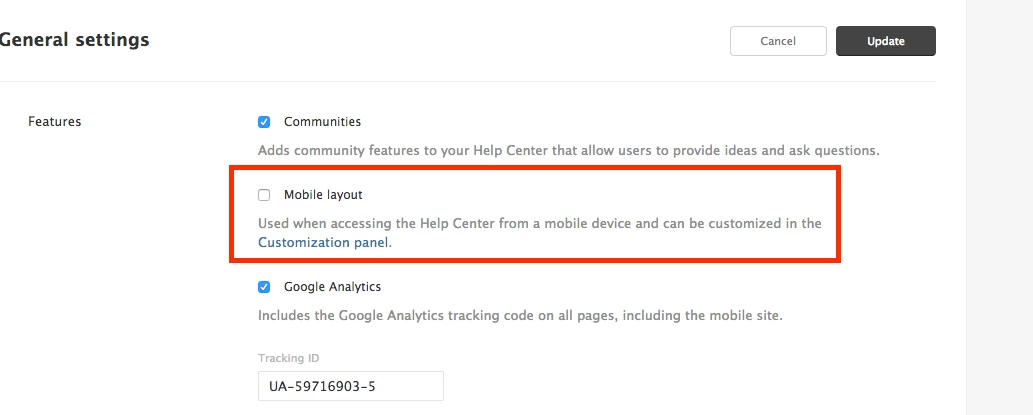
Zendesk note: This tip is addresses the use case where you want to hide the submit a request link until the user signs in, and not restrict tickets in all channels to sign-in users. Alternatively, you can restrict all ticket submission to signed-in users, and prompt users in the Help Center to sign in when they click submit a request (see this article).
Problem: Many organization having their HC on public URL want's the ability to have only signed-in users (end users) to have access to submit a ticket page (new request page).
Solution: Using the below code you can prompt the user to sign-in/signup in order to send a ticket. Zendesk note: Instead of using the JSS in this tip, you might consider using the signed-in helper as described in this comment and the subsequent comment.
- Login into your Help center as admin/agent
- Click customize design
- Click Edit theme
- On HTML replace the submit a request component by adding class=“request” to the element you want to wrap submit-a-request button.
- For an e.g. see how below screen
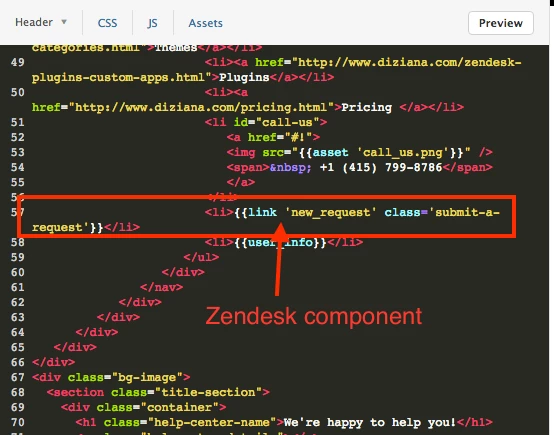
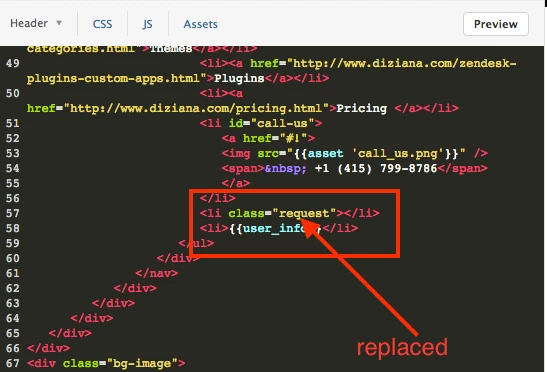
- Now go to JS and paste the below code:
 (function(_w, _d, $){

   $(_d).ready(function(){
     var _locale = window.location.pathname.replace('/', '')
     .replace('?','/').split('/')[1];
     if (HelpCenter.user.role=='end_user') {
       $('.request')
       .html('<a class="submit-a-request" href="/hc/'+
       _locale+'/requests/new">'+
       'Submit a request</a>');
     } else if (HelpCenter.user.role=='anonymous') {
       $('.request')
       .html('<a href="/hc/'+
       _locale+'/signin">'+
       'Submit a request</a>');
     }
   });

 }(window, document, jQuery));
- Save and publish the changes.
This would ask your non-logged in user to sign-in/sign-up if they want to submit a ticket on your public help center.
Get its touch (support@diziana.com) if you face any problem.
Cheers,