
Agent Activity | Community
Skip to main content

Agent Activity

  • May 8, 2025
  • 4 replies
  • 0 views

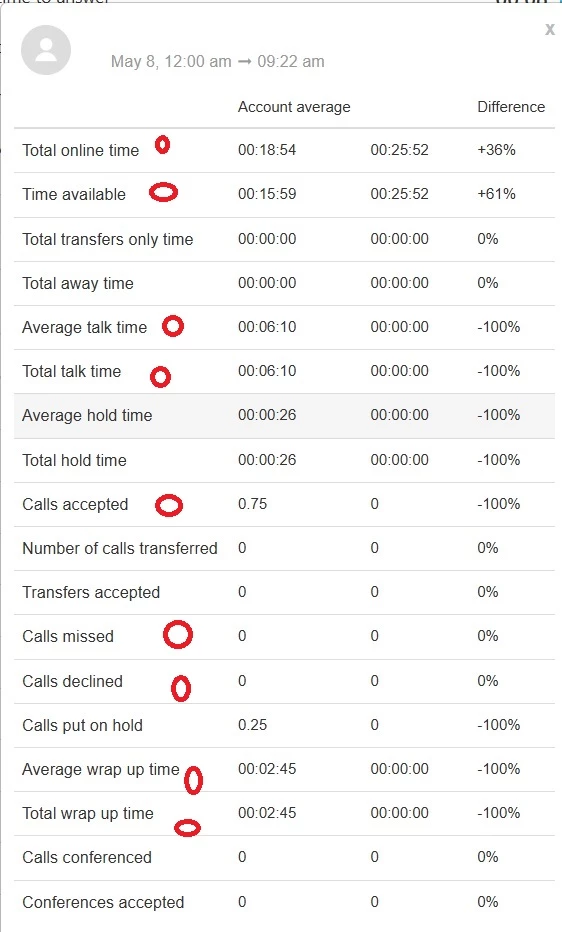
I'd like to better understand our agent's day.  When they go online.  How long they spent available how many calls they took etc.


Mostly, it's a recap of the attached report which we can get from the Talk Dashboard when you click on MORE, but it's per Agent. . . I'd like to see this with multiple agents in there.  and it doesn't need to be live.  A historical look over time is appropriate.  
 

4 replies

  • Author
  • May 12, 2025

I'd love to grab even this report over time. . . 


  • June 10, 2025

Hi @david52 !

The closest we have would be in Explore. Specifically Explore recipe: Reporting on agent state
Your team can create a custom report using the Agent state dataset: Metrics and attributes for agent state, activity, and productivity
Or use the prebuilt dashboard instead: Analyzing agent state and activity


  • June 12, 2025

Having a consolidated report with login times, availability duration, and call count would make it easier to manage team productivity.


Francis14
  • June 12, 2025
Hi Marin,
 
While Zendesk does not currently offer a native, all-in-one report with these exact metrics, there are a few ways you can achieve similar visibility:
 
  1. Zendesk Explore: If you are using Zendesk Explore (our reporting tool), you can build customized dashboards that include these metrics by leveraging data from Zendesk Tickets, Talk, and Agent Activity datasets. For example, you can track agent login/logout times, total online duration, and call statistics.
  2. Talk Dashboard: The Talk section provides call volume and agent activity statistics, which includes call count and availability for agents using Zendesk Talk.
  3. Third-Party Integrations & Apps: There are apps and integrations in the Zendesk Marketplace designed for advanced time-tracking and productivity analytics.
  4. API Access: If you have development resources, Zendesk’s APIs allow you to export raw event and audit data which can be compiled into a custom, consolidated report according to your team’s needs.
