Adding a notification banner to your Help Center v2 | Community
Skip to main content

Adding a notification banner to your Help Center v2

  • February 8, 2016
  • 293 replies
  • 0 views

Show first post

293 replies

Active Feature Request (please vote):

Feature Request: Add a notification banner to Help Center

@Wes Drury

I know you saw the Feature Request I just posted for this at the link below. But, this is for everyone else, If you would like to see this feature please head over there and show your support. Please make sure to add an upvote and comment even if it is simply a "+1"

Also, you may consider adding it to your post to get the feature request more visible.

https://support.zendesk.com/hc/en-us/community/posts/360046767274-Feature-Request-Add-a-notification-banner-to-Help-Center


  • July 2, 2020

This super useful, thanks! If you don't have access to a developer or you don't know how to code yourself, you can check out newclick.io. It's a great little SaaS app to design and display announcement banners. I created it and use it quite a bit with some of my clients that need notification messaging for outages and feature updates! 


Chris191
  • October 15, 2020

Out of interest, and apologies if i'm in the wrong place, I've been using the banner for some time now on the homepage of a help centre using the label of 'announcement'. Is it possible to use multiple labels and have each banner coded differently - ie an announcement banner in an orange, and a hints and tips one in blue for example?

Thanks


Kyle25
  • October 15, 2020

@Chris Horroll I just logged on to post this exact question. Looks like you beat me by 6 hours. 

I tried to duplicate the script but change the label that it looks for, but that didn't work. Following to see if we can find the answer.


@Chris Horroll

Wes would be the best person to ask but taking a quick look at the code you should be able to modify it to have multiple announcements types or variations by using different trigger labels.

The following instructions should get you most of the way there. Let me know if something does not work as expected. I can try and help.

-------------------------------------------------------------

Assumptions:

  • You do not want multiple announcements on the same page. 
  • You know how to change the CSS code to get your expected outcome

Caveats:

  • You are ok with duplicating code
  • This will be inefficient
  • This will most likely break if you tried to use multiple labels at the same time and that is ok.
  • There will be some trial and error since I have not implemented this code on my site.

Allow multiple labels to be used:

  1. Duplicate the Zendesk.js code from the repo
  2. In the duplicated code change the "label_names=alert" to whatever the new label you want
  3. Test that the new trigger label will also trigger the notification banner.

That should allow you to have different labels that you can use.

Change the CSS for the new trigger label:

  1. Identify the CSS that needs to be adjusted for the change you want to make
  2. Duplicate the specific class or classes in the same place and suffix the class name with something (a number or the label) Example: .ns-box-hint or .ns-box-1
  3. Keep track of all of the classes that were changed

That should allow for different colors and versions

Adjust the code for the new trigger label:

  1. Find the zendesk.js duplicated code with the different trigger label
  2. On the line with "var style1=" change any of the classes you created previously for the new label

That should allow you to change the label and different CSS code will be used to generate the notification. i.e. whatever change you want shows up

----------------------------------------------------------


Kyle25
  • October 15, 2020

Thanks, Alejandro! That worked! For a little more detail on what Alejandro explained, here is what I did:

In the .js file, I changed this:

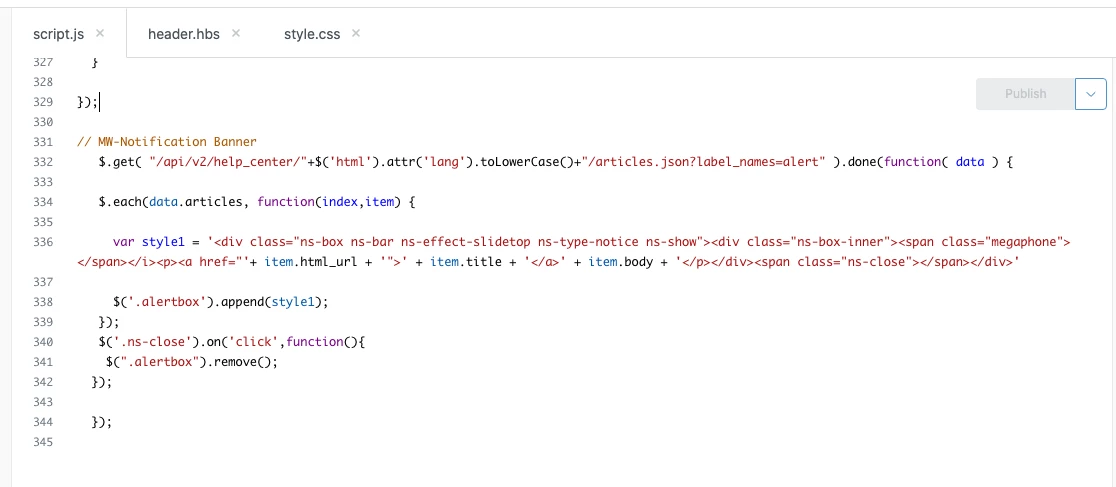
  // MW-Notification Banner
$.get( "/api/v2/help_center/"+$('html').attr('lang').toLowerCase()+"/articles.json?label_names=alert" ).done(function( data ) {

$.each(data.articles, function(index,item) {

var style1 = '<div class="ns-box ns-bar ns-effect-slidetop ns-type-notice ns-show"><div class="ns-box-inner"><span class="megaphone"></span></i><p><a href="'+ item.html_url + '">' + item.title + '</a>' + item.body + '</p></div><span class="ns-close"></span></div>'

$('.alertbox').append(style1);
});
$('.ns-close').on('click',function(){
$(".alertbox").remove();
});

});

to this:

  // MW-Notification Banner
$.get( "/api/v2/help_center/"+$('html').attr('lang').toLowerCase()+"/articles.json?label_names=alert" ).done(function( data ) {

$.each(data.articles, function(index,item) {

var style1 = '<div class="ns-box ns-bar ns-effect-slidetop ns-type-notice ns-show"><div class="ns-box-inner"><span class="megaphone"></span></i><p><a href="'+ item.html_url + '">' + item.title + '</a>' + item.body + '</p></div><span class="ns-close"></span></div>'

$('.alertbox').append(style1);
});
$('.ns-close').on('click',function(){
$(".alertbox").remove();
});

});
$.get( "/api/v2/help_center/"+$('html').attr('lang').toLowerCase()+"/articles.json?label_names=alertresolved" ).done(function( data ) {

$.each(data.articles, function(index,item) {

var style2 = '<div class="ns-box2 ns-bar ns-effect-slidetop ns-type-notice ns-show"><div class="ns-box-inner"><span class="megaphone"></span></i><p><a href="'+ item.html_url + '">' + item.title + '</a>' + item.body + '</p></div><span class="ns-close"></span></div>'

$('.alertbox').append(style2);
});
$('.ns-close').on('click',function(){
$(".alertbox").remove();
});

});


Then went into the .css file and changed this:

/* change the text color by editing "color"  */
.ns-box {
background: #e84325;
position: center;
line-height: 1.4;
pointer-events: none;
color: #e7e7e0;
font-size: 84%;
border-bottom: 1px solid #e7e7e0;
}

to this:

/* change the text color by editing "color"  */
.ns-box {
background: #e84325;
padding: 10px 10px 10px 10px;
line-height: 1.4;
pointer-events: none;
color: #e7e7e0;
font-size: 84%;
border-bottom: 1px solid #e7e7e0;
}
.ns-box2 {
background: #008E13;
padding: 10px 10px 10px 10px;
line-height: 1.4;
pointer-events: none;
color: #e7e7e0;
font-size: 84%;
border-bottom: 1px solid #e7e7e0;
}

Now I get a red banner when there is an "alert" and a green banner when there is a "alertresolved". 


Thanks again!


Just glad I could be helpful.

To be honest, I am a little surprised.

Have a great rest of your day!


Chris191
  • October 16, 2020

366249934668

Thanks for your reply, really helpful. I was actually hoping to be able to use multiple labels at the same time, it's been a bit hit and miss but I've managed to get it to a point.
(Essentially I want to be able to have the announcements up, but also, have one below it for weekly tips. They won't always be both on display at the same time but i'm sure it will occur at some point)

So far:

the js

// MW-Notification Banner
if (window.location.href == "https://support.zoopla.co.uk/hc/en-gb") {
$.get( "/api/v2/help_center/"+$('html').attr('lang').toLowerCase()+"/articles.json?label_names=announcement" ).done(function( data ) {

$.each(data.articles, function(index,item) {
var style1 = '<div class="ns-box ns-bar ns-effect-slidetop ns-type-notice ns-show"><div class="ns-box-inner"><i class="fas fa-bullhorn"></i></i><p><strong>Announcement</strong></p><p><a href="'+ item.html_url + '">' + item.title + '</a>' + '</p></div><span class="ns-close"></span></div>'

$('.alertbox').append(style1);
});
$('.ns-close').on('click',function(){
$(".alertbox").remove();
});

});
$.get( "/api/v2/help_center/"+$('html').attr('lang').toLowerCase()+"/articles.json?label_names=toptip" ).done(function( data ) {

$.each(data.articles, function(index,item) {
var styletip = '<div class="ns-boxtip ns-bar ns-effect-slidetop ns-type-notice ns-show"><div class="ns-box-inner"><i class="far fa-comment-dots"></i></i><p><strong>Top Tip!</strong></p><p><a href="'+ item.html_url + '">' + item.title + '</a>' + '</p></div><span class="ns-close"></span></div>'

$('.alertbox').append(styletip);
});
$('.ns-close').on('click',function(){
$(".alertbox").remove();
});

});
}


the css

/*MW-Notificaiton Banner CSS */
/* Common, default styles for the notification box */

/* change the background color by editing "background" */
/* change the text color by editing "color" */
.ns-box {
background: rgba(255,87,34,100);
padding: 10px 20px 20px 20px;
line-height: 1.5;
z-index: 1000;
pointer-events: none;
color: rgba(255, 255, 255, 1);
font-size: 85%;
border-bottom: 1px solid #DDD;
}
.ns-boxtip {
background: rgba(26,155,224,1);
padding: 10px 20px 20px 20px;
line-height: 1.5;
z-index: 1000;
pointer-events: none;
color: rgba(255, 255, 255, 1);
font-size: 85%;
border-bottom: 1px solid #DDD;
}

.ns-box.ns-show {
pointer-events: auto;
}

.ns-box a {
color: rgba(255, 255, 255, 1);
opacity: 0.7;
font-weight: 700;
}


The Announcement bar is fine and has worked well, but the tip one:

  • Doubled in size
  • Not centred
  • Text colour doesn't follow suit as per the code

Do you have any suggestions? Much appreciated


@Chris Horroll

I had an inkling that was what you were looking for but I was not quite sure. 

There are probably a couple of issues you are experiencing. The first is that the separation of the CSS for each notification is not complete, this is what is most likely partly causing your issue with it not looking correct. The second is that you are most likely utilizing the same div class for each Notification Bar, this is also probably causing some issues as well.

CSS Issue

To fix the first issue, go through your CSS code and where the ".ns-box" is included in those will also have to be duplicated.

  • For example, I see that you created ".ns-boxtip" but I also can see that ".ns-box.ns-show" and ".ns-box a" have not been duplicated. Anywhere where the original ".ns-box" was it will need to be duplicated and replaced with the ".ns-boxtip"

Use Multiple Notifications on the Same Page

To add multiple notification bars to the same page, you will need to create a separate HTML div and class.

Duplicate HTML code provided for the Notification Bar

<!--This should be added at the very top -->
<div class="alertbox"></div>

I would suggest something like the following:

<!--This should be added at the very top -->
<div class="tipbox"></div>
   

The new code should look something like this:

<!--This should be added at the very top -->
<div class="alertbox"></div>

<!--This should be added at the very top -->
<div class="tipbox"></div>

Then you will need to update your js code from this:

// MW-Notification Banner
if (window.location.href == "https://support.zoopla.co.uk/hc/en-gb") {
$.get( "/api/v2/help_center/"+$('html').attr('lang').toLowerCase()+"/articles.json?label_names=announcement" ).done(function( data ) {

$.each(data.articles, function(index,item) {
var style1 = '<div class="ns-box ns-bar ns-effect-slidetop ns-type-notice ns-show"><div class="ns-box-inner"><i class="fas fa-bullhorn"></i></i><p><strong>Announcement</strong></p><p><a href="'+ item.html_url + '">' + item.title + '</a>' + '</p></div><span class="ns-close"></span></div>'

$('.alertbox').append(style1);
});
$('.ns-close').on('click',function(){
$(".alertbox").remove();
});

});
$.get( "/api/v2/help_center/"+$('html').attr('lang').toLowerCase()+"/articles.json?label_names=toptip" ).done(function( data ) {

$.each(data.articles, function(index,item) {
var styletip = '<div class="ns-boxtip ns-bar ns-effect-slidetop ns-type-notice ns-show"><div class="ns-box-inner"><i class="far fa-comment-dots"></i></i><p><strong>Top Tip!</strong></p><p><a href="'+ item.html_url + '">' + item.title + '</a>' + '</p></div><span class="ns-close"></span></div>'

$('.alertbox').append(styletip);
});
$('.ns-close').on('click',function(){
$(".alertbox").remove();
});

});
}

The updated code should look like this:

// MW-Notification Banner
if (window.location.href == "https://support.zoopla.co.uk/hc/en-gb") {
$.get( "/api/v2/help_center/"+$('html').attr('lang').toLowerCase()+"/articles.json?label_names=announcement" ).done(function( data ) {

$.each(data.articles, function(index,item) {
var style1 = '<div class="ns-box ns-bar ns-effect-slidetop ns-type-notice ns-show"><div class="ns-box-inner"><i class="fas fa-bullhorn"></i></i><p><strong>Announcement</strong></p><p><a href="'+ item.html_url + '">' + item.title + '</a>' + '</p></div><span class="ns-close"></span></div>'

$('.alertbox').append(style1);
});
$('.ns-close').on('click',function(){
$(".alertbox").remove();
});

});
$.get( "/api/v2/help_center/"+$('html').attr('lang').toLowerCase()+"/articles.json?label_names=toptip" ).done(function( data ) {

$.each(data.articles, function(index,item) {
var styletip = '<div class="ns-boxtip ns-bar ns-effect-slidetop ns-type-notice ns-show"><div class="ns-box-inner"><i class="far fa-comment-dots"></i></i><p><strong>Top Tip!</strong></p><p><a href="'+ item.html_url + '">' + item.title + '</a>' + '</p></div><span class="ns-close"></span></div>'

$('.tipbox').append(styletip);
});
$('.ns-close').on('click',function(){
$(".tipbox").remove();
});

});
}

That should allow you to have 2 completely separate Notification Bars.


Chris191
  • October 19, 2020

Worked a treat, and it made sense as to why too! Thanks for all your help Alejandro!


@Chris Horroll

Glad I could help. :)

Have a great rest of your day!


Kyle25
  • November 10, 2020

I have a strange issue that I can't figure out for the life of me. I'll post the code at the end of this. 

I have 2 alerts, one red for outages and one green for when the outage is resolved. I copied the code from the OP and made some minor tweaks to get it as desired. They both function properly, but the green alert is bigger (taller) than the red one. 

At first, I thought I tweaked the wrong thing, and maybe it was my margins or something. So I started from scratch. I coped the code from the OP again, made some changes to the sizing, and removed the megaphone kind of thing, and when I liked it, I copied that and made it my green alert, only changing the background color. So everything should be the same, yet it isn't. 

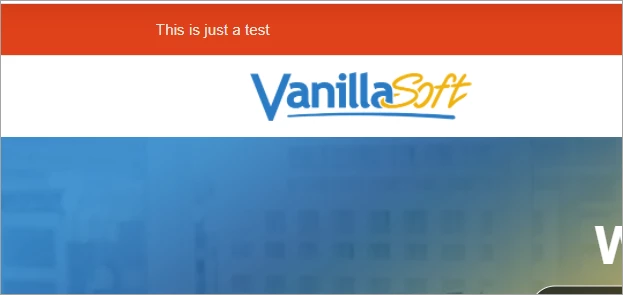
Here are some examples of what I mean. For this test, I used the same article without modifying it. I only modified the "label_names=alert" part to the .js to use style1 or style2. Here is the red alert:


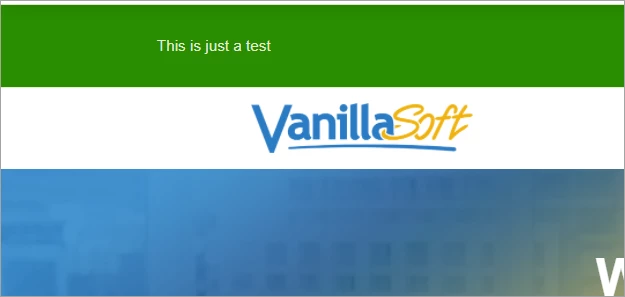
And here is the green alert:


The red alert is 53 pixels tall and the green is 84 pixels tall. No idea how there is a difference. 


Here is the code from my .css:

/*MW-Notificaiton Banner CSS */
/* Common, default styles for the notification box */

/* change the background color by editing "background" */
/* change the text color by editing "color" */
.ns-box {
background: #e84325;
padding: 15px 0px 15px 0px;
line-height: 1.4;
z-index: 1000;
pointer-events: none;
color: #e7e7e0;
font-size: 85%;
border-bottom: 1px solid #e7e7e0;
}

.ns-box2 {
background: #008E13;
padding: 15px 0px 15px 0px;
line-height: 1.4;
z-index: 1000;
pointer-events: none;
color: #e7e7e0;
font-size: 85%;
border-bottom: 1px solid #e7e7e0;
}

.ns-box.ns-show {
pointer-events: auto;
}

.ns-box a {
color: inherit;
opacity: 0.7;
font-weight: 700;
}

.ns-box a:hover,
.ns-box a:focus {
opacity: 0;
}

.ns-box p {
margin: 0;
}

.ns-box.ns-show,
.ns-box.ns-visible {
pointer-events: auto;
}

.ns-close {
width: 20px;
height: 20px;
position: absolute;
right: 4px;
top: 4px;
overflow: hidden;
text-indent: 100%;
cursor: pointer;
-webkit-backface-visibility: hidden;
backface-visibility: hidden;
}

.ns-close:hover,
.ns-close:focus {
outline: none;
}

.ns-close::before,
.ns-close::after {
content: '';
position: absolute;
width: 3px;
height: 60%;
top: 50%;
left: 50%;
background: #6e6e6e;
}

.ns-close:hover::before,
.ns-close:hover::after {
background: #fff;
}

.ns-close::before {
-webkit-transform: translate(-50%,-50%) rotate(45deg);
transform: translate(-50%,-50%) rotate(45deg);
}

.ns-close::after {
-webkit-transform: translate(-50%,-50%) rotate(-45deg);
transform: translate(-50%,-50%) rotate(-45deg);
}

.ns-box-inner i {
color: #fff;
font-size: 3.8em;

}

.megaphone:before {
content:'\1F4E3';
font-family: "entypo";
font-size: 2.2em;
display: none;

}

/* Top bar notifications */
.ns-box.ns-bar {
top: 0;
left: 0;
width: 100%;
}

.ns-bar .ns-close {
background: transparent;
margin-top: 15px;
right: 20px;
-webkit-transform: translateY(-50%);
transform: translateY(-50%);
display: none;
}

.ns-bar .ns-close::before,
.ns-bar .ns-close::after {
background: #b7b5b3;
}

[class^="ns-effect-"].ns-bar.ns-hide,
[class*=" ns-effect-"].ns-bar.ns-hide {
-webkit-animation-direction: reverse;
animation-direction: reverse;
}


/* Slide on top */

.ns-effect-slidetop .icon {
position: absolute;
display: block;
font-size: 109%;
top: 50%;
left: 1em;
-webkit-transform: translate3d(0,-20%,0);
transform: translate3d(0,-20%,0);
}

.ns-effect-slidetop p {
padding: 0 3.2em;
font-size: 1.2em;
display: inline-block;
}

.ns-effect-slidetop .ns-close::before,
.ns-effect-slidetop .ns-close::after {
width: 2px;
background: #fff;
}

.ns-effect-slidetop .ns-close:hover::before,
.ns-effect-slidetop .ns-close:hover::after {
background: #fff;
}

.ns-effect-slidetop.ns-show .icon,
.ns-effect-slidetop.ns-show p {
-webkit-animation-name: animScaleUp;
animation-name: animScaleUp;
-webkit-animation-duration: 0.3s;
animation-duration: 0.3s;
-webkit-animation-delay: 0.2s;
animation-delay: 0.2s;
-webkit-animation-fill-mode: both;
animation-fill-mode: both;
}

.ns-effect-slidetop.ns-show p {
-webkit-animation-name: animFade;
animation-name: animFade;
}

@-webkit-keyframes animScaleUp {
0% { opacity: 0; -webkit-transform: translate3d(0,-50%,0) scale3d(0,0,1); }
100% { opacity 1; -webkit-transform: translate3d(0,-50%,0) scale3d(1,1,1); }
}

@keyframes animScaleUp {
0% { opacity: 0; -webkit-transform: translate3d(0,-50%,0) scale3d(0,0,1); transform: translate3d(0,-50%,0) scale3d(0,0,1); }
100% { opacity 1; -webkit-transform: translate3d(0,-50%,0) scale3d(1,1,1); transform: translate3d(0,-50%,0) scale3d(1,1,1); }
}

.ns-effect-slidetop.ns-show,
.ns-effect-slidetop.ns-hide {
-webkit-animation-name: animSlideTop;
animation-name: animSlideTop;
-webkit-animation-duration: 0.3s;
animation-duration: 0.3s;
}

@-webkit-keyframes animSlideTop {
0% { -webkit-transform: translate3d(0,-100%,0); }
100% { -webkit-transform: translate3d(0,0,0); }
}

@keyframes animSlideTop {
0% { -webkit-transform: translate3d(0,-100%,0); transform: translate3d(0,-100%,0); }
100% { -webkit-transform: translate3d(0,0,0); transform: translate3d(0,0,0); }
}


And here is the code from my .js:

 // MW-Notification Banner
$.get( "/api/v2/help_center/"+$('html').attr('lang').toLowerCase()+"/articles.json?label_names=alert" ).done(function( data ) {

$.each(data.articles, function(index,item) {

var style1 = '<div class="ns-box ns-bar ns-effect-slidetop ns-type-notice ns-show"><div class="ns-box-inner"><span class="megaphone"></span></i><p><a href="'+ item.html_url + '">' + item.title + '</a>' + item.body + '</p></div><span class="ns-close"></span></div>'

$('.alertbox').append(style1);
});
$('.ns-close').on('click',function(){
$(".alertbox").remove();
});

});
$.get( "/api/v2/help_center/"+$('html').attr('lang').toLowerCase()+"/articles.json?label_names=alertresolved" ).done(function( data ) {

$.each(data.articles, function(index,item) {

var style2 = '<div class="ns-box2 ns-bar ns-effect-slidetop ns-type-notice ns-show"><div class="ns-box-inner"><span class="megaphone"></span></i><p><a href="'+ item.html_url + '">' + item.title + '</a>' + item.body + '</p></div><span class="ns-close"></span></div>'

$('.alertbox').append(style2);
});
$('.ns-close').on('click',function(){
$(".alertbox").remove();
});

});


Kyle25
  • November 10, 2020

After the good ol' "delete and see what happens" troubleshooting, I found that if I delete the padding for ns-box2, the height matches that of ns-box. Could the padding from ns-box affect ns-box2 somehow? That's very strange to me. 


@Kyle B

There might be a couple of issues you are experiencing. The first thing I see is that the separation of the CSS for each notification is not complete, this is what is most likely partly causing your issue with it not looking correct.

CSS Issue

To fix the CSS issue, go through your CSS code and where the ".ns-box" is included in those will also have to be duplicated.

  • For example, I see that you created ".ns-box2" but I also can see that ".ns-box.ns-show" and ".ns-box a" have not been duplicated. Anywhere where the original ".ns-box" was it will need to be duplicated and replaced with the ".ns-box2"

Joshua11
  • November 30, 2020

Is there any reason why this wouldn't work on the Sandbox? I've followed the instructions from Wes, and I think I've done it right, but the banner is not displaying. URL: https://medbridge1603833747.zendesk.com/

What would be most helpful for me to provide here?


  • December 1, 2020

Hey Joshua,

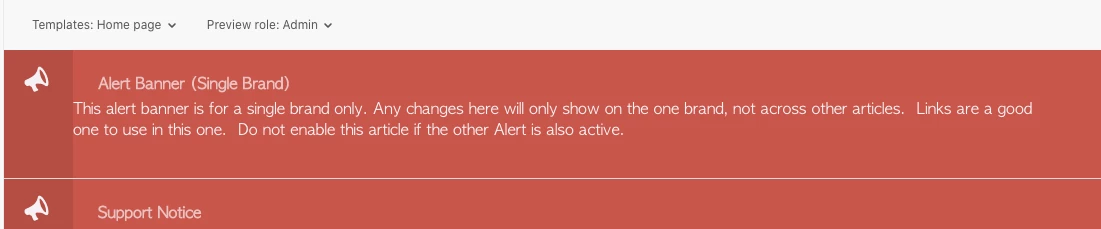
It should work in a sandbox. When you preview the changes as an Admin, does your banner show regardless of the publication state of the alert banner article? For example, this is the preview on one of ours - neither of the articles are published to be visible to end-users, but both banners (we have two articles set as templates for banners) are visible in the preview.

If it's not showing on Admin preview, that suggests something's not quite working for you in the html, js or css (for me it was something like a missing comma or bracket in script.js).  If it is showing in Admin preview, then check your visibility permissions and published state of your article with the alert label :)

Hope that helps!


Joshua11
  • December 1, 2020

@Harriet Klymchuk - thanks for the response. No, it's not showing at all. I'm not a coder - I just know enough to be dangerous. I'll comb through it and see if I'm missing a bracket or comma somewhere. A lot of the text is red in the js code and I assumed it was just part of the syntax coloring. XD

I'll have a look and see if I can figure it out. If not, you know I'll be back. :)

Thanks again!


Joshua11
  • December 1, 2020

@Harriet Klymchuk In the JS code, there are dollar signs and when I run the code through a javascript checker it says the $ is undefined. I checked the remainder of the JS code and there are no other $ occurring. Is that something that's defined in the CSS?


  • December 1, 2020

424615257913 Your summary of "I'm not a coder - I just know enough to be dangerous" is very much applicable to me as well (I love that description though and I'll be using that myself more often :D), so I'm not able to answer your question unfortunately! My js has dollar signs in though, so it the directions in the GitHub from Wes should work for you.

If it helps, I put the CSS and script at the very bottom of both respective files, after everything else (rows 331-344 below).  If I recall, I think the issues I had the first time around were trying to fit this in before the widget customisation, as I thought it would have to be higher up the script to be in order, but it can just go at the end no problem :)


Joshua11
  • December 3, 2020

@Harriet Klymchuk Thank you for that. And glad I could give you a new phrase. :)

It turns out that this code did NOT work on our sandbox. When I added it to a test version of our actual (non-Sandbox) site, it worked fine. I've been tweaking it to make it look the way we want. I still have some work to do to make it look good on mobile. And I'll probably be tweaking the code a little so we can have multiple alerts with different colors and icons.

Thanks for all your help!


Kyle25
  • December 17, 2020

I am a little confused about the proper way to make this happen. I can't really do testing since it can only be done live and when there is a notification needed (such as an outage). Here are a few questions I have:

- The article with the tag/info, does that have to be published in order to see the notification banner or can it be a draft? 

- Does the article have to be visible to everyone or can I leave it only visible to Admins/Agents? 

- There is sometimes a delay in seeing the banner, even if I clear cache. Is there something I need to change? 


That's it for me, for now at least. Thanks in advance. 


  • December 17, 2020

Hey Kyle, I'll try and help from my experience with this piece :)

- Yes, the article needs to be published in order for it to appear to whichever users have permission to view the article.  However it should show in the preview for you, regardless of whether it is published (at least it does for me :) )

- I'm not 100% on the second point I've only tested this in preview, but if it's published, the banner shows for all users, but the article that the banner is populated from only shows for the user segment it is aimed at.  (e.g. I have an article set to be for Agents and admins, it doesn't come up in searches or in the section, but the banner is visible).

- I sometimes see a delay in promoted articles and other Guide changes going live in general, so I think sometimes the theme needs time to update.  Normally I use an incognito window on Chrome to check any public facing changes.

Hope that helps!


Kyle25
  • December 17, 2020

Thanks for the reply Harriet Klymchuk!

My goal is to actually not have the article published. I only want it to be seen as a banner and nothing else. Not in searches or anything. I even removed a lot of the stuff that would allow the user to click on it and bring them to the article. When you say "preview," are you referring to the notification banner itself? 

I think a way around the delay would be to have multiple themes. One with no banner, one with a banner (and repeat for however many banners you have). Then if you need a banner to display, switch to the theme with that banner. That should work quicker (in my mind, at least). Does anyone have any thoughts on this theory? 


  • December 17, 2020

Hey @Kyle B sorry for any confusion! By preview I meant, previewing the theme in Guide (where you edit the templates) rather than looking at it on live. 

I've just checked one of our banners that's persistent at the moment and changed the settings to see how it looked and can confirm if you set the article to only be visible to Agents and admins (or other segment) then it won't show for all users or in any searches for end-users, but the banner stays visible. Personally, I don't think there's any harm in the article of the banner being searchable or visible - if it's published as a banner then it's intended for users to view, plus anyone who comes across the article may want to comment or vote on it (if you have those enabled).

With your templates option, I think that could work but changing the theme in order to change the banner content seems a bit more difficult to me than just editing the publication status or content in an article itself. I'm not sure if it'd be any faster either but worth testing on what works for you!  For us, it's great having the article option, as agents with access can edit the banners as needed without needing an Admin or Guide Manager to edit the theme.


Joshua11
  • December 28, 2020

Hey, @Kyle B - I can confirm what Harriet has told you.