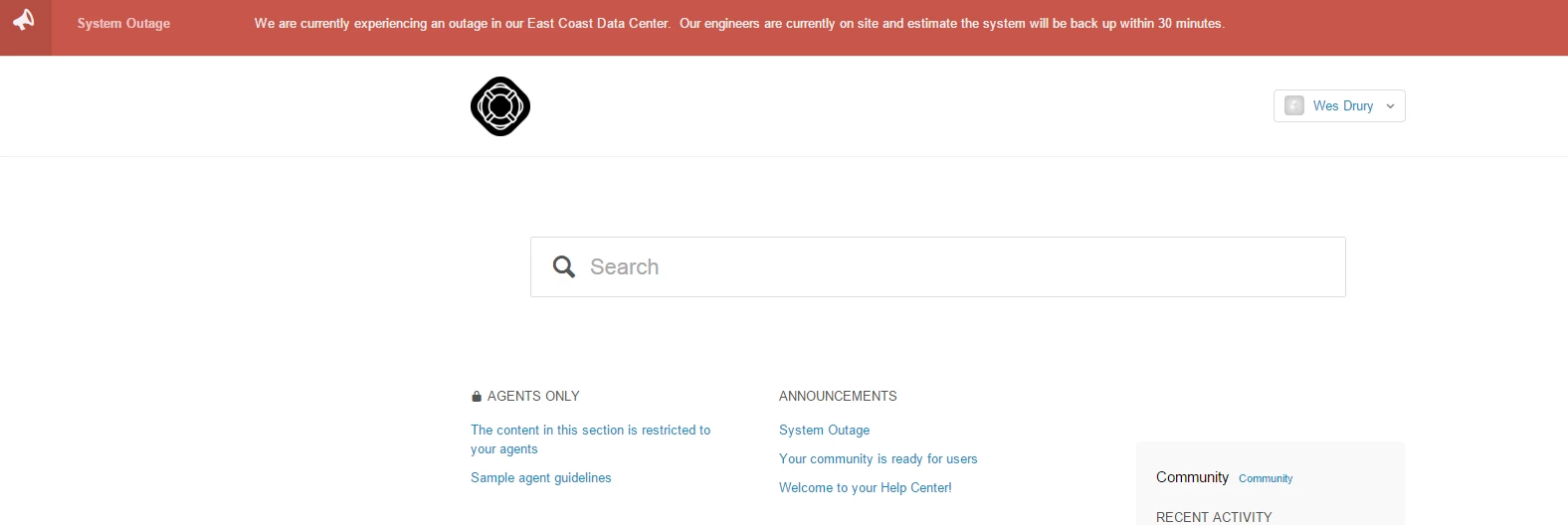
Adding a notification banner to your Help Center v2 | Community
Skip to main content

Adding a notification banner to your Help Center v2

  • February 8, 2016
  • 293 replies
  • 0 views

Show first post

293 replies

ModeratorWes

Hi Emma. The code is based upon a label on the article. If you want an alert to show then add the correct label and when you don't want an alert then just remove the label from the article. Hope this helps.


  • October 31, 2018

Oh that's perfect! Thanks Wes!


  • November 26, 2018

Hi,

It looks like the addition of this code has somehow affected the functionality of our Help Centre.

I'd pasted all code into our Copenhagen help centre as instructed, however, once in place the "add to conversation" button no longer works.

Once the code is deleted the button now works.

Could this be an effect of the recent Zendesk updates to Help Centre design?


ModeratorWes
  • Author
  • November 26, 2018

@Thomas. I’m pretty sure you are pasting the code in the wrong spot. Make sure the code is after the $document.ready function. It can’t be pasted at the very beginning or very end of the JS file. Please read the instructions carefully.


  • December 21, 2018

This is great and easy to implement, thanks! One question: how can I change the header in the banner to link to a page other than the source of the banner content. For example, I plan to keep the page used to update banner text only visible to managers and agents, so would like to link out to a different page in the help center when the end user clicks the link in the banner. Any help would be appreciated! Thank you.


  • December 21, 2018

Hi Mary!

I've checked with our Community Moderators to see if they can help you out with this. Hopefully one of them will have some insight to share!


  • December 21, 2018

Thanks! I actually managed to figure it out...

I changed the opening <a> tag of the js file to include the URL that I wanted the banner header to open, as in the following example:

var style1 = '<div class="ns-box ns-bar ns-effect-slidetop ns-type-notice ns-show"><div class="ns-box-inner"><span class="megaphone"></span></i><p><a href="https://yourURLhere.com">' + item.title + '</a>' + item.body + '</p></div><span class="ns-close"></span></div>'

Nicole17
  • December 24, 2018

Glad to hear that you got things working, Mary! Thanks for letting us know.


  • March 12, 2019

Hi Zendesk Support,
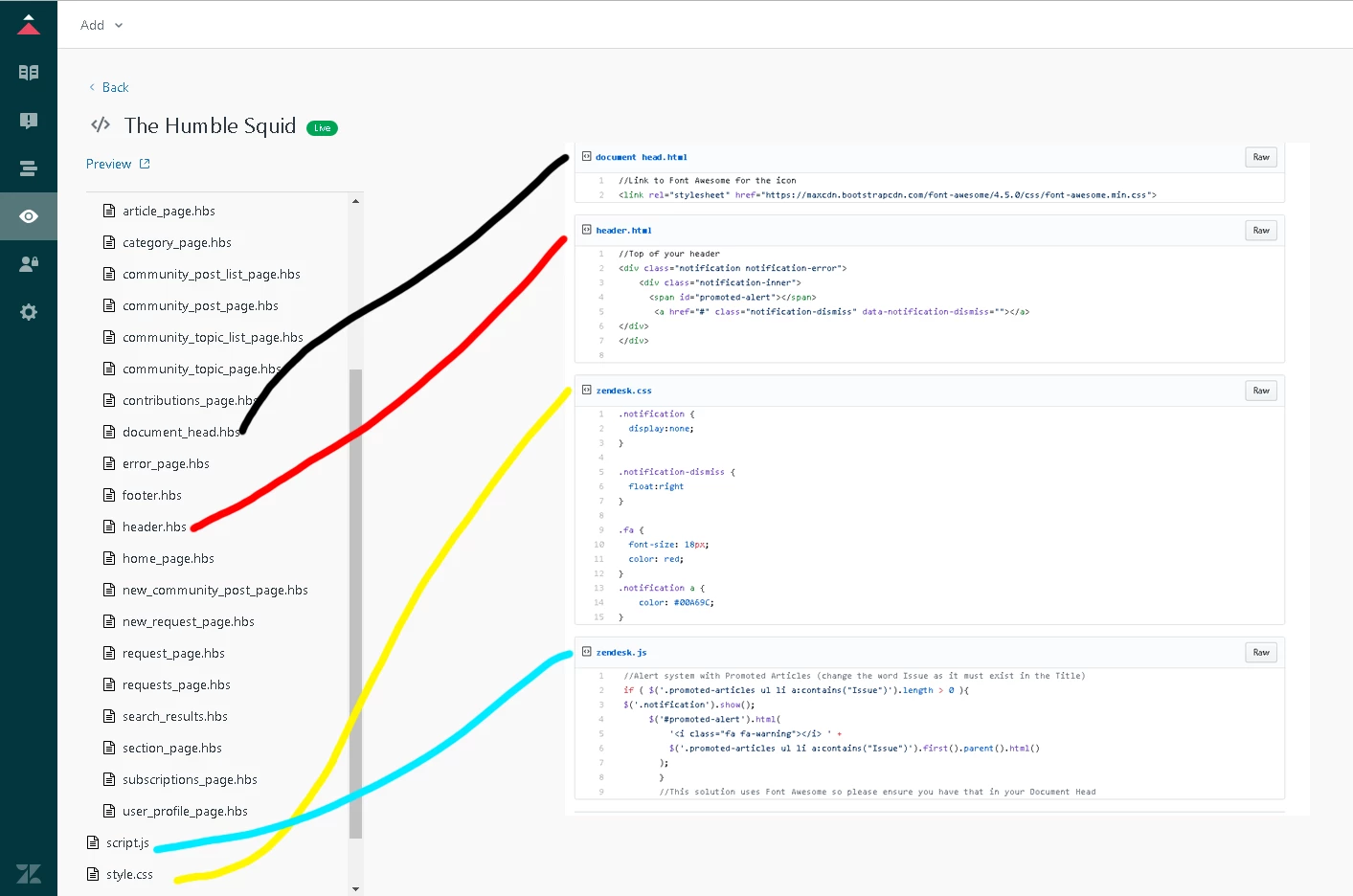
Is this the correct location of the codes that you have provided?


Brett13
  • Community Manager
  • March 12, 2019

Hi Clarence,

I do want to set the expectation that the code you're referencing was posted by one of our community members and is actually unsupported by us at Zendesk.

Judging from your screenshot I'd say the code is in the correct location. If you're experiencing issues you'll want to get your developers involved or you can post back here and one of our other community members may jump in :)

Cheers!


  • April 11, 2019

Hi,

Have people managed to get the banner to only display the first time a user accesses the Help Center (i.e. check for a certain cookie on loading, if the cookie is not present display the banner, when user closes the banner create the cookie so it isn't displayed next time)?

I know a few people  mentioned it - Wes said he'd done it for a customer site at one point.


Hello,

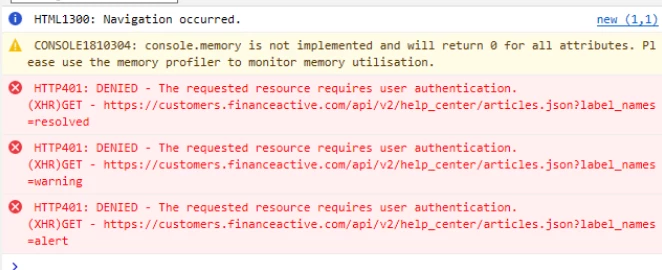
We set up a notification banner, which work fine for us and most of our users. However, one of our end user using edge reported that she was disconnected from the Help Center after a few minutes (3-5 min). browser's console shows authentication denied (401) on the following API calls that we've added in script.js

Have they already been reports of such bahevior on Microsoft Edge?


Dan28
  • April 29, 2019

Hi Thibault,

Microsoft Edge isn't a supported browser by Zendesk.  I suspect this may change in the near future as Microsoft has been rebuilding Edge to use the same backend as Google Chrome.  Are you seeing these errors with any other browser of just Edge? 


It has never been reported before so to my knowledge, only on Edge indeed. End user has now migrated back to IE and it seems to work fine for now... Irony?


  • August 29, 2019

Hi Wes,

I followed what you did exactly and this is what is outputting. What could the problem be?

Thanks


Dan32
  • September 18, 2019

Hey Krista

That $(document).ready(function() { (and the closing brace you need at the end) may be the culprit.


Can you open your browser console (right click->inspect-.Console) and put any errors that come up when the banner should load here? Or if you have the theme live, a link to a page that should have a banner?


Kelly34
  • October 23, 2019

This is great and useful, thanks for posting Wes. I'm curious why Zendesk doesn't have a function that easily allows us to turn on/off banners for outages/notifications/ect.

I suspect this is a common occurrence for support, and would be much easier if we can configure within Zendesk, versus needing to have some level of coding knowledge. Does anyone else feel the same?


  • November 22, 2019

This is so awesome, although I do wish that it was a native part of Zendesk and/or the Copenhagen theme.  The only problem I'm having is with color, for some reason, no matter what I do, I can't get the color of the banner or text to change to anything other than the default.  Anyone have the same issue or can explain what I need to change to make this?  I attempted to change the CSS as Wes mentioned but it didn't appear to work. 


Brett13
  • Community Manager
  • December 2, 2019

Hey Eddie,

Any chance you could provide us with the CSS that you're using to change the color of the text? It's possible that this CSS is being overwritten by another in your theme.

Let me know!


  • January 15, 2020

Hey @Wes Drury

I recently implemented your awesome banner but experienced that the banner was not showing to anonymous end-users - it showed however when in preview and with the role set as anonymous.

The only way I could get it working was adjusting how the locale was being added to the URL getting the article info.

I simply added the following and adjusted your GET request:

function getLocale() {
return window.location.href
.split('/hc/')[1]
.split('/')[0];
}
var locale = getLocale();
// MW-Notification Banner
$.get( "/api/v2/help_center/"+locale+"/articles.json?label_names=alert" ).done(function( data ) {

I just thought I wanted to share this in case anyone else was stumbling into a case like mine.

#helpsome regards,
Simon Blouner
Zendesk Consultant @ helphouse.io


Trapta
  • January 15, 2020

Hey @Simon Blouner, take a look at this: https://github.com/moderatorwes/Notification-Banner/blob/master/zendesk.js

You can simply use $('html').attr('lang').toLowerCase() too in place of locale to prevent any further issues.

Cheers

Team Diziana


  • January 15, 2020

Hey @Trapta

This was actually what I was using - the weird thing is I just tried reverting back to this, and it still works. 

Don't know if some mad cache is going on or something, but I tried everything to get it working as an anonymous end-user, but to no avail.


  • February 18, 2020

@Trapta @Simon Blouner

I've had the same thing, whereas we can see the banner when signed in but anon/external users aren't seeing it. I tried Simon's suggestion but didn't find that it helped. I'll keep digging.


  • May 11, 2020

Hi @Wes Drury

We've had your notification banner functioning in our Help Center for quite some time now. It has suddenly stopped working consistently. Doesn't load at all on mobile anymore it appears and is inconsistent on appearing when accessing our Help Center through web. 

We haven't made any recent changes, so I'm not sure why the sudden change. Any assistance to why this may have occurred would be appreciated! Thanks.


Brett13
  • Community Manager
  • May 27, 2020

Hey Radele,

It looks like you received your answer on the following post: Help Center Banner Help.

Hope this helps!