Adding a notification banner to your Help Center v2 | Community
Skip to main content

Adding a notification banner to your Help Center v2

  • February 8, 2016
  • 293 replies
  • 0 views

Show first post

293 replies

ModeratorWes

@Russ - If you look at the Live Demo then you will see a white X in the top right corner that users can click on to close however it would come back if they navigate to another page.  Since you have a custom theme you may need to adjust where the X is showing via CSS.


  • May 24, 2016

Hi Wes

This looks like a great feature which we'd get a oot of use out of. Sadly I'm having difficiulty getting it to work. I'm trying it in our Sandbox. Will this make a difference?

*****************************************

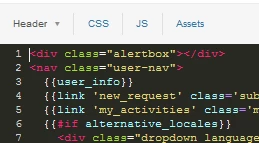
Screenshots of how I've copied the HTML and JS are below. I've created an article labelled with alert too.

Any advice would be much appreciated.

Thanks - Luke


Edit: removing certain data from post.


ModeratorWes

@Luke - I just installed it on my Sandbox without any issues so it should work.  From  your screenshot the domain name has too many slashes so make sure your domain name is correct, it should be:

"https://transversal1442412232.zendesk.com//api/v2/help_center/articles.json?label_names=alert"

You can also try: 

"/api/v2/help_center/articles.json?label_names=alert"


  • May 24, 2016

Wes - you're a star - thank you so much for the quick and helpful response.

I changed it to "/api/v2/help_center/articles.json?label_names=alert" and it's worked a treat. Very exciting! 


ModeratorWes

@Luke - Glad to hear it worked, you can now move that code straight over to production without changing a thing.  If you run into any other issues just let me know.


  • June 1, 2016

Have we been able to find a solution, for Help Centers in muliple language to display an alert message localazied in the language and/or not display the alert if the article is not translated in that language?


  • July 3, 2016

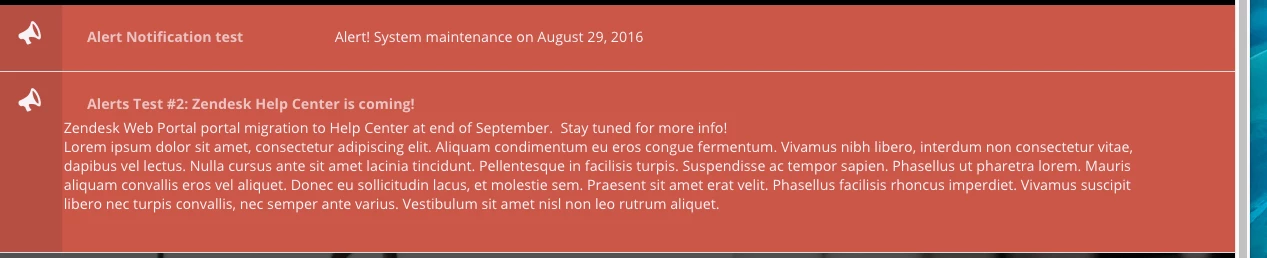
Hello guys, I have the banner like this:

Is there any way I can modify the code to have the title in the middle and centered?


Thank you.


  • August 8, 2016

Thanks for this, worked like a charm!


ModeratorWes

@Marissa - Glad to hear.  Best of luck


  • August 25, 2016

Hi Wes,

Great work on this notification banner and your very clear instructions.  It's exactly what I was looking for!

Need some assistance though.  I added the notification code to my Help Center Professional Plan, and notifications doesn't seem to be working.  The notification banner does not appear after creating an article with the tag "bigalert" (I changed the label)

   $.get( "https://helpcentral.zendesk.com/api/v2/help_center/articles.json?label_names=bigalert" ).done(function( data ) {


I'm currently in the process of preparing for the migration from Web Portal to Help Center (I know, I'm late to the party).

Is the notification banner not appearing because my Help Center instance is still in "Setup Mode"?


ModeratorWes

@Edmund - I believe it should appear even though you are not live.  Try the following:

Make sure your JS is below the $(document.ready) function 

Change your code to:

 $.get( "/api/v2/help_center/articles.json?label_names=bigalert" ).done(function( data ) {

Let me know if that helps.


  • August 25, 2016

Hi Wes,

Your recommendation to move the JS code to below the $(document.ready) function worked.  Thank you for your guidance.  The notification banner is gorgeous!

A follow-up question if you don't mind.

After entering one and two notifications, I noticed the notification banner's close button "X' at the upper right corner disappeared (see screenshot).  I saw the "X" when the page/notification first loads, but then disappears.

Tried clearing cache and using Chrome and Firefox on Mac.

Have you seen that before? 


ModeratorWes

@Edmund - Its not doing that in the demo site so I bet its a CSS issue somewhere with that theme.  When I get some time I'll plug it into the Copenhagen theme and see if I get the same results.


ModeratorWes

By the way I also have accordions for the Copenhagen theme just haven't had time to post all the code.  You can see it here.


  • September 7, 2016

Wes,

When I try to use the alert for a category with a title that is not in English the alert code does not work. When I paste any URL for the place that I want the alert to appear that has something other than English in it I get a bunch of random characters like the link below. How can I tell Zendesk to use the correct characters? I read that I should be able to use the decodeURIComponent but Im not as good at Java as you are. Or how can I change the existing code to only use the part of the link below up to the category number. 


..../hc/ja/categories/201299046--%E4%B8%80%E8%88%AC%E7%9A%84%E3%81%AB%E3%81%AF-%E3%82%88%E3%81%8F%E5%AF%84%E3%81%9B%E3%82%89%E3%82%8C%E3%82%8B%E8%B3%AA%E5%95%8F%E3%81%97%E3%81%BE%E3%81%97%E3%81%9F


ModeratorWes
  • Author
  • September 8, 2016

@Mike - Sorry I haven't tested this with different languages but hopefully I can get around to it just not sure when.  If someone else solves feel free to submit a commit to my github where the code is posted.


  • October 11, 2016

Hello Wes, for Help Center in different languages, any update on how can we make the alert to show in the respective language? or even not showing at all, if the corresponding translation in the alert tagged article is not created? 


  • October 26, 2016

Hi Wes,

 thanks for this it is really helpful, I am using the copenhagen theme and it is not showing the x to close out the alert, I was wondering if you had any ideas on how to fix that.

thanks,

Jason


  • November 9, 2016

Hi Wes,

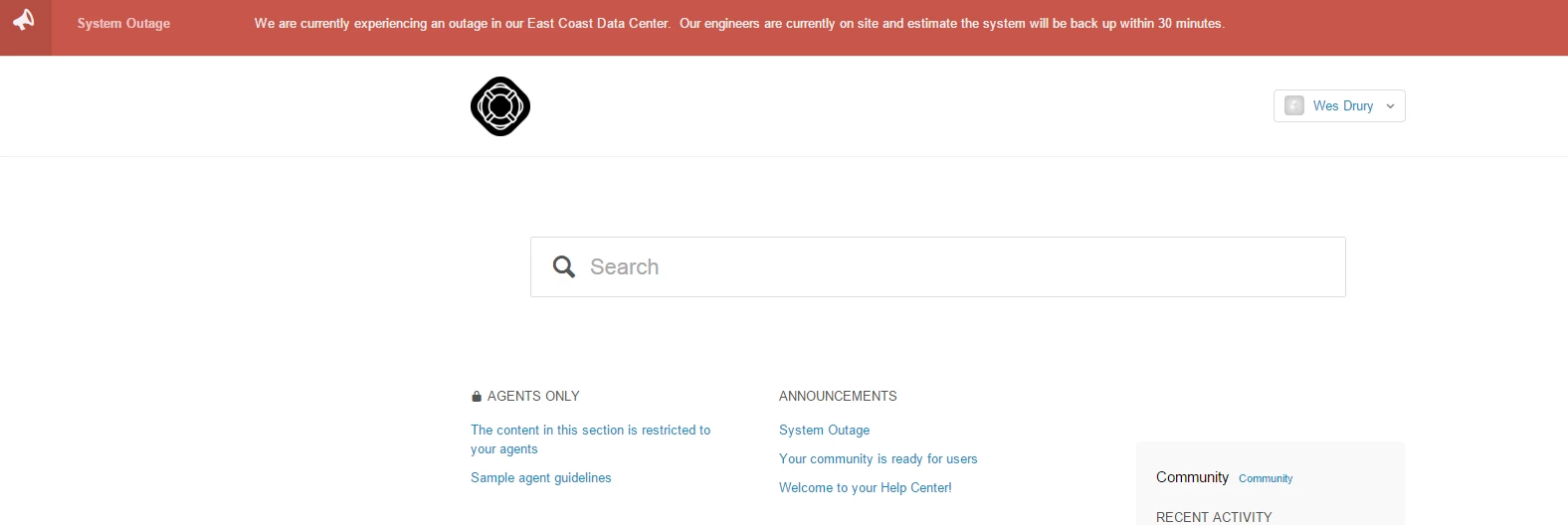
Thanks for the above code, it has been very helpful for our help centres, I have one question, what can I do when there is no alert tag set to any KB articles? At the moment it shows an empty placeholder of where the alert bar should be and looks as attached.

Is this something you have taken into account or would this need a further JS if statement?


Kind regards


Ben Tyler


ModeratorWes

@Ben - If you don't have a tag then it wouldn't show anything at all, it only shows the alert when a tag is in place.


ModeratorWes

@Jason - I will have to take a look, copenhagen theme didn't exist when this was created so it may have some CSS that is interfering.  


  • November 12, 2016

Really great work on this banner Wes!  It works beautifully.  Thank you!


ModeratorWes
  • Author
  • November 14, 2016

@Lisa - thanks for the great feedback.


Dan28
  • November 30, 2016

I may have missed it in the comments, but has anyone figured out how to set this up to work for a community post?  We have taken to using the community to update our customers over articles and would love to promote these posts over articles.


ModeratorWes

@Daniel - You couldn't use this solution in the community as it deals with labels however you could go back and look at the older solution where it was using a key word in the title.  It is possible to use something like this in the community but would need a little code re-work.