Adding a notification banner to your Help Center v2 | Community
Skip to main content

Adding a notification banner to your Help Center v2

  • February 8, 2016
  • 293 replies
  • 0 views

Show first post

293 replies

David204
  • October 12, 2022

@stuart23 I'm not sure I fully understand the question, but I manually added the CSS style close to the top of the CSS file.


  • October 13, 2022

@david204 I added the below code to my Sandbox instance and I could still view the article (I tried refreshing, using an Incognito window and using a different machine):

a[href*="/hc/en-us/articles/9613354347924-Service-Outage-"] {
    display:none;
}

I also tried:

a[href*="/hc/en-us/articles/9613354347924-Service-Outage-"] {
  display:none !important;
}

David204
  • October 13, 2022

@stuart23 my solution doesn't stop you from viewing the article if you have the direct link. It just removes it from the list in the category or section pages. On further thought, a user could still search for the article and find it, so this wouldn't fully solve your problem


  • October 13, 2022

I see @david210 - thank you for coming back to me. And that's exactly what I'm looking for - currently I have the articles published to a section on the site there is no navigable way to - but if you search for them, you can access them. This is what I'd like to disable,

Any ideas anybody else? Thanks in advance.


Frank12
  • November 9, 2022

Newbie here: Forgive my ignorance, but does adding this banner require modifying code on our Zendesk site? On the GitHub page, you refer to opening the “HTML Tab in Zendesk”; how does one actually open the HTML tab? Is it simply using the “View Source” command (in Safari) to view the web page's underlying code and then modifying it?


  • August 17, 2023

I want similar, but in a pop up window format rather than a banner. Is this also possible by modifying codes provided here?


Paolo11
  • October 26, 2023

Hello, I am trying to add a banner on my Help centre. So I copy pasted html header on top of the code in the dedicate section. Where should I copy paste the css and js? I tried copy-pasting on top of the code and nothing is coming out in the preview.

Thanks in advance!


  • October 26, 2023
Hi Paolo,

In order for you to perform this action, it will involve editing the code theme of your Help Center. Zendesk leaves the door open for any type of customization, however, since this will involve coding and customization, this falls out of the scope of our support.

However I was able to find  an article that might help you in achieving this.
https://github.com/moderatorwes/Notification-Banner

Best,

  • November 28, 2023

Hi, is this still relevant/functional today? I see that the video that was attached to this post was removed. I'm looking to add a notification banner to inform my customers of any outages.


  • November 29, 2023

hi, this is still relevant. 


Elaine14
  • November 30, 2023
Hi Hector,

Yes, adding a notification banner to inform customers about outages is still relevant and useful today. While the specific video attached to the post might have been removed, the concept of using notification banners remains a valuable and effective way to communicate important information, such as service interruptions or outages, to customers in real-time.

ModeratorWes
  • Author
  • November 30, 2023

@elaine17 - thanks for the response and @hector15 - just let me know if you have any follow-up questions but the instructions should be pretty straightforward.


  • December 12, 2023

This is an incredibly helpful and relevant article! I just implemented it for my company. Thank you, @moderatorwes for creating such a useful guide!

I would like to suggest one change because I am from the software development side and not a Zendesk Admin: label/article/alert are HTML/JS keywords while also being Zendesk terms. Luckily, someone in the comments referenced creating a Zendesk article - including screenshots - and everything clicked.

Would someone please consider updating the README with the below?

Article Labels

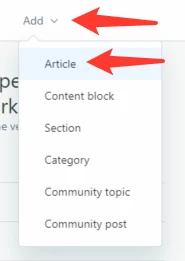
  •  Create or edit one of your articles

To create an article in Zendesk, click Add then Article

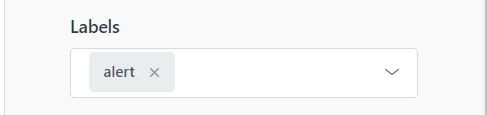
In this new window, place the word alert here:

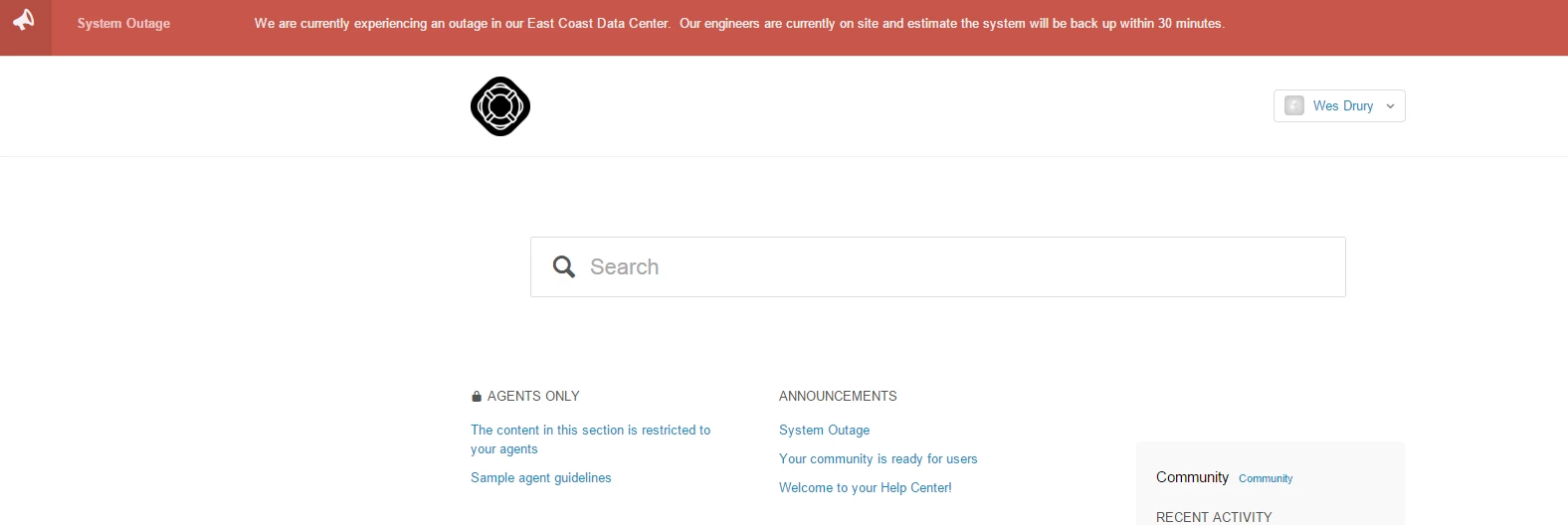
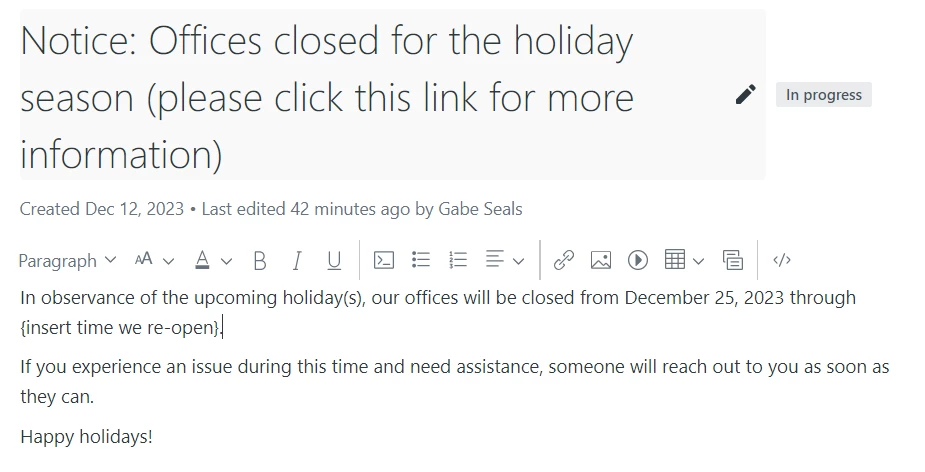
Now, whatever you write in the Title and Body of the article will appear in your alertbox. For example, this:

yields this:

*** this link covers how to create articles in greater detail: https://support.zendesk.com/hc/en-us/articles/4408839258778-Creating-and-editing-articles-in-the-knowledge-base

Of note:

- In this example, only the Title appears because I switched this Boolean value from true to false. If you leave this value as true, then the contents of your Title and Body will display:

- As noted in other comments and FAQs, the Label(s) you apply to your article should coincide with the const label value in your .js file. For example, I left mine as this so that the screenshot above of the Labels value allowed my Title to appear.:

- You can update this line with the Domain Name that is relevant to your company's Zendesk page:

For example, if your company's Zendesk url is something like https://support.sandwich.zendesk.com/hc/en-us then the url value would be https://support.sandwich.zendesk.com/api/v2/help_center/${locale}/articles.json?label_names=${label}`


Vamshi13
  • February 15, 2024

Is there anyway where we can create schedule for these banners like planned system outage or maintenance?


Greg29
  • February 20, 2024

Hi Vamshi! We don't have a native way to do that, but you could utilize the Github integration for Guide and then use a trigger in Github to schedule your updates. 


  • April 9, 2024

how do you make the banner centered and all items next to it has a line break to go below?


With Guide Templating V2, you'll need to import a jQuery library if you want to use jQuery statements in a theme in place of vanilla JavaScript . So 

So you need to add something like this to your document_head.hbs


<script src="https://code.jquery.com/jquery-3.6.0.min.js"></script>

Anyone has a smart way to display this across all brands and languages?