Adding a notification banner to your Help Center v2 | Community
Skip to main content

Adding a notification banner to your Help Center v2

  • February 8, 2016
  • 293 replies
  • 0 views

Show first post

293 replies

Chris191
  • January 14, 2021

Hi All, 

One minor issue i'm having and i'm convinced its a quick positioning fix.. I'm just not seeing it!!

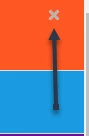
I have 2 banners, the orange for announcements (ns-box) and the blue for promoted info (ns-boxpromoted). I want the X to be in that position for both banners so users can close them.

However, after a second, the X for the blue banner moves from the top right position of the blue banner and sits on top of the orange X on the orange banner. Rather than having 2 X's on the orange where the first click clears the blue banner and the second click clears the orange, how can I get the X to stay fixed in the top right of the blue banner.

My js code..

// MW-Notification Banner
if (window.location.href == "https://help.zoopla.co.uk/hc/en-gb") {
$.get( "/api/v2/help_center/"+$('html').attr('lang').toLowerCase()+"/articles.json?label_names=announcement" ).done(function( data ) {

$.each(data.articles, function(index,item) {
var style1 = '<div class="ns-box ns-bar ns-effect-slidetop ns-type-notice ns-show"><div class="ns-box-inner"><span class="megaphone"></span></i><p><strong>Announcement 📣</strong></p><p><a href="'+ item.html_url + '">' + item.title + '</a>' + '</p></div><span class="ns-close"></span></div>'

$('.alertbox').append(style1);
});
$('.ns-close').on('click',function(){
$(".alertbox").remove();
});

});
$.get( "/api/v2/help_center/"+$('html').attr('lang').toLowerCase()+"/articles.json?label_names=promoted" ).done(function( data ) {

$.each(data.articles, function(index,item) {
var stylepromoted = '<div class="ns-boxpromoted ns-bar ns-effect-slidetop ns-type-notice ns-show"><div class="ns-box-inner"><i class="fas fa-star"></i></i><p><strong>Promoted Article ⭐</strong></p><p><a href="'+ item.html_url + '">' + item.title + '</a>' + '</p></div><span class="ns-closepromoted"></span></div>'

$('.promotedbox').append(stylepromoted);
});
$('.ns-close').on('click',function(){
$(".promotedbox").remove();
});

});
}

My css code..

/*MW-Notificaiton Banner CSS */
/* Common, default styles for the notification box */

/* change the background color by editing "background" */
/* change the text color by editing "color" */
.ns-box {
background: rgba(255,87,34,100);
padding: 10px 20px 20px 20px;
line-height: 1.5;
z-index: 1000;
pointer-events: none;
color: rgba(255, 255, 255, 1);
font-size: 85%;
border-bottom: 1px solid #DDD;
}
.ns-boxpromoted {
background: rgba(26,155,224,1);
padding: 10px 20px 20px 20px;
line-height: 1.5;
z-index: 1000;
pointer-events: none;
color: rgba(255, 255, 255, 1);
font-size: 85%;
border-bottom: 1px solid #DDD;
}

.ns-box.ns-show {
pointer-events: auto;
}

.ns-boxpromoted.ns-show {
pointer-events: auto;
}

.ns-box a {
color: rgba(255, 255, 255, 1);
opacity: 0.7;
font-weight: 700;
}

.ns-boxpromoted a {
color: rgba(255, 255, 255, 1);
opacity: 0.7;
font-weight: 700;
}

.ns-box a:hover,
.ns-box a:focus {
opacity: 1;
}

.ns-boxpromoted a:hover,
.ns-boxpromoted a:focus {
opacity: 1;
}

.ns-box p {
margin: 0;
}

.ns-boxpromoted p {
margin: 0;
}

.ns-box.ns-show,
.ns-box.ns-visible {
pointer-events: auto;
}

.ns-boxpromoted.ns-show,
.ns-boxpromoted.ns-visible {
pointer-events: auto;
}

.ns-close {
width: 20px;
height: 20px;
position: absolute;
right: 4px;
top: 4px;
overflow: hidden;
text-indent: 100%;
cursor: pointer;
-webkit-backface-visibility: hidden;
backface-visibility: hidden;
}

.ns-close:hover,
.ns-close:focus {
outline: none;
}

.ns-close::before,
.ns-close::after {
content: '';
position: absolute;
width: 3px;
height: 60%;
top: 50%;
left: 50%;
background: #6e6e6e;
}

.ns-close:hover::before,
.ns-close:hover::after {
background: #fff;
}

.ns-close::before {
-webkit-transform: translate(-50%,-50%) rotate(45deg);
transform: translate(-50%,-50%) rotate(45deg);
}

.ns-close::after {
-webkit-transform: translate(-50%,-50%) rotate(-45deg);
transform: translate(-50%,-50%) rotate(-45deg);
}

.ns-box-inner i {
color: #fff;
font-size: 2.2em;
}

.ns-boxpromoted-inner i {
color: #fff;
font-size: 2.2em;
}

.megaphone:before {
content:'\1F4E3';
font-family: "entypo";
font-size: 2.2em;
}


/* Top bar notifications */
.ns-box.ns-bar {
top: 0;
left: 0;
width: 100%;
}

.ns-boxpromoted.ns-bar {
top: 0;
left: 0;
width: 100%;
}

.ns-bar .ns-close {
background: transparent;
margin-top: 15px;
right: 20px;
-webkit-transform: translateY(-50%);
transform: translateY(-50%);
}

.ns-bar .ns-close::before,
.ns-bar .ns-close::after {
background: #b7b5b3;
}

[class^="ns-effect-"].ns-bar.ns-hide,
[class*=" ns-effect-"].ns-bar.ns-hide {
-webkit-animation-direction: reverse;
animation-direction: reverse;
}


/* Slide on top */
.ns-effect-slidetop {
box-shadow: inset 5.4em 0 rgba(0,0,0,0.1);
}

.ns-effect-slidetop .icon {
position: absolute;
display: block;
font-size: 109%;
top: 50%;
left: 1em;
-webkit-transform: translate3d(0,-20%,0);
transform: translate3d(0,-20%,0);
}

.ns-effect-slidetop p {
padding: 0 3.2em;
font-size: 1.2em;
display: inline-block;
}

.ns-effect-slidetop .ns-close::before,
.ns-effect-slidetop .ns-close::after {
width: 2px;
background: #fff;
}

.ns-effect-slidetop .ns-close:hover::before,
.ns-effect-slidetop .ns-close:hover::after {
background: #fff;
}

.ns-effect-slidetop.ns-show .icon,
.ns-effect-slidetop.ns-show p {
-webkit-animation-name: animScaleUp;
animation-name: animScaleUp;
-webkit-animation-duration: 0.3s;
animation-duration: 0.3s;
-webkit-animation-delay: 0.2s;
animation-delay: 0.2s;
-webkit-animation-fill-mode: both;
animation-fill-mode: both;
}

.ns-effect-slidetop.ns-show p {
-webkit-animation-name: animFade;
animation-name: animFade;
}

@-webkit-keyframes animScaleUp {
0% { opacity: 0; -webkit-transform: translate3d(0,-50%,0) scale3d(0,0,1); }
100% { opacity 1; -webkit-transform: translate3d(0,-50%,0) scale3d(1,1,1); }
}

@keyframes animScaleUp {
0% { opacity: 0; -webkit-transform: translate3d(0,-50%,0) scale3d(0,0,1); transform: translate3d(0,-50%,0) scale3d(0,0,1); }
100% { opacity 1; -webkit-transform: translate3d(0,-50%,0) scale3d(1,1,1); transform: translate3d(0,-50%,0) scale3d(1,1,1); }
}

.ns-effect-slidetop.ns-show,
.ns-effect-slidetop.ns-hide {
-webkit-animation-name: animSlideTop;
animation-name: animSlideTop;
-webkit-animation-duration: 0.3s;
animation-duration: 0.3s;
}

@-webkit-keyframes animSlideTop {
0% { -webkit-transform: translate3d(0,-100%,0); }
100% { -webkit-transform: translate3d(0,0,0); }
}

@keyframes animSlideTop {
0% { -webkit-transform: translate3d(0,-100%,0); transform: translate3d(0,-100%,0); }
100% { -webkit-transform: translate3d(0,0,0); transform: translate3d(0,0,0); }
}

.custom-iframe {
height: 1050px!important;
border: none!important;
}


  • March 5, 2021

Hi everyone,
I hope someone can help me with this!

I've been trying to implement this add-on on our website based on the Copenhagen theme many times over, following the instructions to the dot each time but I've been unsuccessful so far!

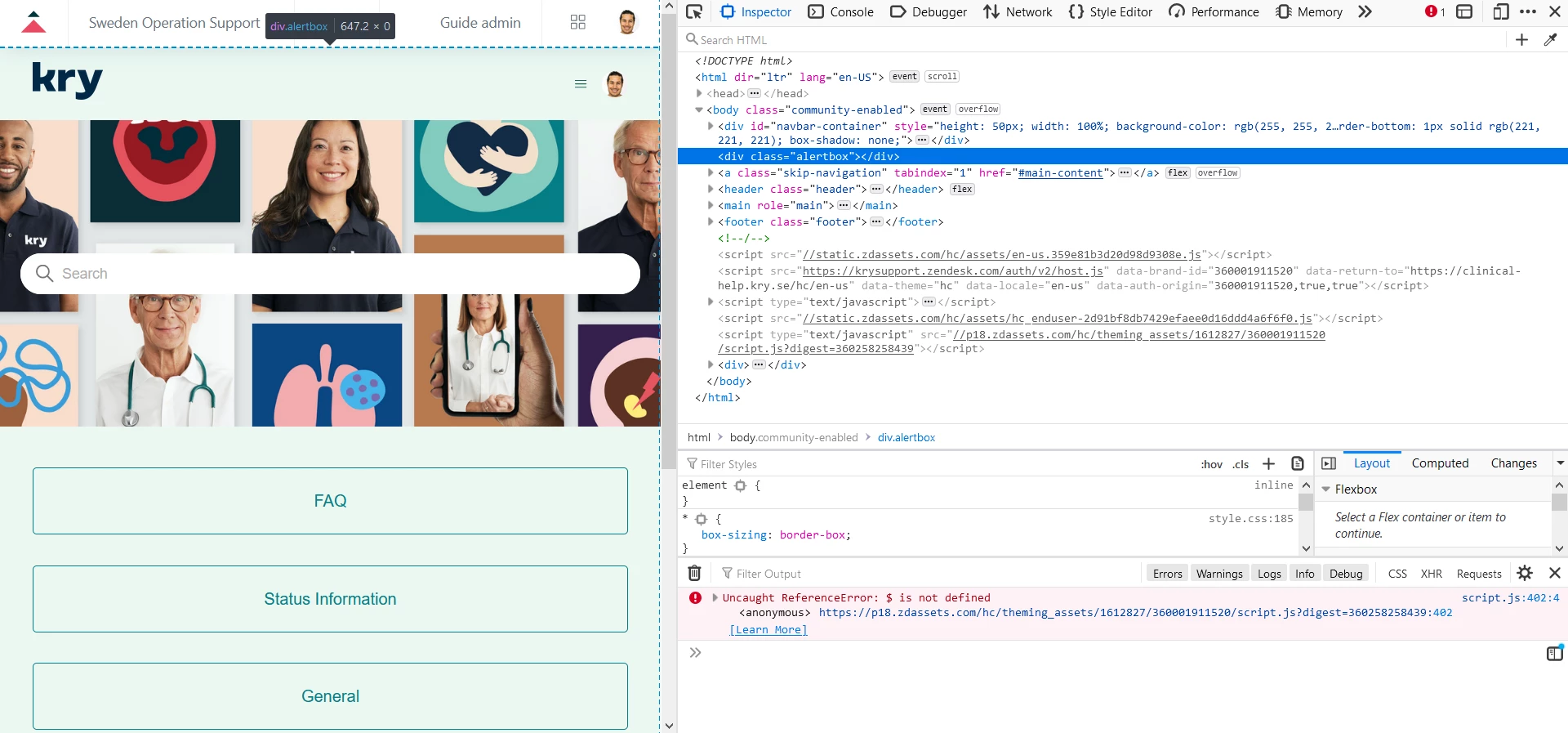
I keep getting the same error message in the console:

I can at least see the alert div-box when inspecting the site but that alert-box is totally empty and doesn't show anything, even though I've created many articles by now, with the label: "alert" and made it so that everyone should be able to see it, not only admins and agents.

I've also experimented with the ways I implement the codes, like for example, pasting the JS code at the very top or at the very bottom, nothing changes, still getting the very same error.

Has anyone else experienced this? Have I missed something?


  • March 5, 2021

Hi Surlyan,

Are you doing this on the page called header.hbs?  Here is my code you can look at.  It is working for us.  I just have to go to an article in the KB,  put the tag 'alert' and the message to post for it to activate.  Hope it helps....

<!--This should be added at the very top -->
<div class="alertbox"></div>
<header class="header">
<div class="logo">
{{#link 'help_center'}}
<img src="{{settings.logo}}" alt="{{t 'home_page' name=help_center.name}}">
{{/link}}
</div>
<div class="nav-wrapper">
<span class="icon-menu" tabindex="0" role="button" aria-controls="user-nav" aria-expanded="false" aria-label="{{t 'toggle_navigation'}}"></span>
<nav class="user-nav" id="user-nav">

{{link 'new_request' class='submit-a-request'}}
</nav>
{{user_info}}
</div>
</header>


Kyle25
  • March 5, 2021

Suriyan Schock, just for clarification, is the tag "alert" or alert? It should be just alert although I'm assuming you were using quotes because that's the proper way to type, just making sure. 


David204
  • March 8, 2021

I would like to place this banner over several articles. However, it is repeating the alert banner for each article that has the label. Could you help, please? I'm not sure what I am doing wrong. I essentially only want to show the banner over articles with the alert label. Not over the entire help center. I moved the alert HTML from the header page to the alerts page, but it is still showing a separate alert for each article.


@Suriyan Schock I have not implemented this myself but I have helped out a couple of other people with their implementations. 
I believe that this code uses jQuery as well as javascript. I know that some themes do not automatically include it. That is where I would start. 
Here is the first article that popped up for checking if it is loaded. https://medium.com/coding-at-dawn/how-to-check-if-jquery-is-loaded-on-a-page-using-javascript-333b1ea27dc1

-----------------------------------------------------------------------------------------------------------------

@David Crichlow Again, I have not implemented this myself but I believe that your implementation may be backward. I believe that the 'alert' label is used to identify which article will be used for the alert header. So, in your case, all of the headers are being generated from the articles with the 'alert' label.

That being said I believe that you can achieve what you are looking to achieve with some conditionals. 

Specifically, I would go back to the initial way of implementing it and add some conditionals like Wes mentioned in GitHub. https://github.com/moderatorwes/Notification-Banner#how-do-i-only-show-the-alert-on-the-homepage-and-not-all-the-other-pages


  • March 12, 2021

Hi, the only solution in my case turned out to be in the script.js file, the original one kept giving me "$ is not defined".

But with these added code-lines and changes to the original codes - It all now works properly!
This whole code-section is in its own scope and at the very bottom of the script.js file.

Note that using the labels "alert" or ""alert"" works just the same ( alert or "alert" typed in as label both works , just to clarify ).

I hope this info can help any other, that may come across the same issues that I've experienced before finally fixing it like this!
*********************************************************

// MW-Notification Banner
   function httpGetAsync(theUrl, callback)
{
    var xmlHttp = new XMLHttpRequest();
    xmlHttp.onreadystatechange = function() { 
        if (xmlHttp.readyState == 4 && xmlHttp.status == 200)
            callback(xmlHttp.responseText);
    }
    xmlHttp.open("GET", theUrl, true); // true for asynchronous 
    xmlHttp.send(null);
}
function httpGet(theUrl)
{
    var xmlHttp = new XMLHttpRequest();
    xmlHttp.open( "GET", theUrl, false ); // false for synchronous request
    xmlHttp.send( null );
    return xmlHttp.responseText;
}
  function alert( data ) { 
    console.log(JSON.parse(data).articles);
    var alertBox = document.querySelector(".alertbox");
    var articles = JSON.parse(data).articles
    articles.forEach((item, index) => {
      console.log(index);
      var style1 = '<div class="ns-box ns-bar ns-effect-slidetop ns-type-notice ns-show"><div class="ns-box-inner"><span class="megaphone"></span></i><p><a href="'+                item.html_url + '">' + item.title + '</a>' + item.body + '</p></div><span class="ns-close"></span></div>'
      console.log(style1);
      
      var newNode = document.createElement('div');
            newNode.innerHTML = style1;
      alertBox.appendChild(newNode);
      
    })
   
  };
  var url = "/api/v2/help_center/articles.json?label_names=alert";
  httpGetAsync(url, alert);

*********************************************************
Thank you for your efforts to help me at any rate:
Krista Martin , Kyle B and Alejandro Colon


@Suriyan Schock No problem.

I believe that the reason your code worked is that you replaced the jQuery code with plain Javascript. 

Glad you are up and running. Hopefully, this will help others that run into the same issue.


  • March 17, 2021

Having a bit of trouble implementing this.

I have pasted the necessary code in the corresponding places:


And then gone ahead and created a new article and added an "alert" label to it. But it doesn't seem to work. The only thing that seems to be happening is that its moving our logo from the top right to the top middle of the landing page. Am I missing something?


@Chinmay Kansara Can you provide some screenshots of the code you put in? Blank out any identifying information but the important piece is the structure of the code and where exactly it was input. 

---------------------------------------------------------

The first thing that comes to mind is that your logo should not be affected. On the instructions, it says to add the HTML to the very top of the code on the header.hbs
https://github.com/moderatorwes/Notification-Banner#how-to-install

---------------------------------------------------------

The other thing that comes to mind is that you should be seeing at least something. Because you are only seeing the logo move I would open the developer console on a web browser to check for any errors in the logs.
https://balsamiq.com/support/faqs/browserconsole/


  • March 18, 2021

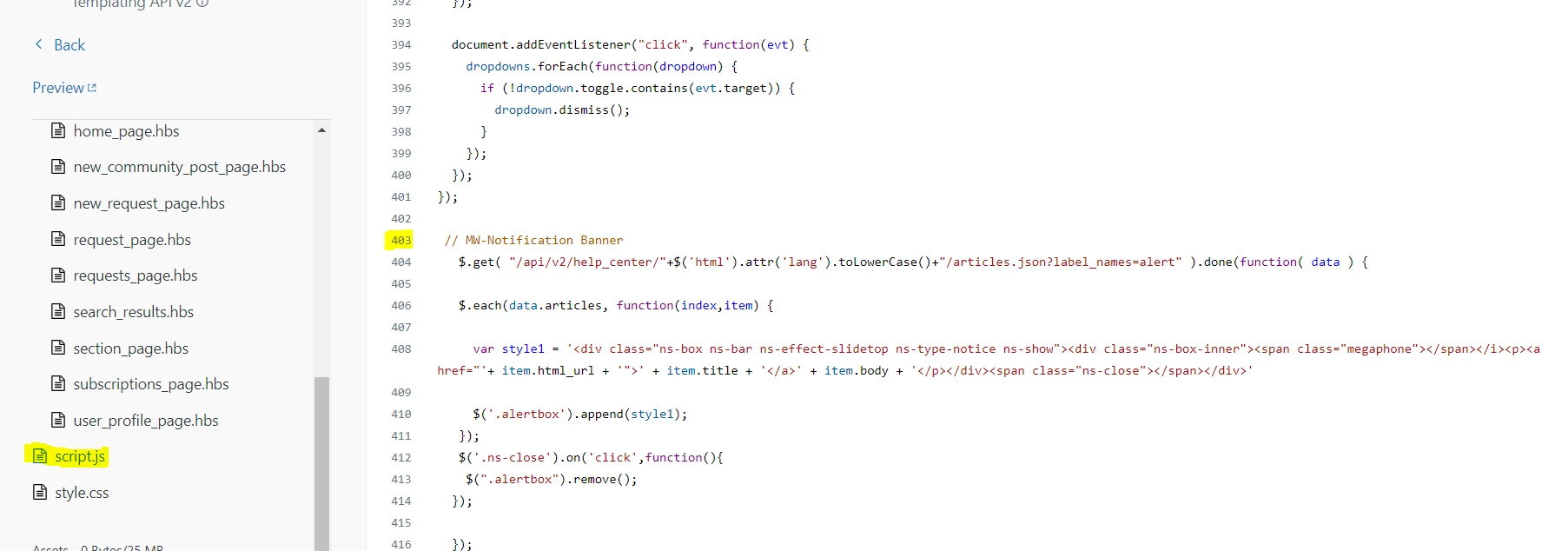
Javascript starting at line 403 (at the end of the file):


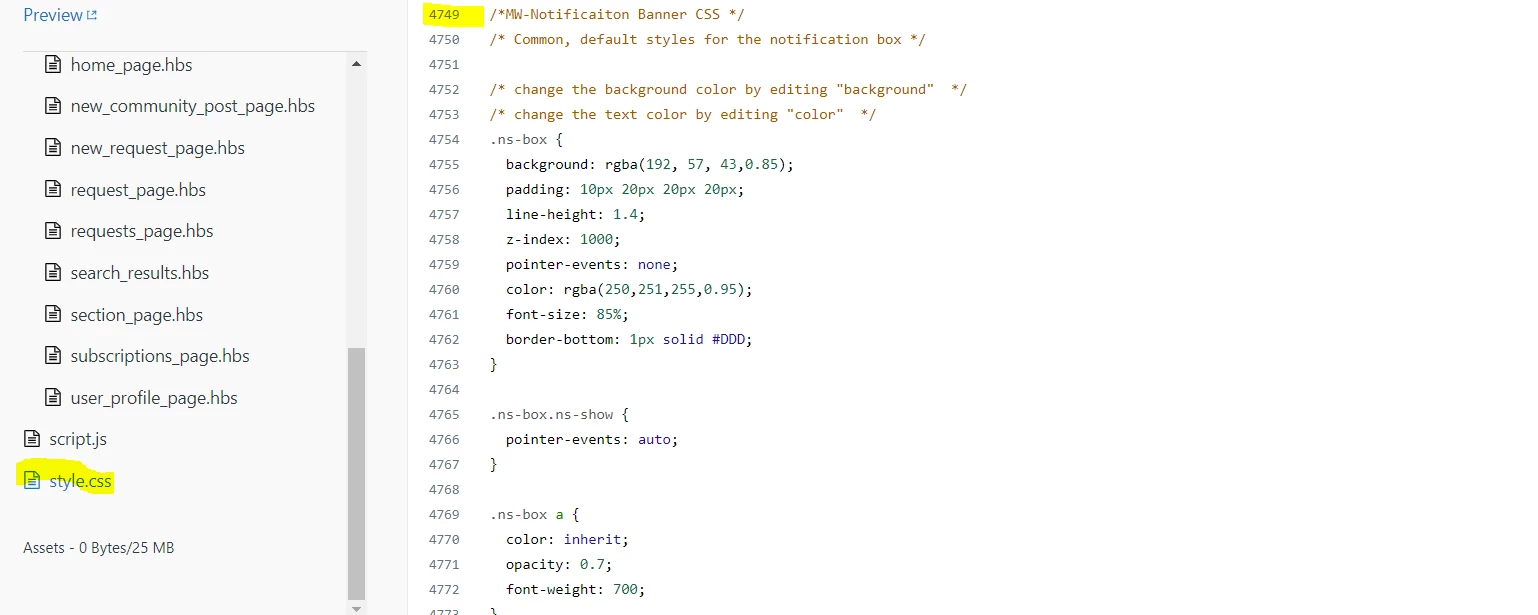
.css also at the end of its corresponding file:


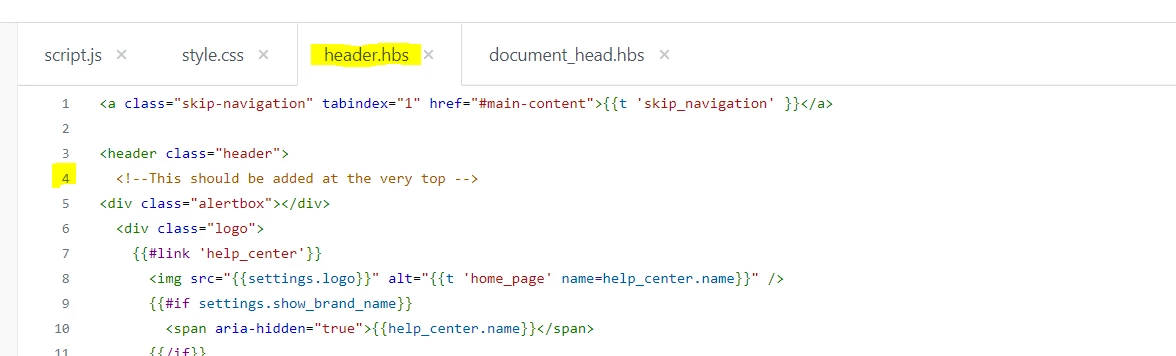
The header was inserted as the first thing under the "header" tag:


Though I also tried placing it above the header tag, and also at the very top of the document.


@Chinmay Kansara Looks like everything seems to be in the correct places. 

You may want to try this suggestion. https://support.zendesk.com/hc/en-us/community/posts/207738148/comments/360013764794

-------------------------------------

If the above does not work, then the next thing would be to use the developer tools to find the alert. As seen here. https://support.zendesk.com/hc/en-us/community/posts/207738148/comments/1260802901609

--------------------------------------

If you can find it and it seems to be good then check the console in the developer tools for errors. As in here. https://balsamiq.com/support/faqs/browserconsole/

----------------------------------------

Provide some screenshots and that should at least point us in the correct direction. 


@Chinmay Kansara Looking at the github repo it looks like others have had the same issue as yourself and there has been an update to the code. I would try the new code as it does not rely on jQuery which is no longer supported by Copenhagen v2

Let's see if that makes a difference.


  • April 8, 2021

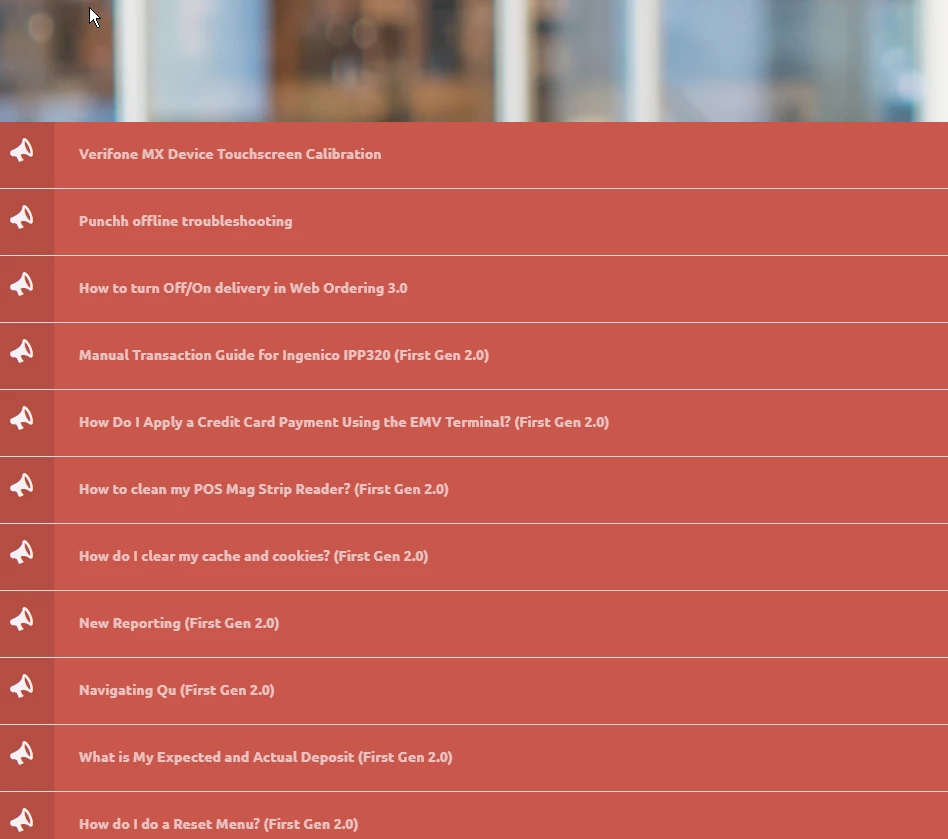
Hi, does anyone have the same problem with the CSS like we have with this type of announcement?
This type of message should be standard enough for the CSS to work properly but it doesn't, especially on different screen-sizes!

Does anyone have a suggestion to how I should fix this in the CSS file so longer announcement-texts can be displayed in a nice way rather than showing this kind of mess?


  • July 14, 2021

Question from a novice Zendesk user.

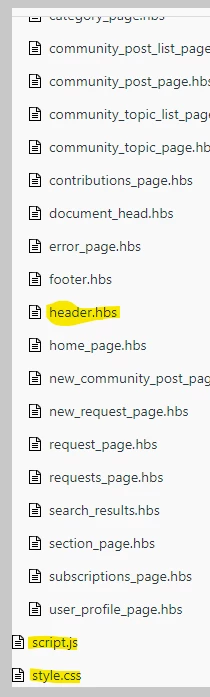
I am unable to locate HTML tab or css tab. All I can see when you select the edit code option, are a  bunch of .hbs files in the left column, along with script.js and style.css files.

Could anyone help locate the HTML tab, or css tab. The "tab" as mentioned in solution.

Much thanks.


Trapta
  • July 14, 2021

Hi @Bee Hive,

Zendesk has updated its theming template since the time this post is created. You will not find the HTML or CSS tab anymore in the Guide instance now.

However, in response to your question, when you are editing the code, you can paste the code mentioned for the style.css file as it is in the style.css file under the left sidebar when clicking on edit code.

For the header.html file, paste the code in the header.hbs file and instead of zendesk.js paste the code in the script.js file.

Let us know if this helps you.

Thanks


Itay13
  • August 26, 2021

The link to "Live Demo" is broken.


Dave12
  • August 26, 2021

Hi Itay,

Thanks for the heads-up – I've removed that link as the help center it pointed to is no longer active.


  • January 12, 2022

Hi @moderatorwes - great work, I love it!

A small question:

How can I make the closing of the banner persistent for that session?

If the user clicked on the "X" of the banner, I don't want it to pop up again whenever the user moves around pages in the Help Center as it can be annoying.

Thank you!


  • June 22, 2022

This is great. One question though, the color seems to get lighter L to R. Is there a way to make it just one solid color? 


Kyle25
  • June 23, 2022

Hi @ruth15,

What do you have listed in your script.css in the 'background' line of your .ns-box? 

For example, mine is setup like this:

.ns-box {
    background: #e84325;
(with more padding and other settings)


which gives me a solid red bar. I did have to remove the megaphone by changing the display to none (I can elaborate if interested), but it's just a solid line for me.


  • June 27, 2022

@kyle25 Thank you! We had an RGBA value in there. I switched it to hex and it's one color now. 


  • August 15, 2022

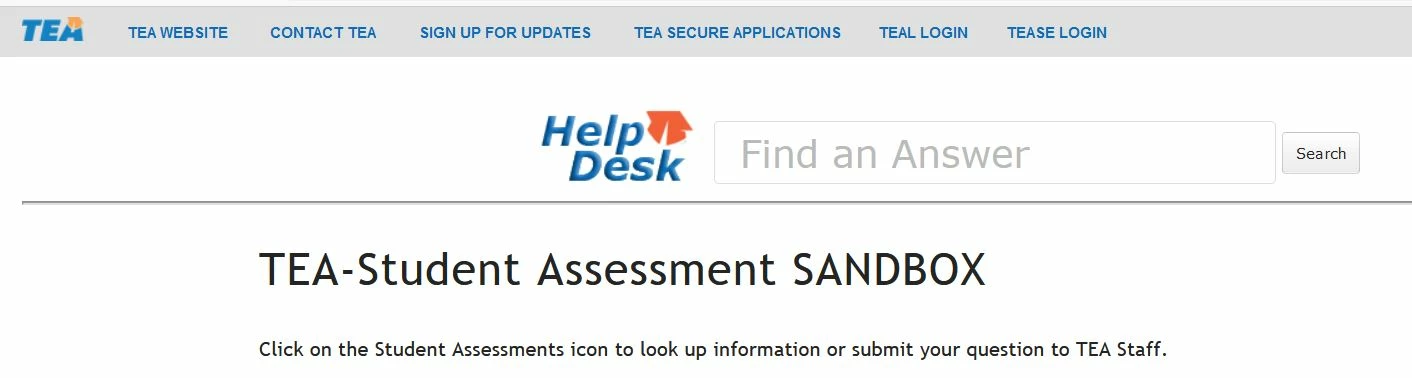
I copied the codes as steps in the instructions. I created an article with label as "alert". Since every article need to publish in a section, I see the alert in FAQ of the section. But I don't see any banner showed up. I put the url,  /api/v2/help_center/${locale}/articles.json?label_names="alert" to the site. I got the result as 

{"error":"InvalidEndpoint","description":"Not found"}

My artilce URL is https://teastudentassessments1555347296.zendesk.com/knowledge/articles/8576598013460/en-us?brand_id=360002376392.

Does any one know how I should query the URL for the alert data?


Brett13
  • Community Manager
  • August 16, 2022
f

  • August 16, 2022

Maybe I need to change my API setting. Brett, @brett13 I saw your smiling face here. Do you have any suggestions?

Thanks,