Add a Tag to a New ticket if attachment is present | Community
Skip to main content

Add a Tag to a New ticket if attachment is present

  • December 2, 2020
  • 46 replies
  • 0 views

Show first post

46 replies

Kuldeep11
  • August 12, 2021

Hi Ash, I hope you are doing well!

I have a query regarding ticket event properties! I was wondering if there is a functionality/capability within Zendesk to automatically trigger an escalations after 'X' amount of comments or events per ticket.

For example: A Zendesk ticket is submitted by the client, the client is provided guidance by the Core agents via macros and the client does not understand the request, they are then sent to Tier 2 for clarification, and Tier 2 comes back into the Zendesk ticket with questions for the Core  Agent. This goes on to hit 10 events/comments on the ticket.

Would it be possible to have the 10th comment trigger an automatic escalation, or apply a tag that could be routed to a separate queue?

I'm not certain if we can set it with the help of the HTTP target. Any information that you could share would be greatly appreciated.

Kind Regards,

Kuldeep


Terry19
  • August 12, 2021

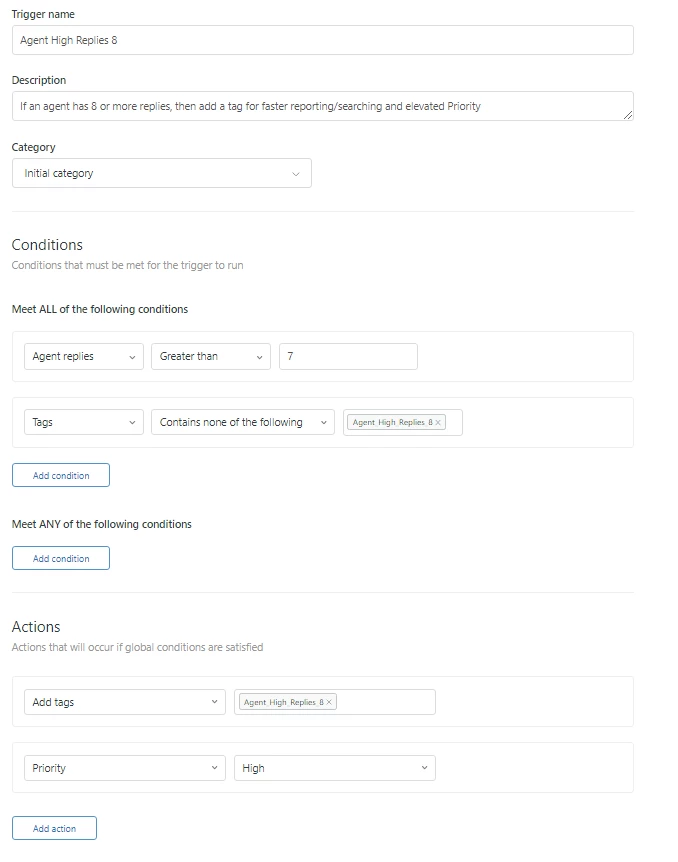
Hi 1262731691290 - This is easily accomplished within a trigger.  We have one in place that elevates to high priority when 8 replies are exceeded


Kuldeep11
  • August 13, 2021

Hi @Terry Ehrhard,

Thanks for sharing the great workaround! This looks very much similar to what I thought, but I would like to know if 'Agent Replies' condition will address the 'Internal comments' or not?

Since we're using an escalation mechanism to compete with those request and with the increase in back and forth between the teams, we're getting a lots of internal comments in the ticket and therefore want to apply a tag that could be routed to a separate queue if feasible. Or if there is any other workaround, please let me know.

Thanks again!

Kuldeep


Terry19
  • August 14, 2021

Hi Kuldeep - This would give you a count of any/all replies by agents both to customer and to internal agents.  See this article https://support.zendesk.com/hc/en-us/articles/115015611647-Trigger-conditions-and-actions-reference

If you only wanted to determine internal comments I suppose you could use markup to count the number of internal comments and add a tag when the count exceeds your preset limit.  


Kuldeep11
  • August 16, 2021

Hi @Terry Ehrhard,

Thanks for confirming. I feel strongly about information and love learning more on this. If possible, can you please help me in building that markup to achieve my goal.

Edit: I think we need to use “tickets/update_many” endpoint here.

I'm afraid as I have minimum knowledge of markup, so not sure how the correct code/request should look like.

I truly appreciate your valuable support!!

Regards.

Kuldeep


  • October 4, 2021

Awesome resolution Ash! :)


Sebastian13

Thanks Ashish and Terry!

Did anyone yet check how to also trigger images pasted directly in the email text? The trigger in itself works fine but it seems images pasted into the text are not stored as attachments in the ticket JSON. Anyone checked out already how to catch those images as well?


Dave12
  • December 3, 2021
I'm not sure there's a way to do that, but since it seems adding options to the creation of views might obviate the need for these solutions, and since the method of updating a ticket via a trigger and target is not supported and can be unreliable, and since HTTP targets are being deprecated soon in favor of Webhooks, I think it might be helpful to our product team if one of you could post your use case to our Feedback - Ticketing System (Support) topic, using our Product Feedback Post Template to format your feedback. Our product team watches that space, and the more we can learn about your needs, the better. Thanks!
 

  • December 13, 2021

I have a question. I am using a webhook to set the subject of a ticket depending on various data in the form's fields. The subject does get updated using this trigger, but I want the subject to update before the email goes out on a newly created ticket. When I run the following webhook as the very first trigger on our instance (ahead of the notify requester of new proactive ticket) the email still goes out with the subject as it was when I submitted the ticket originally, not as is since being updated by this webhook.

What am I doing wrong?

The endpoint that this webhook is looking at is a PUT and domain/api/v2/tickets/{{ticket.id}}.json

{"ticket":
{"subject": "{% if ticket.ticket_field_360041372052 != null and ticket.ticket_field_360041372052 != '' and ticket.ticket_field_360044340271 != null and ticket.ticket_field_360044340271 != '' and ticket.ticket_field_360041327151 != null and ticket.ticket_field_360041327151 != '' %}TSG Reporting – Order Follow Up - {{ticket.ticket_field_360041372052}} - {{ticket.ticket_field_360044340271}} - {{ticket.ticket_field_360041327151}}{% elsif ticket.ticket_field_360041372052 != null and ticket.ticket_field_360041372052 != '' and ticket.ticket_field_360044340271 != null and ticket.ticket_field_360044340271 != '' and (ticket.ticket_field_360041327151 == null or ticket.ticket_field_360041327151 == '') %}TSG Reporting – Order Follow Up - {{ticket.ticket_field_360041372052}} - {{ticket.ticket_field_360044340271}}{% elsif ticket.ticket_field_360041372052 != null and ticket.ticket_field_360041372052 != '' and (ticket.ticket_field_360044340271 == null or ticket.ticket_field_360044340271 == '') and (ticket.ticket_field_360041327151 == null or ticket.ticket_field_360041327151 == '') %}TSG Reporting – Order Follow Up - {{ticket.ticket_field_360041372052}}{% elsif ticket.ticket_field_360041372052 != null and ticket.ticket_field_360041372052 != '' and (ticket.ticket_field_360044340271 == null or ticket.ticket_field_360044340271 == '') and ticket.ticket_field_360041327151 != null and ticket.ticket_field_360041327151 != '' %}TSG Reporting – Order Follow Up - {{ticket.ticket_field_360041372052}} - {{ticket.ticket_field_360041327151}}{% elsif (ticket.ticket_field_360041372052 == null or ticket.ticket_field_360041372052 == '') and (ticket.ticket_field_360044340271 == null or ticket.ticket_field_360044340271 == '') and ticket.ticket_field_360041327151 != null and ticket.ticket_field_360041327151 != '' %}TSG Reporting – Order Follow Up - {{ticket.ticket_field_360041327151}}{% elsif (ticket.ticket_field_360041372052 == null or ticket.ticket_field_360041372052 == '') and ticket.ticket_field_360044340271 != null and ticket.ticket_field_360044340271 != '' and ticket.ticket_field_360041327151 != null and ticket.ticket_field_360041327151 != '' %}TSG Reporting – Order Follow Up - {{ticket.ticket_field_360044340271}} - {{ticket.ticket_field_360041327151}}{% elsif (ticket.ticket_field_360041372052 == null or ticket.ticket_field_360041372052 == '') and ticket.ticket_field_360044340271 != null and ticket.ticket_field_360044340271 != '' and (ticket.ticket_field_360041327151 == null or ticket.ticket_field_360041327151 == '') %}TSG Reporting – Order Follow Up - {{ticket.ticket_field_360044340271}}{% endif %}"}
}

Eric27
  • December 15, 2021
Hey Dean,

Do you mind opening up a ticket so that our team can take a look at your account? When opening that ticket, if you could provide some examples where this is happening - it'd be apprecitated.

Thanks so much!


AKW11
  • February 18, 2022

Hi @ash13,

what does the first line do? 

{% for comment in ticket.public_comments offset:0 limit:1 %}

I'm curious if this 'offset' and 'limit' stuff only checks the latest comment? But I have no idea how it works. ;-) 

I'm asking because let's say I want to see if there's a way to check if there is more than one attachment in the whole ticket conversation. I assume I would need to adjust the line mentioned above and also include some kind of counter instead of this '> 0 %' thing in line 2? 


Tipene
  • March 3, 2022

Hi Fabio,

@ash13 might want to jump in here to offer more clarification but from my understanding of how this is written, you're correct that the offset:0 and limit:1 specifies that only the most recent ticket comment will be evaluated against. You can increase the limit to evaluate against more comments in the ticket.public_comments array. 

The next line is evaluating the actual size of the attachment, not the attachment count on that ticket comment so for you to be able to check if there are multiple attachments, you will need to implement some type of counter to track how many attachments are present on the ticket, and apply the tag depending on that. 

Here's a link to the docs which might be helpful to you:

https://shopify.github.io/liquid/tags/control-flow/

I hope this helps!

Tipene


Alan19
  • April 6, 2022

@ash13 (or anyone else who is knowledgeable) - I could use some assistance with this.


I set up my webhook and trigger according to all the comments. The trigger is firing as it should, but every ticket is getting tagged as if it has an attachment. Any idea why that may be? 


Cheeny
  • April 10, 2022
Hi Alon, 

I created a ticket on your behalf. Don't worry! one of our colleagues will get in touch with you regarding this issue.

  • May 22, 2022

@terry19 @ash13

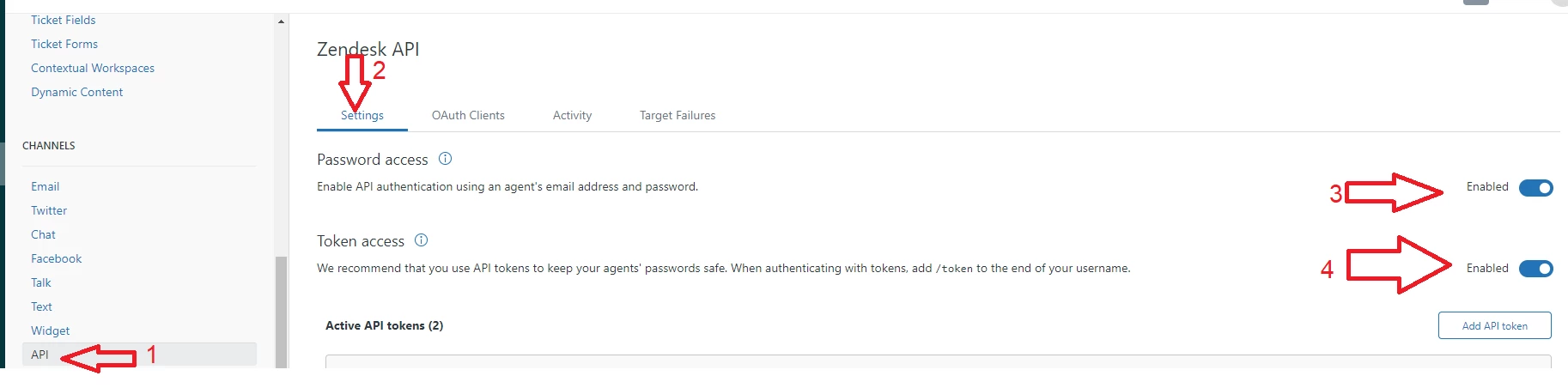
This was woking fine for us, but it stopped and I've been unable to get it working again.  I'm using a target with a basic authenticion using token.  I know that the authentication is working fine b/c I've tested it without the liquid markup and it updates the ticket (I'm using the update many endpoint).

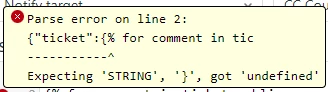
Something is off with the code. I keep getting the unable to parse json error.  I've tried copying as a single line, multiline. Not sure if Zendesk changed something.  


{"ticket":
{% for comment in ticket.comments offset:0 limit:1 %}
{% if comment.attachments.size > 0 %}
{"additional_tags":["attachments_yes"]}
{% else %}
{"additional_tags":["attachments_no"]}
{% endif %}
}
{% endfor %}


Alan19
  • May 22, 2022

Hey @tyler14,

As per another suggestion here, changing ticket.comments to ticket.public_comments may work for you here. The second line would look like this:

{% for comment in ticket.public_comments offset:0 limit:1 %}


  • April 5, 2024

Hi, 


Can you advise if this is an issue that anyone else is experiencing as well?

I was able to create webhook and trigger as shown above, but the issue that I am experiencing is that when a file is sent through Live chat, it seems like Zendesk doesn't consider that as ‘’attachment''. I tested that couple of times and when I check in the ‘Attachment Manager’ App, it says that there are no attachments, when a picture was uploaded via chat. 


All of the chat tickets (even those with pictures in them) are being tagged with attachements_no. 


Is there probably something that I am doing wrong?


Regards,

Rose


Tipene
  • April 9, 2024
Hi Rositsa,
 
Nothing immediately comes to mind that would cause this workflow to function incorrectly with live chat; the attachments should be available to the API in the same way as normal tickets. 
 
Are you using messaging by any chance? If so, that would likely be the cause of what you're seeing.

  • April 10, 2024

Hi @tipene ,


We use Agent Workspace but we haven't switched to messaging yet and we are still using the live chat option. 

Here is an example of what is happening:

Regards,

Rose


Tipene
  • April 10, 2024
Thanks for the update, Rose!
 
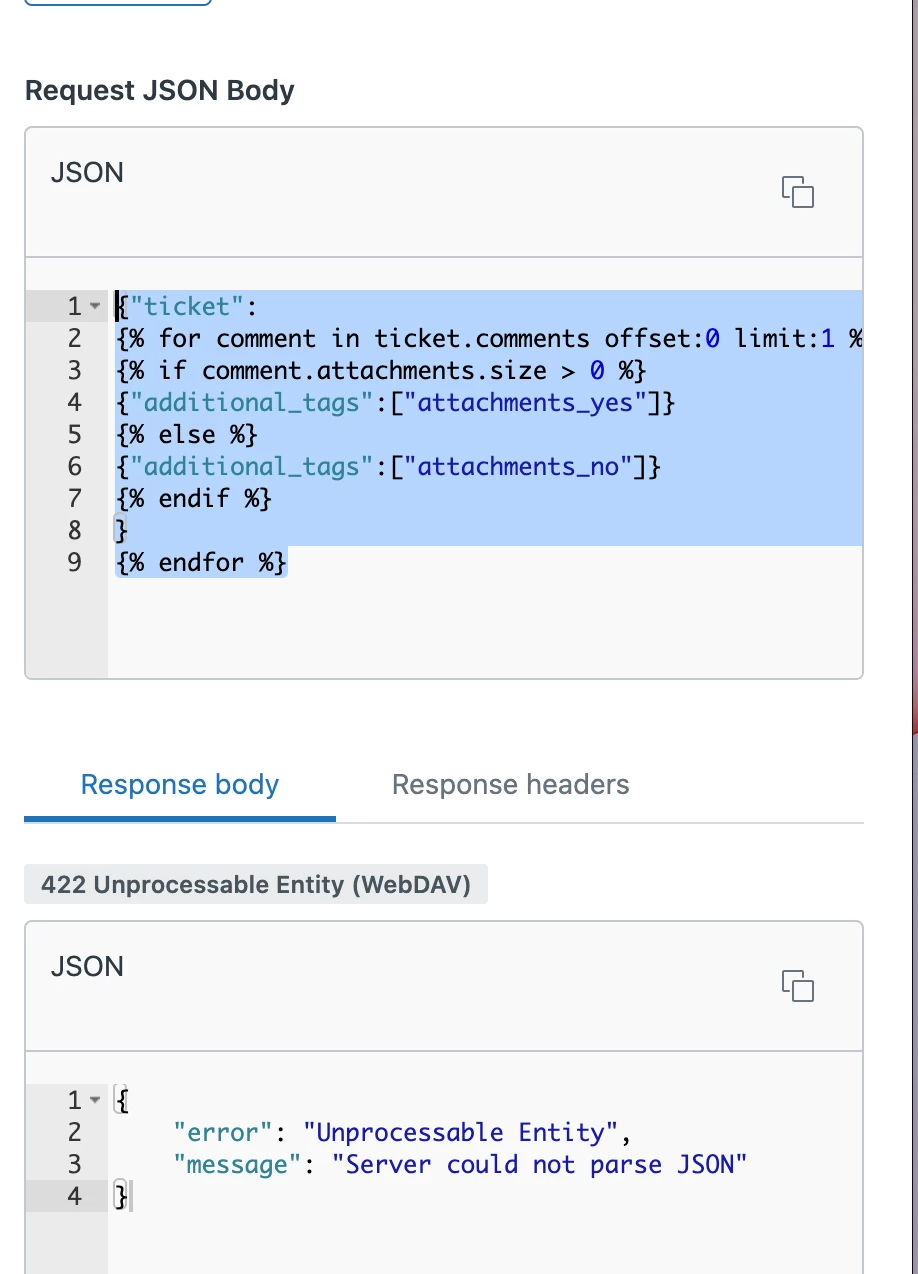
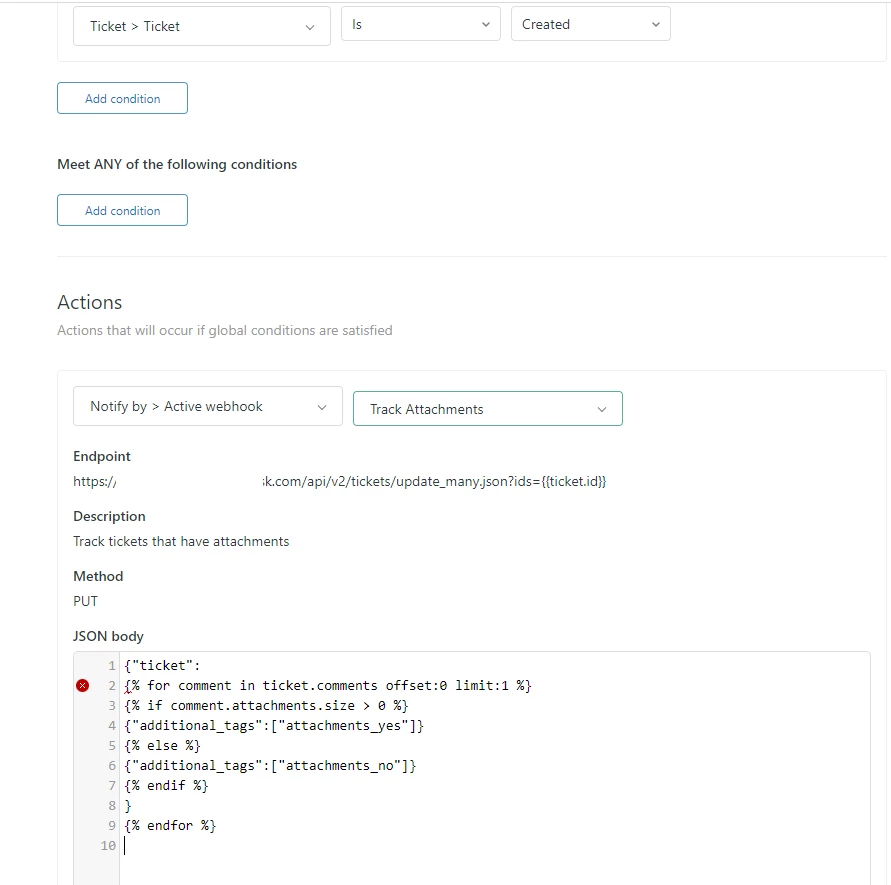
Can you send me through a screenshot of your webhook set up, including the JSON body containing the markup? And just to be double sure, this is working with tickets other than chat, correct?
 
Thanks!
 
Tipene

  • April 11, 2024

Hi Tipene,


I ran this just for short period of time and got one email with attachment where the ticket was correctly tagged with ‘’attachments_yes''.


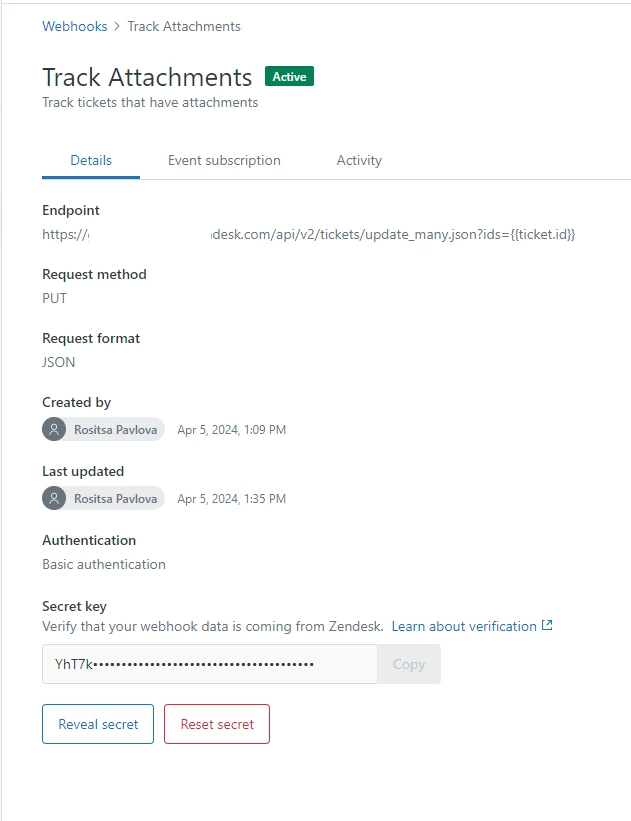
Here is the webhook: 


And this is the attached trigger:


Regards,

Rose