
Add a Tag to a New ticket if attachment is present | Community
Skip to main content

Add a Tag to a New ticket if attachment is present

  • December 2, 2020
  • 46 replies
  • 0 views

To tag new tickets with a tags when they have attachments.

Use Case :

You can then use this tag to filter tickets with attachments to one view while other with no attachments to another view.

There can be other use cases too. 

Steps:

1. Enable API access type (see screenshot)
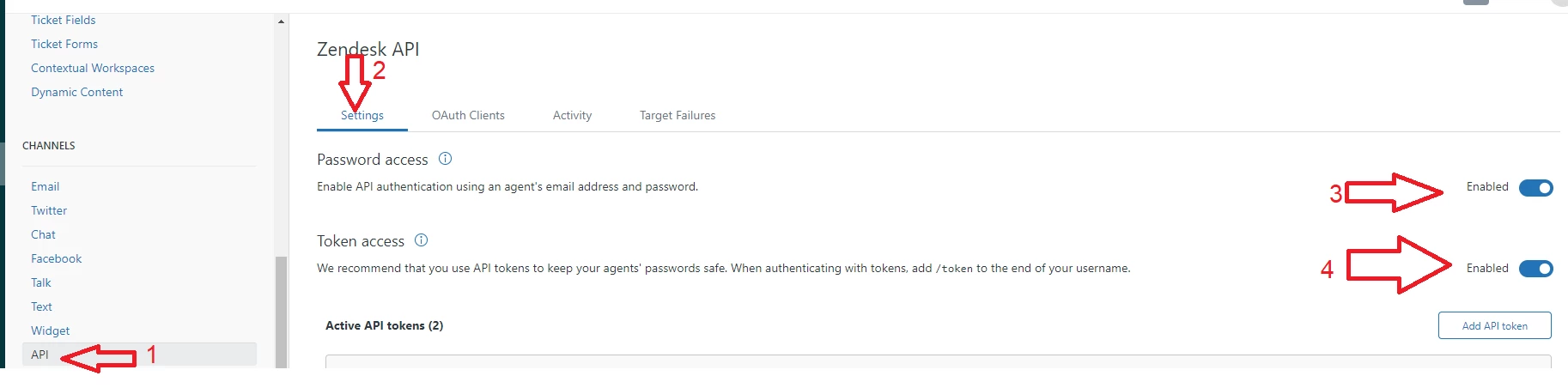
Password Access item 3 on the screenshot above - if you want to use username and password for your API auth only.

For token select item 4 on the screenshot - if you are going to generate API token in zendesk and use that.

You don't have to enable both but one will do.

2.Create target extension > HTTP
Title : Update Tags

URL : https://domain.zendesk.com/api/v2/tickets/update_many.json?ids={{ticket.id}}
Method PUT
Content Type JSON

Make sure your external target uses Basic auth. either via API token or admin credentials.


3.Create Trigger
SET-Check for Attachments
Condition - Ticket is created
Action - Notify Target : Update Tags
JSON Body : 

{"ticket":
{% for comment in ticket.public_comments offset:0 limit:1 %}
{% if comment.attachments.size > 0 %}
{"additional_tags":["attachments_yes"]}
{% else %}
{"additional_tags":["attachments_no"]}
{% endif %}
{% endfor %}
}

above code checks the comment for attachments, if attachments more than 0 than it tags the ticket with "attachments_yes"

or else it will tag as "attachment_no"

NOTE: You will see the following error-
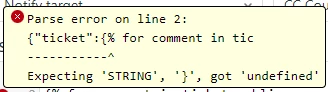
You can ignore that error message, the JSON target is trying to validate your code as JavaScript rather than Liquid.

I tested this and it works for all new tickets

If this was helpful please upvote this and feel free to drop me a line on Linkedin.

46 replies

Brett13
  • Community Manager
  • December 4, 2020

Awesome tip Ash! Thanks for taking the time to write this up and share with everyone :) 


  • December 8, 2020

Hi, thanks for the advice!

However I am receiving a parse error on line 2: 

Expecting 'STRING', '}', got 'undefined'


Any ideas how to fix this? Thanks!


  • Author
  • December 8, 2020

You can ignore that error message, the JSON target is trying to validate your code as JavaScript rather than Liquid.


  • December 8, 2020

Thanks Ash, the trigger doesn't seem to be working still :(. 

Please can you confirm all the 'Conditions' and 'Actions' you are setting for the trigger? 

Cheers


  • Author
  • December 8, 2020

Hi Alex,

Can you explain what you mean by "doesn't seem to be working"?

You can also check if the trigger is even firing.

If it is then check if the external target is working-check if API logs have any errors.

Let me know.


  • December 8, 2020

Hi Ash,

It says it has triggered, however the tags are not being added to the tickets. 

The JSON script in the Trigger settings should add the following tags, correct? 

"attachments_yes"

"attachments_no"

Perhaps the issue is with the target extension:

  • Basic Authentication - should this be enabled or disabled? 
  • There are also 3 other options prior to submitting: Test Target, Update Target, Delete Target - which should we select? 

Melissa42
  • December 10, 2020

Hey Alex,

I was having the same issues as you with the trigger firing, but the tags not adding to the ticket. I had a colleague assist and he said I needed the Basic Authentication, which is not mentioned in the article. He had me:

1. Create an API token which we called "Attachment Target" but call it whatever you want. Be sure to save your token somewhere because once you "Save" it, you cannot access it again.

2. We created the target "Attachment Tags" using Ash's instructions above and added Basic Authentication with a system admin address for the Username: admin@ourcompany.com/token 

3. Basic Authentication Password: API token that you copied and saved

4. Create Target and Submit

5. Then we created Ash's trigger

Hope that helps you!


  • Author
  • December 10, 2020

@Melissa Norton Thank you, 

And yes, you need basic authentication either via API token or admin credentials to do anything with external targets.

Sorry, I assumed everyone knew that.


Max34
  • December 22, 2020

Ash, in testing, I'm unable to get the trigger, which is firing successfully, to hit the extension I built. 

When I test the extension, I get an error:

{"error":"Unprocessable Entity","message":"Server could not parse JSON"}

Any thoughts?


@Max McDaniel

Personally, when using liquid to create my JSON requests, I have had to remove all extraneous spaces to get the JSON to parse correctly. 

Example with spaces: 

{"ticket":
{% for comment in ticket.public_comments offset:0 limit:1 %}
{% if comment.attachments.size > 0 %}
{"additional_tags":["attachments_yes"]}
{% else %}
{"additional_tags":["attachments_no"]}
{% endif %}
}
{% endfor %}

Example without spaces:

{"ticket":{% for comment in ticket.public_comments offset:0 limit:1 %}{% if comment.attachments.size > 0 %}{"additional_tags":["attachments_yes"]}{% else %}{"additional_tags":["attachments_no"]}{% endif %}}{% endfor %}

I would try that as a troubleshooting step.


Max34
  • December 22, 2020

Thanks @Alejandro Colon, I tried copy/pasting the example you shared but received the same error. 

Is there something in the actual JSON that I need to be changing/adding? 

Based on the error, I don't suspect this is an authentication issue, but could that be the case?


I personally have not implemented the code in this post but I saw your issue and I know I have had a similar issue in the past.

Potentially your issue could be related to authentication but it also could be a number of things. I would start at the basics and get something working and then start from there. 

  • The first thing I would do is remove the liquid code and simply try to send the request without it. That will help you narrow down the issue.
  • Of course, you want to make sure the authentication is working correctly as well. So, that could be something as simple as putting an invalid password/token and see if that gives you a different error.
  • Another thing I might try is to view the output. I usually do this by creating a dummy trigger and copying the code into an email. Then I can activate the trigger and get the output emailed to me where I can reference it. That is also a great way to confirm the liquid code is working as intended. 
  • You could also try and replicate the request from the CLI to give you a quicker and easier to adjust feedback loop. 

That should help you narrow down the issue.


Max34
  • December 23, 2020

Thanks @Alejandro Colon, was able to confirm that it doesn't appear to be an auth issue, as changing the credentials caused a different error. I'm not familiar with JSON/Liquid so not sure what would be a basic request to run, but when I left the JSON input blank it errored out with "400 Bad Request" ("both ticket IDs and arguments required"). 


I created a trigger to send the liquid script via email and it (I think correctly) delivered this for a ticket which did not have an attachment: 

{"ticket":{"additional_tags":["attachments_no"]}}

What I don't know is how that translates into adding a tag to the ticket. 


  • December 23, 2020

After following Melissa's post i've managed to get it working. Thanks a lot!

The JSON body that Ash posted originally worked fine for me. 


@Max McDaniel

Now, that you have ruled out authentication as the issue and it seems like the liquid code is producing the appropriate request. The next thing I would do is take the output you received and send that in the original request. That will allow you to confirm that the endpoint is receiving the appropriate content. If that does not work then it has something to do with the target since you have verified that the liquid code is producing the appropriate request and that authentication is not an issue.

This is the documentation on what endpoint to hit and what it is expecting. Which, it seems, aligns with Ash's post. 
https://developer.zendesk.com/rest_api/docs/support/tickets#updating-tag-lists

-----------------------------------

As a sidenote, it is interesting that the error is not an authentication error but it may be the correct error. I am not sure.

-----------------------------------

If you don't mind, take a screenshot of the target you created and the trigger. 
Feel free to scrub out your company name in the URL but leave the rest as that is critical.


  • January 14, 2021

not sure if anyone is still having difficulty but if so remember that in your target creation you need to do this as an example:
Username:  steve@abccompany.com/token (so the email address with "/token"

Password: jghekrghoierhgoiejfgiodjfoidjoidjiodjvoi (the API token you generated)

I was having trouble until I realized the format


  • January 27, 2021

If you don't mind, take a screenshot of the target you created and the trigger. Feel free to delete your company name in the URL but leave the rest as it is crucial.


  • February 23, 2021

To tag new tickets with a tags when they have attachments. Use Case : You can then use this tag to filter tickets with attachments to one view while other with no attachments to another view.


Terry19
  • April 1, 2021

I find this very useful since we need to know about attachments the moment the ticket arrives (hint hint wink wink - Zendesk team why isn't this field within core Ticket API results....?).  One thing I noticed is occasionally we get the following error and wondering if anyone else experienced this issue.  And if so, how was or could this be fixed? 

Seems to only happen every so often yet sometimes I see groups of tickets in a short period where this occurs and worried this extension may fail as we continue to add new groups.

{
"error": "ParameterMissing",
"description": "Parameter Both ticket ids and arguments must be present is required"
} 


Guillermo11

Hello,

In case you are looking for a feature that add tags depending on the presence or lack of attachments, we have published the following app in the marketplace. On top of that, it also establishes them depending on the file extension (ri_application/pdf, ri_application/docx, ri_application/jpg, etc.)

https://www.zendesk.com/apps/support/respira-tag-files/


  • August 11, 2021

@Ash Divay I am getting the same errors that @Max McDaniel was receiving. 

Separately, using your guide I tried to do something a little different.  Any idea why this does not work?

{"ticket":
{% for comment in ticket.public_comments %}
{% if comment.attachments.file_name contains ".ics" %}
{"additional_tags":["attachments_ics"]}
{% endif %}
}
{% endfor %}


Terry19
  • August 11, 2021

This is what we are now using which works well.  We found a bug in expecting that attachments are only in public comments and now utilize searching all comments for any attachments

{"ticket":
{% for comment in ticket.comments offset:0 limit:1 %}
{% if comment.attachments.size > 0 %}
{"additional_tags":["attachments_yes"]}
{% else %}
{"additional_tags":["attachments_no"]}
{% endif %}
}
{% endfor %}


  • August 11, 2021

Thanks @Terry Ehrhard that's helpful.

Do you know if there is any reason to believe that the code below would not work?

{"ticket":
{% for comment in ticket.comments offset:0 limit:1 %}
{% if comment.attachments.size > 0 and comment.attachments.file_name contains ".ics" %}
{"additional_tags":["attachments_ics_yes"]}
{% else %}
{"additional_tags":["attachments_ics_no"]}
{% endif %}
}
{% endfor %}


Terry19
  • August 11, 2021

50k executions in the last week - only one failure due to a timeout.  I would say it is working well


  • Author
  • August 12, 2021

I am happy to see this code worked for so many of you.

Please feel free to contact me if you need any free advice on a solution.