
Web Widget Contact Form Prevent Minimize | Community
Skip to main content

Web Widget Contact Form Prevent Minimize

  • August 11, 2021
  • 2 replies
  • 0 views

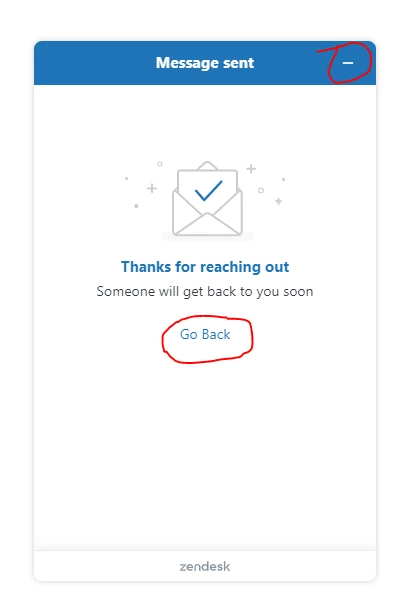
I have a customer that asked me to embed the web widget contact form on their contact page in place of their existing email form. By using an iframe, offset settings and ze.Activate I have it positioned and opening as desired.  What I need to know is can the minimize icon and back option be disabled or is there an event of some sort I can use to prevent the widget from being minimized when either of the options are selected.
 

2 replies

Tipene
  • August 13, 2021

Hi Neal,

Thanks for reaching out!

The Web Widget Core API has access to the userEvents object which allows you to listen for events, which includes actions. One option could be to listen for the action “Web Widget Minimised” and suppress the behavior using zE(“webWidget”,  “open”).

Here is a link to our docs with more info on userEvents.

Alternatively, this code snippet below should also accomplish what you’ve outlined, in a similar way:

zE("webWidget:on", "close", function () {
    zE("webWidget", "open");
});

One thing to note: disabling these buttons can have a negative effect on accessibility standards, so we would generally advise against that if at all possible.

I hope this helps! If you have any questions, feel free to reach out.

Tipene


  • Author
  • August 13, 2021

Thank You.  I chose to use the userEvents option but both methods worked.