SLA for tickets from chat | Community
Skip to main content

SLA for tickets from chat

  • October 8, 2021
  • 2 replies
  • 0 views

Илья11

Hello!

Can you please tell me how to correctly set the SLA for tickets that were created from chats?
If I do not specify Agent work time, then the SLA does not count at all for such cases.

And if I specify 1 hour by analogy with First reply time and Next reply time, then ordinary tickets are considered incorrect.

I need to make all responses (first and subsequent) one hour for the agent. And so that the ticket created from the chat is also given one hour.
How can I do that?

2 replies

Steve25
  • October 8, 2021

They have not been able to produce this yet. I have 2 different workarounds that I use.

To determine the number of Message requests are serviced while the request spends 10 minutes waiting and showing in the conversations button.

In Explore create a query using Support:Tickets

Metrics:Dcount tickets.

Channel: Messaging

Pick your date range, 

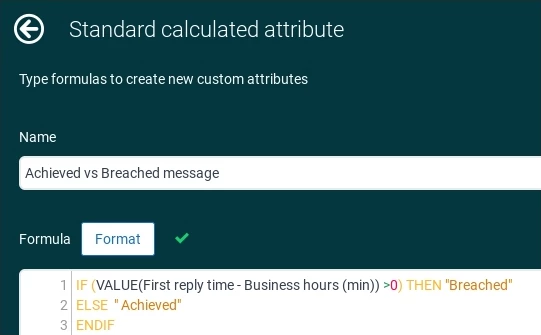
Create a standard calculated attribute using below. 


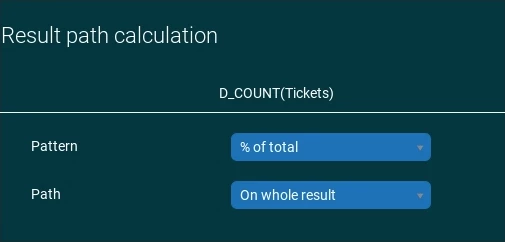
For Result Manipulation choose:

Now you can see how many are answered in 10 minutes (cannot yet track sooner though I think maybe try the filter - time ticket unassigned.)

For tickets that become Missed (or the 10 minutes expires) You can set an SLA for first/next reply time. You can also set on for end user email responses using Update Via is Email with Message channel.

Hope this helps.


  • October 19, 2021

Hi,

I'm creating a First Reply Time SLA and it appears to be firing on applicable tickets in the view, but I set the time to be 5mins, and it is showing on the view as 2 days from now. I'm new to this, can anybody give me some insight as to what's going wrong? Regards Pro