How to minimize the widget | Community
Skip to main content

How to minimize the widget

  • January 8, 2020
  • 6 replies
  • 0 views

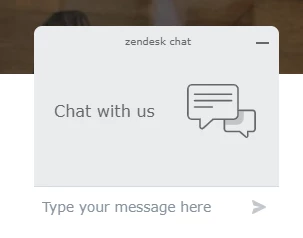
Recently the chat in our website started to appear open like this:
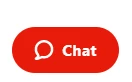
We would like it to show like this:
I have been trying to find in the help where that is configured but I couldn't find anything.

How do you make it appear always minimized?

Thanks!

6 replies

  • January 9, 2020

Hi there Viviana,

That is the Chat Badge and you can disable it in the Widget settings within the Chat dashboard.

You can look at this article on the settings to learn more: https://support.zendesk.com/hc/en-us/articles/360022367353-Customizing-the-appearance-of-the-widget

Thanks,

Ramin


  • April 15, 2020

Hello Ramin,

I'm unable to force the chat badge to be always minimize, I can't found that option.

I can give you my site to check it. I'm on Lite Chat suscription.

Thanks


  • April 15, 2020

@Albert Llorente that is expected for accounts on the Lite plan, you can see that in the pricing plan breakdown on the website: https://www.zendesk.com/chat/compare/#compare


Luca17
  • April 1, 2022

@ramin14

My client has the same issue and they are on the professional plan.


https://www.screencast.com/t/4F4Xu1duWv


  • April 1, 2022

@luca17 I suggest you or your client reach out to our advocacy team with the subdomain/account information and where the widget is located so they can see what is going on. Thanks.


Al20
  • December 20, 2023

Not available on Lite. FFS. I pay for your other services but I'm moving away. This is vile. 

I bet it's possible with some JS. I'll figure it out.