
[Classic Zendesk Widget] How can I prefill a text area field in widget | Community
Skip to main content

[Classic Zendesk Widget] How can I prefill a text area field in widget

  • May 26, 2025
  • 1 reply
  • 0 views

Tuanva

Hi support team, 

I'm using your widget embed in my platform

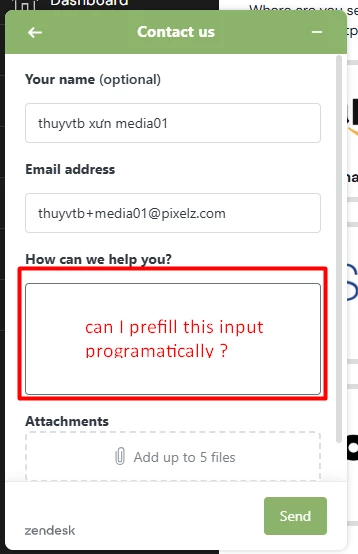
I have a Contact Us form, and I can prefill name and email programatically using zE.identify function, but I have a field called “How can we help you?”  and I don't know how to prefill it programatically ?


Can you guide me please?


FYI: 

1/ I'm using classic widget 

2/ I don't want to use sending ticket form via API, the goal is, when our user click a button that outside of this widget, we still can open this form with every field is already prefilled. 
 

1 reply

  • June 4, 2025

You can use the following API method:

<script type="text/javascript">
 zESettings = {
   webWidget: {
     contactForm: {
       fields: [
         { id: 'description', prefill: { '*': 'My field text' } }
       ]
     }
   }
 };
</script>

It is documented here: https://developer.zendesk.com/api-reference/widget/settings/#example-15:~:text=%3B-,You,-can%20use%20different