
I am working on integrating Zendesk Support into Jira, but having many issues when it comes to the field mappings. It seems like any time I select one dropdown, the other one shows everything disabled. It's almost to the point where mapping just simply doesn't work.
For example, for simple fields such as "Status" or even "Priority", I would think that I could map the two, but doesn't seem to work that way.
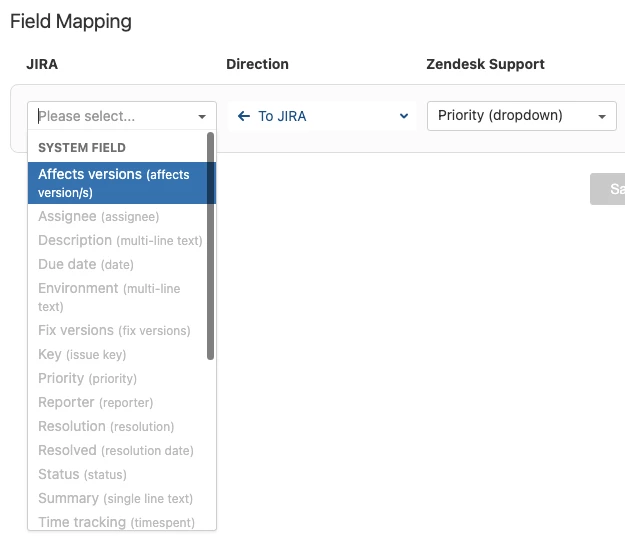
If I flip the direction the other way, same thing:
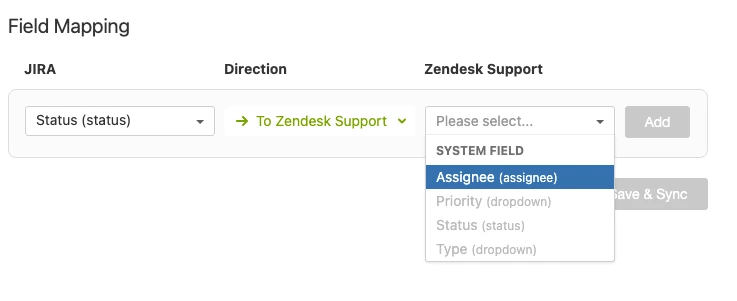
So with that being said, how exactly do I use this field mapping features? I've already set up the webhook and it looks identical to the instructions with the exception of the webhook URL of course.
It's very confusing that you can't map "Priority" to "Priority" or "Status" to "Status" in either direction (neither Jira -> Zendesk nor Zendesk -> Jira)
I'm basically following this guide: https://support.zendesk.com/hc/en-us/articles/203660196
The other confusing part about this is step 12:
If you are using Jira Cloud, you can check the integration works by adding the user add_on_zendesk_for_jira to the group jira-users in the Jira admin.
My integrated user has been added to Zendesk Support, but there is no group called "jira-users" in my Atlassian organization account:
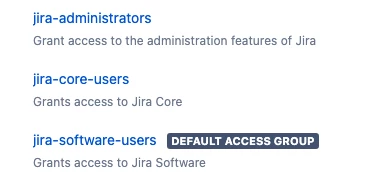
Also, there is no user called "add_on_zendesk_for_jira" either. The instructions say "Jira Cloud" but I don't even know what this is referring to. From my understanding, there are only two versions of Jira: Jira Software and Jira Core.
I have been so totally confused by this setup process that I just realized that many of my browser tabs are all pointing to the same few guides/articles that lead to the same confusion. Cannot find clarification on this.
Any help would be greatly appreciated.

