Allow Zendesk Views to pick 'JIRA Linked Issue Number' as a column. | Community
Skip to main content

Allow Zendesk Views to pick 'JIRA Linked Issue Number' as a column.

  • June 3, 2023
  • 4 replies
  • 0 views

Zendesk Views should include 'JIRA Linked Issue Number' as a column for simple cross-reference and search. This request allows the system to enable a custom (text-based) ticket field automatically. 

4 replies

Jake11
  • June 3, 2023

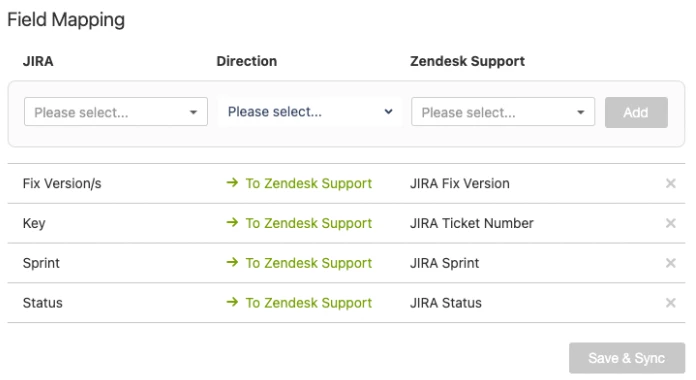
This should be possible, we have the JIRA integration and I map over JIRA Key to a Zendesk ticket field that I created. I use this ticket field in some of my views so when looking at certain groups of tickets, I can see what JIRA they are linked with.


Heather13
  • June 5, 2023

I looked into doing this, but we face issues when there's more than 1 Jira ticket. What do you do in those cases @jake11?


Jake11
  • June 5, 2023

Hi @heather13,

Yeah, unfortunately, that's a known limitation - for the mapping to work as expected, it must be 1:1 Zendesk ticket:JIRA. Our primary use case is defects/enhancement JIRAs being tied to our Support Zendesk ticket, so typically that means just 1 JIRA. In the rare instance we have two, we just train our agents to link to the one where the actual work/fix is going to take place, and to mention other related JIRAs in an internal comment on the ticket. 


mathieu.lepoutre

Hi @kanyewest12

I understand your request for Zendesk Views to include the 'JIRA Linked Issue Number' as a column, which would facilitate cross-referencing and searching within the system.

To address this requirement, one potential solution you might consider is Exalate. Exalate is a comprehensive integration platform that specializes in synchronizing data. I have been using it in the past for this and it works really good. Have a look at this youtube video;

https://www.youtube.com/watch?v=jGu0g-YIE2U