Zendesk Explore - Last public reply by an agent against each ticket | Community
Skip to main content

Zendesk Explore - Last public reply by an agent against each ticket

  • March 17, 2021
  • 9 replies
  • 0 views

Hi Peepz,

Just wondering if anyone can assist with a report Query.

I'm trying to run a report where I can find out the:

"Last public reply by an agent against each ticket (ticket ID)"

Pretty much want to see when a ticket was last replied to a customer by the agent. Date and time of last reply.

Thanks!

Kenny

9 replies

Chris21
  • March 17, 2021

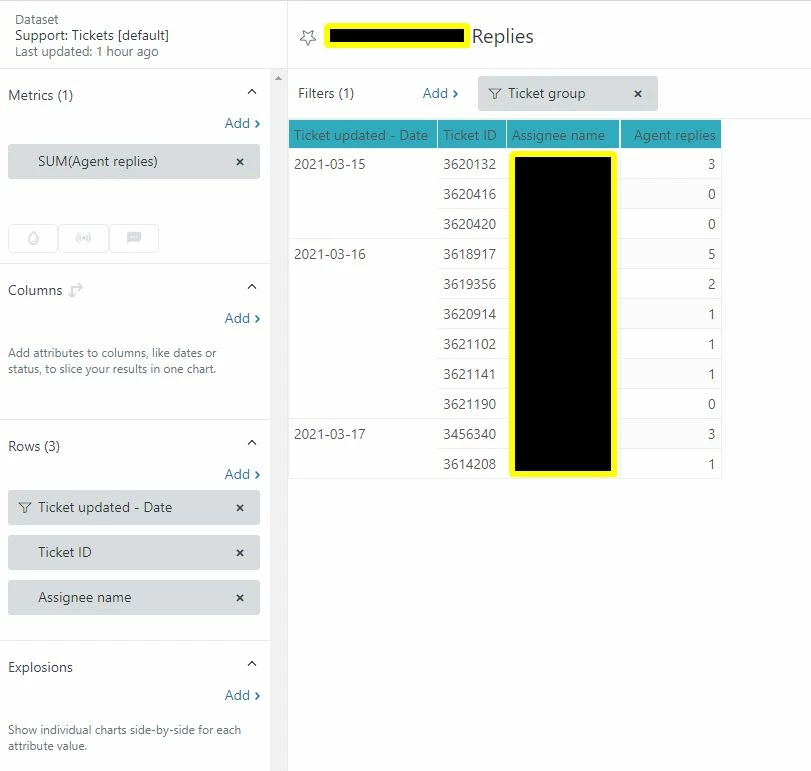
Hi Kenny Li! You can get this from the Support: Ticket Updates dataset. I've created an example that can give you an idea of how to get to it. I measured Agent Replies, filtered it to This Week, and then added the date of update, Ticket ID, and Assignee Name:

Hope that helps!


  • April 28, 2022

Hi I am trying to create a report similar to the request above. "Report on the date of the last public reply by an agent". In the suggestion above I don't see where it is restricting to the update being a public comment.  Any suggestions?


  • April 29, 2022
Hi Bill,
 
If you want to build a similar table, you can create your query under the Updates history dataset, and use the Public comments metric. You can then filter your report by Updater role and select Admin and Agent. Under rows, you can add the attributes Ticket ID, Update - Date and Updater name (in that order). The table will most likely show rows with zero values under the Public comments metric column. Just apply a metric filter to hide zero results (Selecting the metric result range). 
 
Alternatively, if you're comfortable with custom reporting and building calculated attributes, you can try using the latest date functions. Here's an article talking about these date functions: Working with earliest and latest date functions. The example in that doc uses DATE_LAST_FIX to find the timestamps of the latest agent comment. Since you're looking to slice you data by Ticket ID, you can try replacing [Updater name] in that sample formula with [Ticket ID]. You can read through that article to learn more about the earliest/latest date functions.

  • April 29, 2022

Thanks Gab,

I was able to capture the info I wanted with some additional modifications.

IF ([Comment present]=TRUE 
AND [Comment public]=TRUE 
AND DATE_LAST_FIX([Update - Date],[Comment present],[Comment public],[Ticket ID])=[Update - Date]) 
THEN [Update - Date] ENDIF

My next question is I am looking for any date that's > 21 days.  I tried the following but it didn't provide me any results  DATE_DIFF,Today(),<custom attribute>,"nb_of_days")  To get the days since last update but it did not return any data (code was accepted with a green checkmark).

Suggestions?


  • May 2, 2022
Hi Bill,
 
Let me create a ticket so that we can troubleshoot this further. You'll receive an email on this shortly. Thanks!

John87
  • August 30, 2022

What was the outcome of this thread.   I am looking for a simple report that shows the date the ticket was last created and the time it was last updated with a public comment.   I have the report setup but it is showing the date of each public comment, I just want the last one.

Thanks

JD


  • September 6, 2022
Hi John,
 
You can use the latest date functions to pull up the most recent public reply on a ticket. You can refer to this doc about Working with earliest and latest date functions, specifically the sample recipe for date_last_fix

Dave31
  • November 16, 2022

Question - you have used the ticket updated date.  Would that not mean that the selection would be based on any field updated not necessarily the date the agent replied?

This seems to imply that the last update was the public comment?  What am I missing here - what's the relationship between last updated and the time that the comment was made on the ticket?


  • November 30, 2022
Hi Dave,

Yes, that's right, in the sample above, the data is sliced by when the last update was made on the ticket, not necessarily the comment timestamp. If you need the exact timestamp of the last agent comment, then you may have to create your report under the Updates history dataset, with custom attributes or metrics built using the latest date functions. You can check out this article to see some sample recipes: Working with earliest and latest date functions.