Ticket type in explore report is incorrect | Community
Skip to main content

Ticket type in explore report is incorrect

  • May 6, 2022
  • 5 replies
  • 0 views

Stephanie29

I created a Row in a Query (report) using Explore for "Ticket type". However, the data in this field is showing up differently from what shows inside the ticket. 

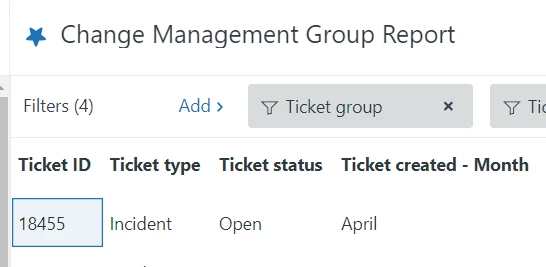
Here is what my report looks like. Note that "Ticket type" is showing as "Incident"


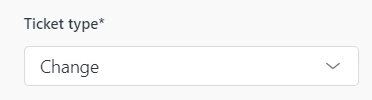
But in that same ticket the "Ticket Type" is showing "Change".
How can I get the report to match the true ticket type that is showing inside the ticket?

Thanks for your help!

5 replies

Zendesk13
  • May 7, 2022

Hi @stephanie29, can you please confirm that this "Change" value for Ticket Type was added by the Change Manager app?

Additionally:

  • Does this happen to all tickets whose Type is "Change", or just this particular ticket? 
  • Depending on what Explore plan you're on, dataset synchronization might vary. Could it be that the ticket type changed in Support but Explore still hadn't refreshed when you consulted?

Thanks in advance for clarifying!


Stephanie29

Hi Pedro,

It is set up under the Admin "Objects and Rules" section. (not the Change Manager App)

It happens for all tickets whose "Ticket type" is "Change".

I have monitored this over days/weeks/months so I do not believe this is a synchronization issue.

Let me know if you need more information. 

Thank you!


Zendesk13
  • May 13, 2022

Hi @stephanie29, apologies for the late reply. As we know, in Support there is a native/system field named "Type". When we're editing it, Zendesk confirms that it's a system field:

When we go to Zendesk Explore, this system field "Type" is renamed as "Ticket type" by default.

What I think could be happening: someone created a custom field named "Ticket type" in your Support account, which means you now have two "Ticket type" fields in Explore (one is the system's, the other one is a custom field).

Can you please confirm?


Stephanie29

Hi @zendesk13

Correct, "Ticket type" is set up as a custom field.

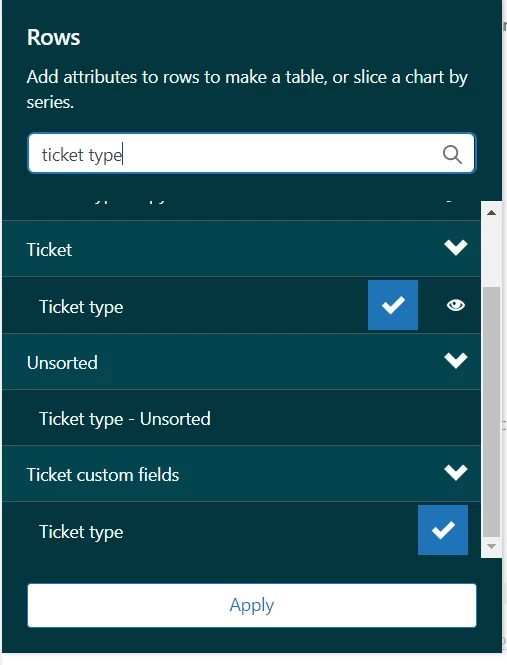
I think you helped me find the solution. When I add a new row to my report, I have to select the "Ticket Type" that appears under "Ticket custom fields". I've added a screenshot in case it helps someone in the future with the same problem.

Appreciate your help Pedro!


Zendesk13
  • May 13, 2022

You're welcome, thanks for confirming 😀