

I need a report that can give me a “live”-view of SLA breaches the moment they happen.
We use Talk, E-Mail and Chat. I attached a photo of what the report is supposed to look like.
I have multiple issues with how it is currently set up:
- breaches are not shown immediately, but sometimes in hindsight, maybe once a ticket is closed?
- The % total fullfillment rate makes no sense - from my understanding it should be the average of the % fullfillment rates I can see for Chat, Talk and Mail.
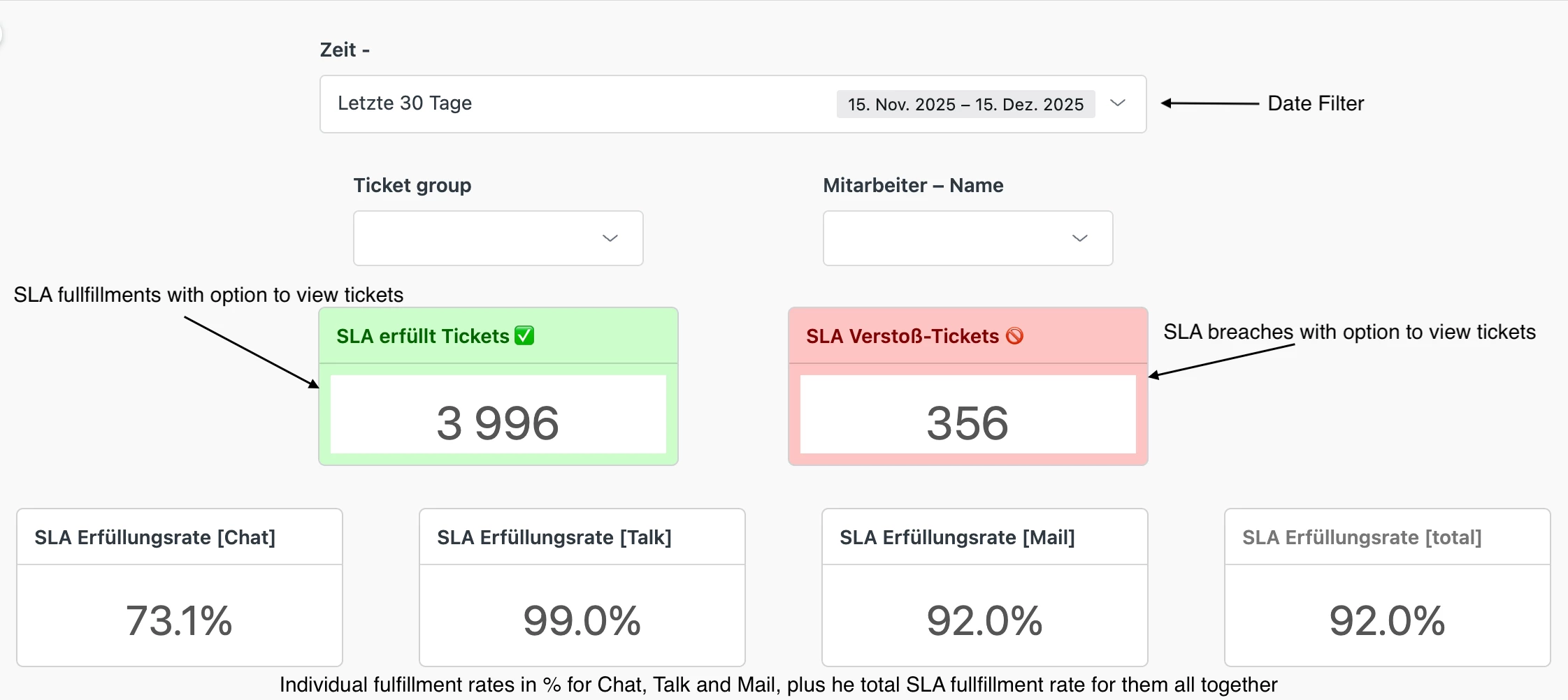
I hope somone here might be able to help me set this up correctly, so we can see breaches when they happen and intervene asap.

Thank you for providing a clear description and screenshot of the SLA breach report you’re looking for.
Zendesk’s native reporting typically processes SLA breach data after ticket updates or closures, which can result in delays in displaying breaches in real-time. Unfortunately, truly “live” SLA breach reporting isn’t available out-of-the-box, but there are a few approaches to get closer to this:
-
-
-
-
If you’d like, I can help guide you through setting up Explore dashboards or triggers tailored to your channels and SLA policies to get timely visibility.Custom Triggers and Webhooks: You can set up triggers that fire immediately when an SLA is breached to send notifications or log events externally, providing near real-time alerts.
Explore Dashboards with Frequent Refresh: While standard reports aren’t real-time, you can create Explore dashboards showing SLA breaches filtered by time frames updated frequently (e.g., last 30 minutes or last hour) to reduce the delay.
Breakdown by Channel: As you mentioned, breaking down SLA fulfillment rates by Chat, Talk, and Mail is possible in Explore, and you can create calculated metrics to get weighted averages if needed.
Third-party Tools or API: For mission-critical real-time monitoring, some teams use API integrations to pull SLA breach data continuously and feed it into external BI or alerting tools.
Feel free to share any specific SLA policies or ticket views you want to monitor, and I’ll assist you further.