
Problems when trying to create an "Assignee Name" filter on Explore Dashboard | Community
Skip to main content

Problems when trying to create an "Assignee Name" filter on Explore Dashboard

  • April 12, 2022
  • 8 replies
  • 0 views

Morning folks!

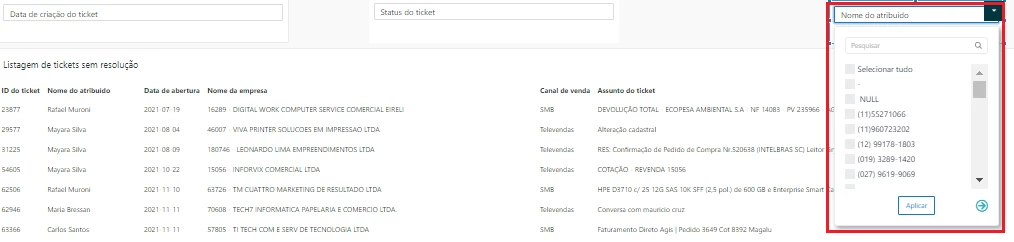
I'm trying to use an "Assignee Name" data filter on one of my dashboards but it keeps pulling all users information. Since end users can't be assigned to tickets is there a way for me to work around it, or a better way to apply this filter?
8 replies

Sydney12
  • April 12, 2022

I noticed a workaround for this! We have definitely used it and it works: https://support.zendesk.com/hc/en-us/articles/4408823511706


  • Author
  • April 12, 2022

That did it just right! Thanks @sydney12!


  • January 3, 2024

This link does not work - @sydney11


Brett13
  • Community Manager
  • January 3, 2024
Hey Efrat, it looks like this article was archived because the issue was resolved by our product team. Are you running into issues with end-users showing up as the assignee of a ticket in your account?

Is it possible that these end-users used to be agents but then were downgraded? I know on closed tickets they would continue to show up on the assignee since closed tickets cannot be edited. 

Let me know!

  • January 4, 2024

I am facing this issue, 
But I have found another workaround to only show selected agents - by using custom set.


Alan14
  • March 11, 2024

The link that's shared here and on other articles about this topic is dead: https://support.zendesk.com/hc/en-us/articles/4408823511706

Any way we can get this updated? Trying to create a data filter in the reporting dashboard beta for Updater Name and exclude end users.


James101
  • March 21, 2024
Hello Alan,
 
I'm afraid that the link in question has become inaccessible, as pointed out by my colleague Brett earlier in the comments.
 
If you're looking to exclude end-user names in the "Updater name" attribute, I recommend creating a custom attribute using the following formula:
 
IF ([Updater role] != "End-user") THEN [Updater name] ENDIF
 
This should only return the names of your agents and you may also use it as a data filter within your dashboard. 

Alan14
  • March 21, 2024

@james101 This worked perfectly to resolve my issue, and I'm confident it will help others looking for the same thing. Thanks for sharing!