
How to calculate the timespan between tickets created to tickets' specific field first change? | Community
Skip to main content

How to calculate the timespan between tickets created to tickets' specific field first change?

  • September 19, 2021
  • 3 replies
  • 0 views

Hi Zendesk:

We created one new Custom Field named Risk Case Priority. Agents should select different priority when they are handling the tickets. We want to monitor the timespan between the tickets created and the tickets are changed from null to Priority 0 or 1.

I tried to use different functions like [Field change time] or DATE_DIFF, but got wrong result

The result is sum of total mins on the tickets. I only need one period of time.

IF ([Changes - Field name]="Risk Case Priority" AND ([Changes - Previous value]=NULL OR [Changes - Previous value]=""))
THEN
DATE_DIFF(DATE_FIRST([Ticket updated - Timestamp]), [Ticket created - Timestamp], "nb_of_minutes")
ENDIF

And in real handling scenarios, the activity of selection of this specific field can happen in the first update, or second update or third update.

What we need is to get the real timestamp.

I can extract the data from API by ticket audits, but it will take long time to calculate the logic.

That is why we need explore to do the job.

thanks
3 replies

  • September 22, 2021

Hi Qin,

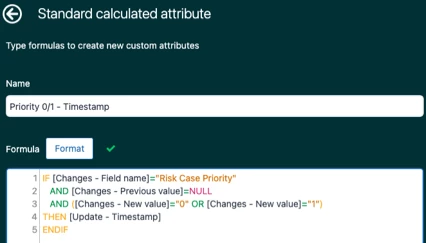
Have you tried creating a separate timestamp attribute for the first time your priority field was set, and then a metric using DATE_DIFF to measure the duration from ticket creation until the custom timestamp attribute? Here's a sample – in your Ticket updates dataset, you can build a custom attribute with a formula that looks like this:

IF [Changes - Field name]="Risk Case Priority" 
AND [Changes - Previous value]=NULL
AND ([Changes - New value]="0" OR [Changes - New value]="1")
THEN [Update - Timestamp]
ENDIF

This attribute should return the timestamp of when the Risk Case Priority field value was changed from null to either 0 or 1.

You can then create a custom metric referencing that attribute to compute for the duration between that timestamp and ticket creation.

DATE_DIFF([Priority 0/1 - Timestamp],[Ticket created - Timestamp],"nb_of_minutes")

  • Author
  • September 22, 2021

Hi Gab:

If the field was changed twice, how can I get the latest time?


  • September 23, 2021

Hi Qin,

If you're looking for the timestamp of the last update (regardless of the field value selected) on the ticket field, then you can use the Latest date function. Your formula should go something like this:

IF [Changes - Field name]="Risk Case Priority"
AND DATE_LAST_FIX([Update - Timestamp],[Update ticket ID],[Changes - Field name])=[Update - Timestamp]
THEN [Update - Timestamp] ENDIF

Then you can use this timestamp attribute in your custom metric for date_diff calculation, to measure the duration between ticket creation and the last time the custom field value was updated.