
Explore - Custom Text Field returning NULL in Standard Calculated Attribute | Community
Skip to main content

Explore - Custom Text Field returning NULL in Standard Calculated Attribute

  • April 7, 2021
  • 3 replies
  • 0 views

Hello!

Our team has been attempting to create clickable links to some of our internal web pages in Explore. This relies on a Custom Field that is of the Text type; the issue we are running into is that this field is returning NULL when referenced in a Standard Calculated Attribute, even when the formula is simply [Field Name] and the tickets have this field filled out.

Some of our other custom text fields function properly, however; these may be tied to user data, however, so I'm unsure if that's why the data isn't pulling properly.

Are there any known limitations that we may be unaware of in relation to the custom fields and calculated attributes? I know this might be broad; I'm happy to answer any questions that may clarify the situation. Thank you in advance for your time!

3 replies

ZZ55
  • April 9, 2021

Gary

I cannot reproduce that problem. It does sound very odd so you may have to reach out to Zendesk for support.

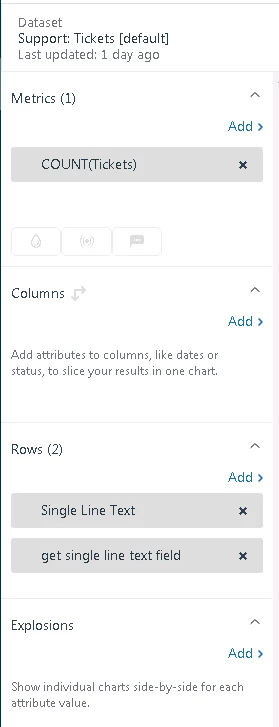
To keep it simple, I used:


Where the 'get single line text field' custom attribute is just pulling the custom field value as you have described.

Assuming you are using the Support Tickets dataset and your data has synced, I do not understand why that would not work,


  • Author
  • April 9, 2021

Thank you for giving that a look, Graeme!

It certainly is odd - my query seems to be set up exactly like yours was. I am indeed using the Support Tickets dataset and as far as I know, our data is synced.

We'll poke around a bit more and reach out to Zendesk directly if we are unable to resolve the situation. Thank you again for your time!


Matthew32
  • January 22, 2023

I am experiencing this too!