
Drill in showing tickets it isn't supposed to | Community
Skip to main content

Drill in showing tickets it isn't supposed to

  • May 10, 2023
  • 9 replies
  • 0 views

Hey guys,

I have an issue with Drill in where it shows more tickets than it is supposed to in reports that use more than one metric.

The metrics for the affected report are Tickets Solved and Public comments and the results are displayed by agent. In the Drill in table for each agent, the tickets are shown with a number in the relevant column. The numbers shown are correct.

However, there are also other tickets displayed which have a zero in both columns, and have neither public replies, nor solved tickets. Most of these tickets actually have status changes by the relevant agent and I think they should be filtered out from the Drill in table, just as they are not shown in the report.

I enabled drill in for a different report with just one metric and the issue was not present.
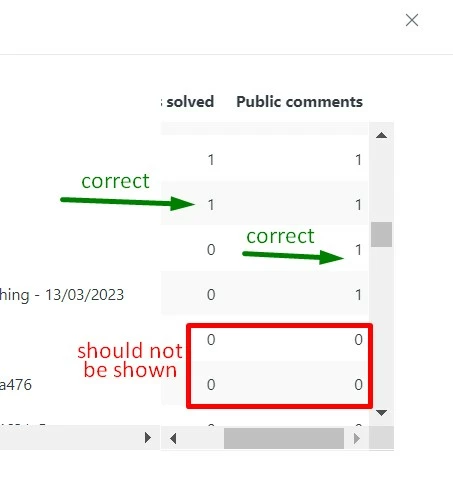
 

I have already contacted support with this (request #11465903) and was told that it is a limitation of Drill in as it does not have metric filtering capabilities, and I was advised to create a post here so this might be considered for future improvements of the functionality.

9 replies

Darenne
  • May 18, 2023

Hi @marina14

Welcome to the Zendesk Community post! I agree with what Elaine mentioned on the ticket you had with us. The reason the 0 value still appear in the drill-in is that these tickets still meet all the attribute and filters to be included in this query and will still be returned in the drill-in even if the metric is read as a 0 value. The drill-in feature is still being expanded and worked on but for now, it does not have any metric filtering capabilities.  

As a possible workaround, you can actually sort out the non-zero results to be shown on top by clicking the two arrows (up and down arrow) beside the attribute. I believe this has been shared also by Elaine on the ticket. 

For now, let's wait for an official comment from our Product team about this. 


  • April 5, 2024

Any update on this? It's leading to some confusion on our end when drilling in


  • August 15, 2024

@darenne I have created a custom metric to ensure the data only meets the specific attributes but I still have tickets that show “0” when I drill in, and do not meet the criteria of the metric being measured.


  • August 27, 2024

Also looking for an update on this matter.


Hannah12
  • September 20, 2024

Hello! Is there an update on if the drill-in will be configurable?


Arthur15
  • January 26, 2025

Looking for an update on this matter too. 

Hoping there's an option to at least auto-sort the drill in result to eliminate the extra step of sorting the column metric on the drill in result


Elaine14
  • February 28, 2025
Hi all,
 
Thank you for sharing your feedback with us. We appreciate your patience as we work on addressing your requests for more information. Rest assured, we are committed to providing a response as soon as we can. In the meantime, you may want to check our announcement page for updates.
 
Thank you for your continued support!

Catlyn
  • October 13, 2025

Hi! We have come across the same issue. Drill in is not really useful, if we cannot actually properly see which tickets are included in the report. Makes it difficult to figure out any errors. 


  • December 30, 2025

Thank you, everyone, for the feedback. While this drill in behaviour is expected, I understand how it can become confusing.  What you often can do is to apply the filter on the report level. For example, if you want to expose only the solved tickets in the drill in you can filter your report by Ticket status and exclude Solved and Closed tickets. It will not work for all use cases, but it works well for KPIs or reports with a single metric.