Display Oldest Ticket | Community
Skip to main content

Display Oldest Ticket

  • April 17, 2019
  • 6 replies
  • 0 views

Hi,

I am trying to build a report, which shows different metrics around tickets in the on-hold status (which we escalated internally and where we are waiting for bugs to be fixed, etc.).

As part of the summary header, I am currently trying to build a query, which only shows the date of the single oldest ticket (on-hold status).

I built a query to

COUNT(Tickets)
Rows: Ticket Created - Date
Filter Ticket Status for "Hold"

From the resulting table, I only need that one date of the oldest ticket – not # of tickets, etc.

Any idea how I can narrow this down, e.g. with a custom Standard calculated metric?

Best,
Marcel

This topic has been closed for replies.

6 replies

  • April 19, 2019

Hi Marcel, thanks for the question.

I want to be sure I understand this fully. Based on your description I imagine that the desirable end goal would be for your report to just be a headline style date, is that correct? The date would be the date that the oldest on hold ticket, is that correct?

I apologize for the repetition here, but I do want to be sure I am looking at this properly


  • Author
  • April 23, 2019

Hi Dan,

thank you for your response.

I want to be sure I understand this fully. Based on your description I imagine that the desirable end goal would be for your report to just be a headline style date, is that correct? The date would be the date that the oldest on hold ticket, is that correct?

100% correct. :)

Best,
Marcel


  • April 23, 2019

Hi Marcel,

I think this is going to start getting a touch account specific so I am creating a ticket for you where we can continue our conversation.

Thanks!


  • October 14, 2019

I'm also trying to build something similar, but with a headline that reports the oldest ticket age (since creation) in days. Ideally clickable to display the ticket. 

367236091628 did you manage to get what you wanted done?


ZZ55
  • October 14, 2019

Pete

Try this:

Metrics

  • MED(Unsolved ticket age (days))


Rows

  • Ticket Created Date
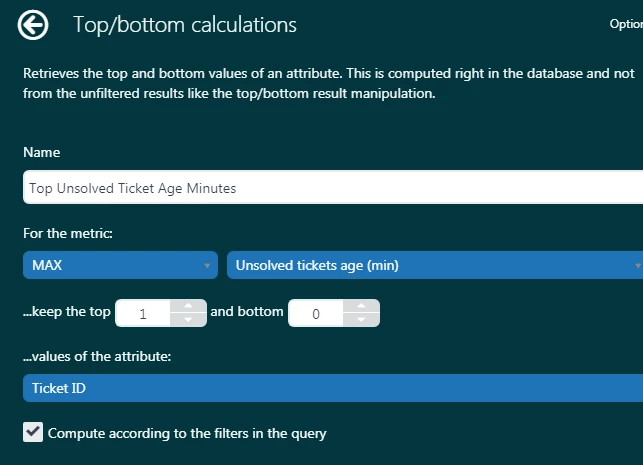
  • Top Unsolved Ticket Age Minutes

Where 'Top Unsolved Ticket Age Minutes' is a custom Top\ Bottom attribute under Calculations>Attributes>Top/bottom attribute' defined as:

To create a clickable link to a ticket in Support, this is not  supported in Explore out the box. Instead, you must create a custom attribute. See here for details.


  • October 14, 2019

Thank you, I'll play around with that and see if I can get what I need. I wasn't aware of that top/bottom calculation option.