DATE_DIFF() with a custom date and custom time fields | Community
Skip to main content

DATE_DIFF() with a custom date and custom time fields

  • February 6, 2024
  • 10 replies
  • 0 views

Nayden12

I have 4 custom ticket fields:
Start Date - Date field.
End Date - Date field.
Start Time - Regex field with HH:MM format.
End Time - Regex field with HH:MM format.

I'm trying to calculate the time between the Start Date + Start Time and End Date + End Time. This is the formula I got so far. It works but the results are incorrect and I can't figure out why.

DATE_DIFF(DATE_ADD([Start Date - Timestamp], "minute", NUMBER(SUBSTR([Start Time (HH:MM)], 0, 2)) * 60 + NUMBER(SUBSTR([Start Time (HH:MM)], 3, 5))), DATE_ADD([End Date - Timestamp], "minute", NUMBER(SUBSTR([End Time (HH:MM)], 0, 2)) * 60 + NUMBER(SUBSTR([End Time (HH:MM)], 3, 5))), "nb_of_minutes")
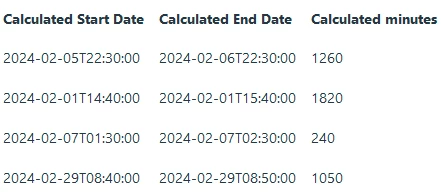
Here is how it looks like if I use "minute" instead of "nb_of_minutes":
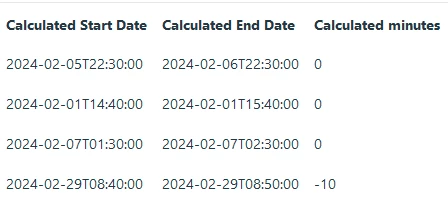
Calculated Start Date:

DATE_ADD([Start Date - Date], "minute", NUMBER(SUBSTR([Start Time (HH:MM)], 0, 2)) * 60 + NUMBER(SUBSTR([Start Time (HH:MM)], 3, 5)))

Calculated End Date:

DATE_ADD([End Date - Date], "minute", NUMBER(SUBSTR([End Time (HH:MM)], 0, 2)) * 60 + NUMBER(SUBSTR([End Time (HH:MM)], 3, 5)))


It feels like the DATE_DIFF function is not taking the whole timestamp. I can't make any sense of the results or what I'm doing wrong.

10 replies

Brandon12
  • February 8, 2024

Hey Ned,

Your approach to calculating the time difference between two timestamps in Zendesk Explore is conceptually correct, but there seems to be a small issue with the SUBSTR function usage, which might be causing the incorrect results. Let's address the potential issue and correct the formula.

Understanding SUBSTR in Your Context

The SUBSTR function extracts a substring from a string, starting at a specified position. The positions are usually indexed starting from 1 rather than 0. This might be the root of the problem in your formula.

Corrected Formula

Given your description, if your Start Time and End Time fields are in the "HH:MM" format, you should adjust the SUBSTR function to start at position 1 for hours and position 4 for minutes, considering the indexing starts at 1. Also, ensure you're using the correct field types ([Start Date - Timestamp] vs [Start Date - Date], as mentioned differently in your examples). You'll want to use the Date fields correctly converted to timestamps if necessary.

Let's correct the formula based on the assumption you're working with Date fields and need to add time parts to them:

DATE_DIFF(
    DATE_ADD(
        [Start Date - Date], "minute", 
        NUMBER(SUBSTR([Start Time (HH:MM)], 1, 2)) * 60 + NUMBER(SUBSTR([Start Time (HH:MM)], 4, 2))
    ),
    DATE_ADD(
        [End Date - Date], "minute", 
        NUMBER(SUBSTR([End Time (HH:MM)], 1, 2)) * 60 + NUMBER(SUBSTR([End Time (HH:MM)], 4, 2))
    ), 
    "minute"
)

I haven't tested this in my instance, but hopefully it points you down the right path.

Brandon


Nayden12
  • Author
  • February 8, 2024

Hi Brandon,

Thank you for looking into this!

From the "Explore functions reference" article the SUBSTR function example is using the 0 index for the first character and the end index is always - 1. The SUBSTR function seems to be fine as I'm visualizing the result under "Calculated Start Date" and "Calculated End Date" and the timestamps are as expected.

I have tried using "Date" and "Timestamp" of the date object with the same result.

I think the timestamps are calculated correctly but the DATE_DIFF function is not liking them. I've tried the function with hard-coded timestamps and I'm getting mixed results. Here are some examples:

DATE_DIFF("2024-02-28T06:50:00", "2024-02-28T08:55:00", "nb_of_minutes")

Returns: -125

DATE_DIFF("2024-02-28T06:50:00", "2024-02-28T08:55:00", "minute")

Returns: -5

DATE_DIFF("2024-02-27T08:55:00", "2024-02-28T08:55:00", "nb_of_minutes")

Retunrs: -1440

DATE_DIFF("2024-02-27T08:55:00", "2024-02-28T08:55:00", "minute")

Returns: 0


It's not very clear what the "_date" value format is from the "Explore functions reference" article and the examples are covering only dates without time.


Brandon12
  • February 9, 2024

Interesting - I'm going to reach out to the Community for additional evaluation here.  More to come!


Nayden12
  • Author
  • February 14, 2024

I figured it out after some trial and error. I converted the returned value from DATE_ADD and DATE_DIFF is calculating the time correctly:

DATE_DIFF(
    DATE(
        DATE_ADD([Start Date - Timestamp], "minute", 
            NUMBER(SUBSTR([Start Time (HH:MM)], 0, 2)) * 60 + NUMBER(SUBSTR([Start Time (HH:MM)], 3, 5))
                )
        ),
    DATE(
        DATE_ADD([End Date - Timestamp], "minute", 
            NUMBER(SUBSTR([End Time (HH:MM)], 0, 2)) * 60 + NUMBER(SUBSTR([End Time (HH:MM)], 3, 5))
                )
        ),
        "nb_of_minutes"
)

  • February 14, 2024

Hi Ned, 

Good job on the self-solve!  

I did some testing with your initial formula vs the modified one (that works) in my test account and I too noticed the same results.  

Here's what I think happened here

Initial Formula Issue

In your initial formula, you directly added minutes to a timestamp and then attempted to calculate the difference between these modified timestamps. However, the problem likely arises from how the DATE_ADD function interacts with the timestamp fields and how the DATE_DIFF function interprets these results. If the DATE_ADD function doesn't return a value in the exact format expected by DATE_DIFF, or if there's any precision loss in the date-time representation, it can lead to incorrect calculations.

Corrected Formula Explanation

Your corrected formula works because it explicitly converts the result of DATE_ADD back into a date format using the DATE function before calculating the difference. This step ensures that the inputs to DATE_DIFF are in a consistent and compatible format, eliminating any ambiguity or formatting issues that could lead to incorrect calculations. Essentially, it standardizes the date-time values, ensuring that the DATE_DIFF function can accurately calculate the difference in minutes.


Nayden12
  • Author
  • February 16, 2024

Hi David,

Thank you for the details!

Unfortunately it's very hard to debug the formulas and the article for the functions is missing details about the expected data types and returned type.


  • February 16, 2024

Yeah it's tough to troubleshoot these formulas and it really just comes down to trial and error.  I'll pass that info along to our documentation team to see if we can get more in-depth with these Explore articles.  


Guilherme17

Olá,


Estou enfrentando um problema com a seguinte fórmula:


IF 

  DATE_DIFF(

    [Atribuição do ticket - Carimbo de data/hora], 

    DATE_ADD(

      [Criação do ticket - Carimbo de data/hora], "hour",

      VALUE(Tempo da primeira resposta (h))

    ), 

    "nb_of_second"

  ) < 0

  THEN NULL

ELSE 

  DATE_DIFF(

    [Atribuição do ticket - Carimbo de data/hora],

    DATE_ADD([Criação do ticket - Carimbo de data/hora], "hour",

    VALUE(Tempo da primeira resposta (h))

  ),

  "nb_of_second"

  )

ENDIF


O objetivo: Retornar o tempo ocioso entre a última atribuição do ticket a um agente e o momento da primeira resposta. Caso o resultado seja menor que zero, a fórmula deve retornar nulo, pois entendo que a primeira resposta não foi realizada pelo último agente atribuído, tornando o dado desnecessário.


O problema: Ao rodar esse código, recebo a seguinte mensagem de erro: “Ocorreu um erro. Entre em contato com o Suporte ao cliente Zendesk (código de erro 7).”


Solicito o apoio da equipe para identificar a causa desse erro.


Vladimir21
  • February 26, 2026
Olá, boa tarde. Tudo bem?
 
Obrigado por entrar em contato conosco. Me chamo Vladimir e farei seu atendimento. 
 
Verifiquei sua conversa com o bot e vi que você está com problemas com métricas personalizadas, certo?
 
 
Nos artigos abaixo, você pode ver como trabalhar com porcentagem no Explore:
 
Vale ressaltar que a criação, edição ou correção de métricas e atributos personalizados está fora desse canal de suporte. Caso queira contratar um serviço personalizado junto à Zendesk, você pode entrar em contato com seu executivo de contas para entender a viabilidade de um upgrade em seu plano: felipe.donato@zendesk.com (
 
Espero que isso te ajude e, se necessário, estou à disposição.

Rafaela12
  • February 26, 2026
Oi, Guilherme. Tudo bem? 
 
Aqui é a Rafaela do time de suporte Premier, sou responsável pela Prevent Senior. 
 
Conversei internamente com o time de cx e me foi pedido que te orientasse a abrir um ticket para a equipe de TI da própria Prevent, eles irão dar uma olhada nessa demanda para você. 
 
Obrigada!