
Dataset "Agent state": Total time per agents on daily base is not equal to 24hours | Community
Skip to main content

Dataset "Agent state": Total time per agents on daily base is not equal to 24hours

  • January 30, 2024
  • 1 reply
  • 0 views

Hello everyone, 

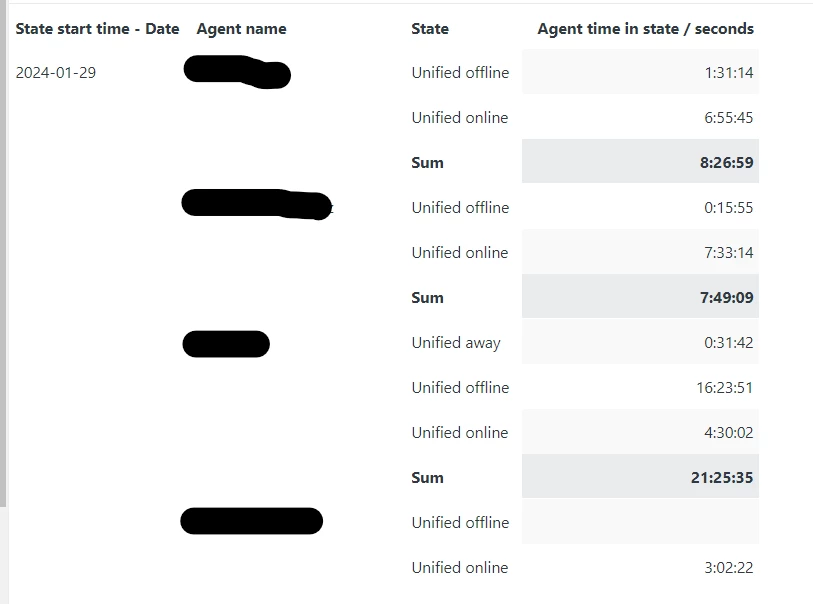
Regarding the dataset "Agent state", when filtering for "Yesterday" in the time filter, none of our agents have a total time of 24hours as we would expect.


The query has the following filters:

- Date: "Yesterday" 

- Channel : "Unified" 


Why is the total hours spent on a daily base from agents not equal to 24hours?
1 reply

  • February 2, 2024

Hey! 

Let’s delve into the intricacies of the Zendesk Agent state dataset and explore why the total hours spent by agents might not always align with the expected 24-hour duration.

Agent State Dataset:

  • This dataset contains metrics and attributes related to when an agent enters a specific state and how long they remain in that state.
  • An agent’s time in a given state is recorded only after their state changes. If an agent remains in a single state throughout the entire reporting period, their state is not reported, as there have been no changes.
  • For example, if an agent is consistently “Online” or “Offline” without any transitions, their time in that state won’t be captured.
  • Due to the volume of data recorded, this dataset retains information only from the previous 90 days.


Agent State Daily Dataset:

  • This dataset provides aggregated data at the end of each day, allowing you to understand agents’ total time spent in specific states.
  • It includes metrics related to how groups and agents spend their time across channels.
  • Unlike the hourly granularity of the Agent State Dataset, this dataset summarizes daily activity.
  • If an agent has no new work items assigned during a specific hour, no data is recorded for that timeframe. Consequently, gaps may appear in reports for hours when agents weren’t assigned any work items.


Sign-In and Sign-Out Behavior:

  • To get accurate representations of agent shifts, it’s crucial for agents to sign in and out of Zendesk.
  • Particularly for the Support channel, where only two states (Online and Offline) are reported, agents must sign out when they finish their shifts.
  • If agents don’t sign out, Explore may incorrectly show them as always online.
  • Remind your agents to follow proper sign-in and sign-out procedures to ensure accurate reporting.


In summary, the discrepancy between the expected 24-hour duration and the actual time spent by agents can be attributed to continuous states (where no transitions occur) and the need for agents to sign in and out accurately. If you encounter further issues, consider reviewing the sign-in behavior and exploring the daily dataset for a comprehensive view of agent activity