Checkbox and Calculated Metrics | Community
Skip to main content

Checkbox and Calculated Metrics

  • January 17, 2024
  • 7 replies
  • 0 views

Lara13

I am trying to create a standard calculated metric that feels like it should be relatively simple - Count of tickets with a specific checkbox value of 'true' and I cannot get this formula syntax. 

Error message: 'Can't use [Training_Complete] as boolean and 'true' as text. Must be the same. 

ZenDesk support center covers tags, text and other categories in calculated metrics, but boolean is not a phrase easily searched. 

I'm simply trying to create a metric in which if the value of a checkbox on a ticket is checked (true) then to display the count of those tickets. Please someone help me


7 replies

Luiz16
  • January 17, 2024

@lara13

Have you tried something like this?

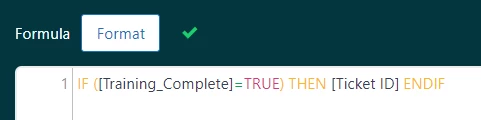
IF ([Training_Complete]=TRUE) THEN [Ticket ID] ENDIF

Lara13
  • Author
  • January 17, 2024

Thanks @luiz16.
Yes, that's exactly what I'm trying to do and this is the message I'm getting.


Luiz16
  • January 17, 2024

@lara13 

Try the word "TRUE" without quotation marks 


Lara13
  • Author
  • January 18, 2024

@luiz16

Removing quotations breaks the syntax more. With the quotations, it's only calling out the section which is underlined in red (screenshot above). Without the quotations, it's the whole formula being called out.


Luiz16
  • January 18, 2024

Even doing like this?

IF ([Training_Complete]=TRUE) THEN [Ticket ID] ENDIF


Asking, because works for me when I try to reproduce, using a checkbox field similar to yours


Lara13
  • Author
  • January 18, 2024

Interesting - the capitalization was the factor. Thanks @luiz16. I wish the error messaging was more descriptive. 


Luiz16
  • January 19, 2024

Glad to help!!