

I'm looking to calculate the duration between the "First Reply" (public comment) and the subsequent reply to the customer, at which point the case is typically set to "Pending".
It is possible to obtain the earliest and latest times, but, I'm not sure if it's possible to get timings in between: https://support.zendesk.com/hc/en-us/articles/1260801335150-Working-with-earliest-and-latest-date-functions
The following thread for Insights (Legacy) appears to have some similar attributes – in terms of calculating the new/previous value of the "status" field, at least: https://support.zendesk.com/hc/en-us/articles/212633717-Insights-recipe-Work-time-between-first-reopen-and-final-solve-using-Time-Tracking-
Perhaps the minimum can be obtained to see when the status was first changed from Open → Pending, at the very least?
Any input is appreciated! 🙌🏻




Hi Matthew,
That's right. There's no function or any native options within Explore that could exactly pull up the date or timestamp of agent reply that came after the first response. But, the workaround that you have in mind – events where the status was changed from open to pending – might be a possible solution. In your workflow, are first agent responses sent out when the ticket is in the New status? This way, the first reply can be distinguished from the subsequent replies when the status is changed from Open to Pending. Under the Ticket updates dataset, you can create a custom attribute to get the timestamp of the first reply by using the earliest date function for agent public comment. This technically should be the first reply timestamp. You can then calculate the duration from ticket creation to first reply (from the custom date attribute) using DATE_DIFF. This will the First reply time in your Ticket updates dataset.
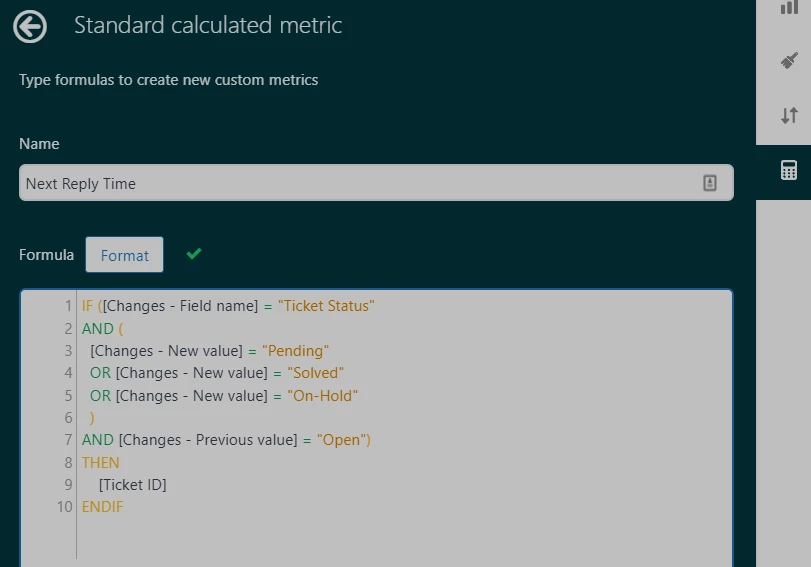
You can create another custom attribute that will get the timestamps of events where the status was changed from Open to Pending. You may check out this thread for some guidance on how to use Changes - Field name and - Previous/New value in an attribute formula. Use the date_diff function again in another custom metric to calculate for the duration between ticket creation and these timestamps. If your report is sliced by ticket ID, you can use the aggregator MIN to get the minimum value.
The difference between the custom First reply time custom, and the other custom metric should give you the duration between first agent response and the next agent reply.
Sorry if Explore does not have native functions for this, and if we're not able to provide exact recipes for this custom report. But, this might be worth exploring, and I hope this would work for you. Thanks Matthew!