How can I set up an automation condition which includes a new line for the ticket description? | Community
Skip to main content

How can I set up an automation condition which includes a new line for the ticket description?

  • June 14, 2023
  • 5 replies
  • 0 views

Masey

I am trying to set up an automation where one of the conditions for the ticket description contains the following string:

"Org Id:

Title"

I tried doing

Ticket: Description>Contains the following string>Org id: Title 

but it isn't picking up any tickets as a condition match. If I just put "Org Id: " It picks up tickets but I need it to be specifically followed by Title on the new line. Any ideas on how to set this up?


5 replies

Jacob20
  • June 15, 2023

Hey @masey

You could try breaking it into two all conditions 

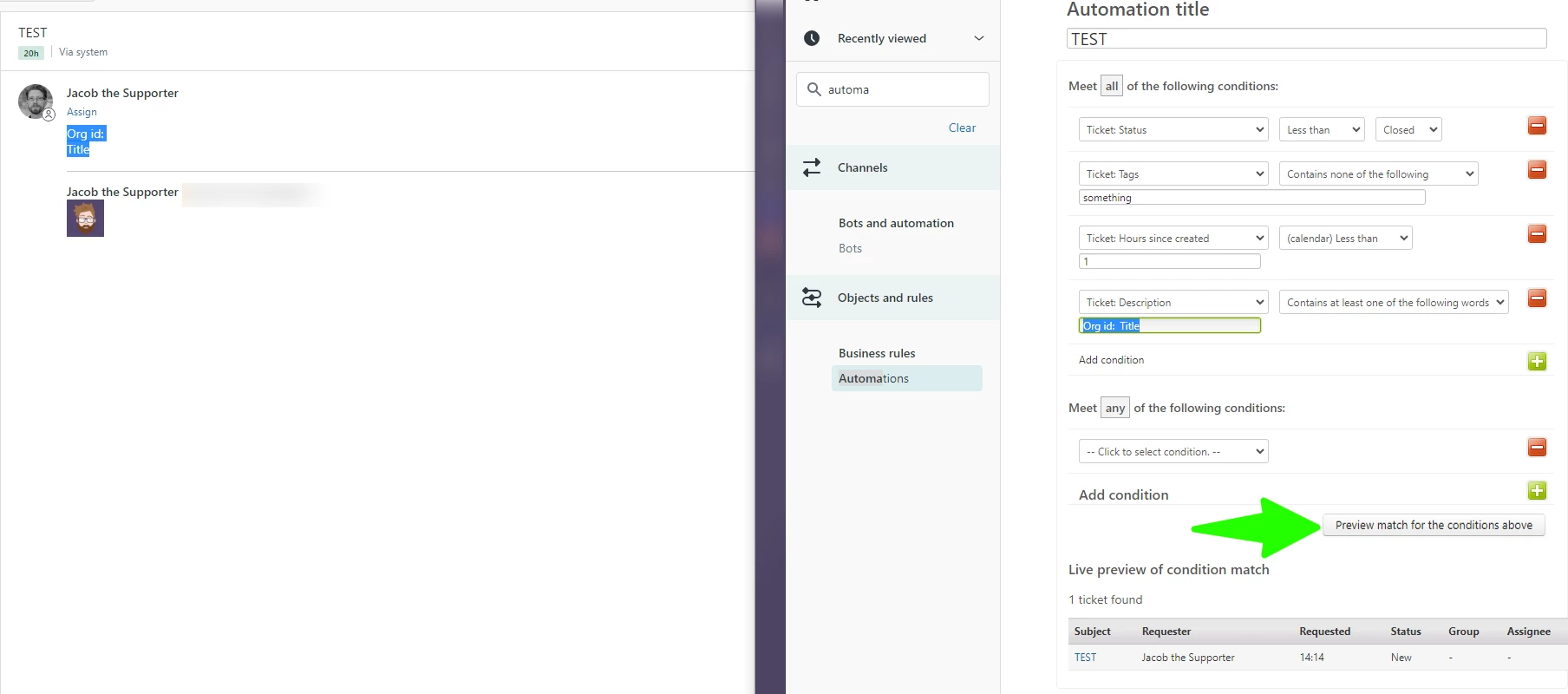
I'm unsure if a paragraph containing a linebreak is still considered a single string, but you could try experimenting with a single string condition for Org id:\nTitle - or variations thereof, you could have other characters or spaces in between. 

I hope that helps you out.


Masey
  • Author
  • June 15, 2023

Thanks @jacob20. That doesn't quite solve my problem. The point of having it be as I stated previously is I need it to capture the tickets we get that don't have anything following "Org Id: " It has to go straight from "Org Id: " to "Title" and if I do as you say, it will capture any ticket whether it has anything after Org Id or not. Any other ideas? I've tried every variation of "Org Id: Title", "Org Id: Title", "Org Id: <br>Title", and  "Org Id:/nTitle" none of which work. 


Jacob20
  • June 15, 2023

@masey

Is there any pattern to the in-between text you don't want the automation to fire on?

If so, you could add a Ticket: Description "contains none of the following words" / "Does not contain the following string", like below.

I am curious about what part of the text is actually considered part of a string, I'll ask around and let you know if I find out.


Masey
  • Author
  • June 21, 2023

@jacob20 the text following "Org Id: " differs depending on who opens the ticket. Essentially we have an integration with our platform which allows users to open a ticket in Zendesk using a "Report a Problem" workflow within our UI. This gets sent to Zendesk via API. Depending on which org they are a part of it will include an Org Id. I need it to capture those that do not have an org Id.

It's a bit complex because there are two places in the ticket that includes "Org Id: " and I need it to capture the second instance.


Jacob20
  • June 29, 2023

Hi @masey,

Sorry about the long wait here!
The wise @dave24 decyphered the string comparison conundrum, basically, a line break will be represented by a single space character, I tested that with your string and got the automation to validate and update based on that as a condition.


If you have any control over how the tickets are created through the API, you may want to make routing easier by setting a particular field value and using triggers rather than parsing the description text.

I hope this helps you out.