Option to Remove Chat, Talk, & Message Icons from Agent Workspace | Community
Skip to main content

Option to Remove Chat, Talk, & Message Icons from Agent Workspace

  • January 21, 2023
  • 4 replies
  • 0 views

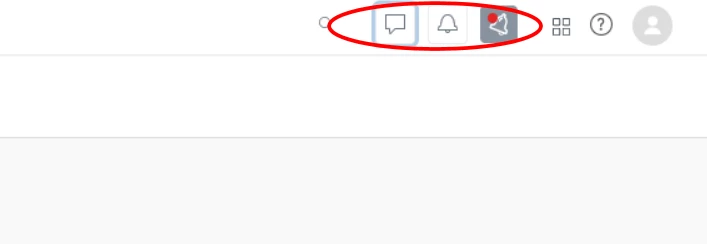
We only use the email channel to communicate with out customers, and do not offer chat, text, or calls. The icons for these three channels are not relevant to our agents, and their pop-ups block visibility of the Notify app, and cause confusion & clutter up agrent workspace.

We need one of these two options for the chat, text, and calls icons:

1)  permanently removed, unless those channels are activated in the future, or

2)  hide the unused icons for all agents, through an option provided to the Admin
4 replies

  • Author
  • January 21, 2023


  • January 22, 2023

Hi @ann11

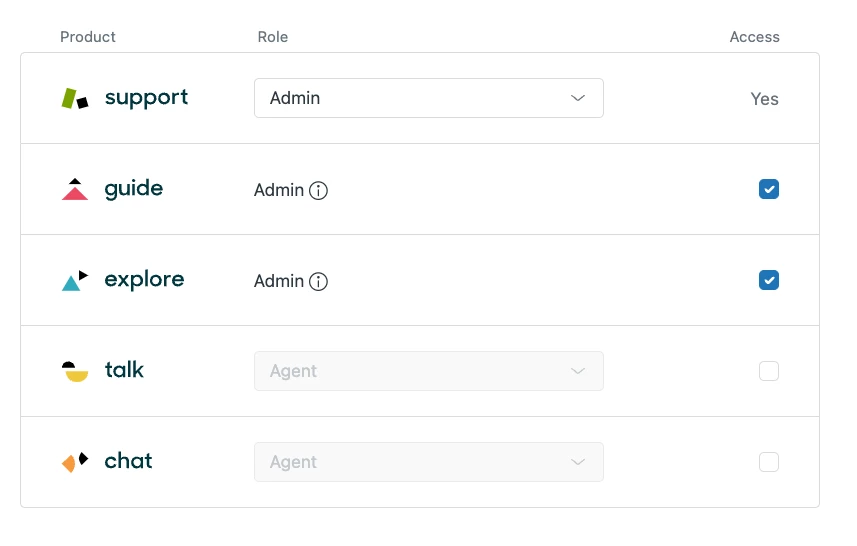
You can remove those agents from Talk and Chat which will remove those icons for those agents.

Head to the Admin Center > People > Team > Team Members > select the agent > uncheck the talk & chat options:


  • Author
  • January 23, 2023

I'm unable to uncheck chat. A warning pop-up says:

Access cannot be removed
You need at least one admin for Chat.

  • Author
  • January 24, 2023

At this point, I still have two icons in my Agent Workspace for Talk and Messaging Updates, that we DO NOT USE.  I've asked to have these removed, but only the Chat icon was removed. 

Can someone please help fix this by removing those icons permanently, or making them optional, so I can turn them off?