Hide Groups from request assignment. | Community
Skip to main content

Hide Groups from request assignment.

  • May 15, 2018
  • 48 replies
  • 0 views

Show first post
This topic has been closed for replies.

48 replies

  • October 8, 2019

Thank you -- I searched for an easy way to find the group id and did not find this.  I'll look at implementing this Assignee Mask. 

Any ETA on implementing the native version?


  • October 21, 2019

360897525527

If you have multiple groups as I have in my organization, you can use the API command to get a list of all your group id without having to individually click on each group.

domain.zendesk.com/GET /api/v2/groups.json


Dan28
  • October 21, 2019

Hello, 

v2 of the Assignment Control app is now available for those on this thread that seem to be waiting for it.


  • October 22, 2019

Does it take awhile to update?  I assigned some group ids to hide from the assignee menu and they still show.  Refreshed and logged out and back in but still not updated. The Assignee Mask app was working well and was immediate.  Thank you!


Brett13
  • Community Manager
  • October 23, 2019

Hey Mare,

I was actually able to replicate this on my end as well. The changes should take place immediately. I'm going to create a ticket on your behalf so our Customer Advocacy team can dig into this further and determine whether or not this is a bug.

Cheers!


Dan28
  • October 24, 2019

Might be worth trying to add ids to the targeted sections of the app as well.  I wonder if it's expected a list of users to know who to hide the assignees from.  It would be nice if there was a bit cleaner documentation on the app to help explain how to setup the app.  I hadn't tried it yet, but not that I have, it looks like I'm seeing the same behavior as well for the test I ran. 


  • October 25, 2019

@dan — for the Zendesk app or for Assignee Mask?


  • October 25, 2019

Strangely I had the Assignee Mask app working to hide groups -- enter group ids you want hidden separated by a comma and it was working. When the Assignment Control app came out I installed that one, added the group ids to it and removed the Assignee Mask app.  When I found the Assignment Control app wasn't working correctly I uninstalled it and reinstalled the Assignee Mask -- and that app isn't working to hide my groups now either.


Dan28
  • October 25, 2019

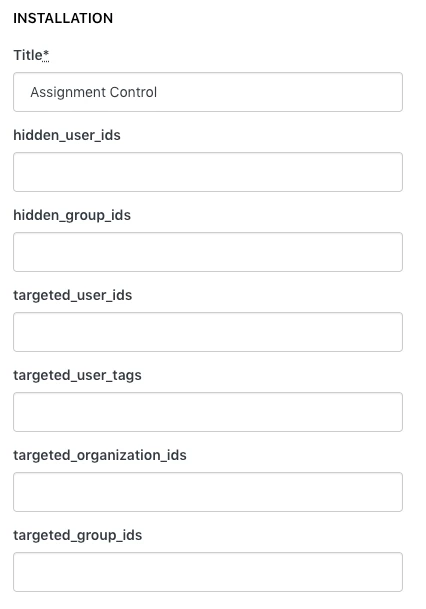
367289652587 - for the Assignment Control app by Zendesk.  I haven't used Assignee Mask, but from the screenshots, it looks like you've got the settings in a more clear state to understand and you have a checkbox for globally enabling it for all users.  I was wondering if Assignment Control is requiring a targeted group of users to enforce hiding which isn't clear when the settings in Assignment Control populate like this without names/descriptions. 


  • October 25, 2019

I don't think that is required.  The app looks very much the same as Assignee Mask and the only thing I entered were hidden group ids separated by a comma and it worked.  But now that I uninstalled it to try Assignment Control, reinstalling Assignee Mask and it isn't working now.  Very strange.  At least the problem was duplicated and it is being looked into.  I'm sure they'll have a solution.


  • October 25, 2019

I haven’t looked at the new Assignment Control app, but the targeted groups/users/orgs were required with the old one, same with Assignee Mask but it adds the option to apply to all users.


Dan28
  • October 25, 2019

I'll stop speculating over here on why it's not working. Thanks 5097752608 for escalating this up for Mare, let us know if a solution can be found to get everything up and running.


  • October 26, 2019

In the interest of garnering context as to ~when~ it isn’t working, feel free to respond if you’d like, Mare.


  • October 29, 2019

Zendesk support got back to me.  You have to add the groups you want this to work for to the targeted_group_ids.  This wasn't the case for the Assignee Mask app.  Since I wanted it to work for all agents I created an All Agents group (which I didn't have before) and I added the group id of that group to not only be hidden but be the targeted_group_id.


Devan
  • October 29, 2019

Hello 360897525527,

Glad one of our Advocates was able to assist you and find a solution. Appreciate you sharing it with the Community!

Best regards. 


  • February 6, 2020

@Mare Donohue How did you get it to work?  I've tried everything mentioned in this thread and nothing has worked yet. 


  • February 6, 2020

@Teri Reblin, I can screen share if you want, have you tried Assignee Mask in the ZD Marketplace?


  • February 6, 2020

I created an All Agents group and put every agent in that group and added that group id to Targeted Groups.  

Hidden Groups are all the group ids I want to hide separated with a comma no spaces.  I also am hiding the All Agents group.

I have set the All Agents group to default group so when I create a new agent I don't forget to put them in this group.

Previous app didn't require filling in a targeted group but this one did for it to work.

Hope this helps!


  • February 6, 2020

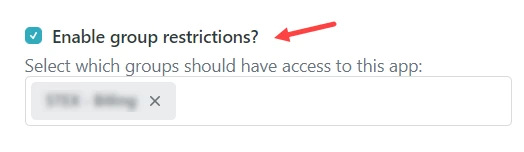
Thanks 360897525527!  I'm using the Zendesk Assignment Control app. I figured it out...I forgot an obvious and critical step. I hand't enabled the group restriction for my target group.  Once I did this, it works exactly as it should.  


Erica22
  • February 11, 2020

I installed this app and it worked great except for the fact that it does not hide groups in bulk edit mode, meaning if you assign an individual ticket the desired group is blocked (or if you click 'take it'). However, if you are bulk assigning tickets for any reason, which we very often do, the 'hidden' group is visible allowing you to only be able to make assignment errors in.... bulk. 

Our company would benefit greatly from being able to create groups specifically for more 'team specific' views at a more granular level that their designated ticket group. So the bulk edit group exposure (for us) defeats the purpose of the app. 

Until this app hides groups from bulk edit mode it's useless for us, and I would be very interested in using it if this is ever resolved. 


Devan
  • February 18, 2020

Hello @Erica Sutherland,

Appreciate the feedback on our app and explaining how your provided changes would make this more useful for you and potentially other users. I would recommend though posting your insight in our Integration & 3rd party apps feedback page so our devs can consider it for future updates. 

Best regards. 


Erica22
  • February 19, 2020

The assignment control app works great when assigning individual tickets but does not block assignment when bulk editing tickets so we haven't been able to implement it. I would love to know I could use it without the risk remaining of agents making assignment errors in bulk, which we often have to use when reassigning teams, agents, or accounts. I've created a post in app feedback regarding this issue, but it is of note that bulk edit leaves the hidden groups exposed. 


Brett13
  • Community Manager
  • February 20, 2020

Thanks for sharing this Erica! I'll be sure to let the apps team know you've submitted your feedback :)